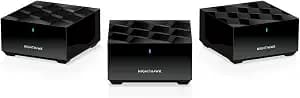
NETGEAR Nighthawk Tri-Band Whole Home Mesh WiFi 6 System (MK73S) – Router + 2 Satellite Extenders - 3Gbps Speed - Coverage up to 4,500 sq. ft., 25 Devices - Includes 1-Year Armor – AX3000 802.11ax
商品説明
Coverage up to 4,500 sq. ft. and 25 plus devices; Fast AX3000 Gigabit speed with WiFi 6 technology for uninterrupted streaming, HD video gaming, and web conferencing; Connects to your existing cable modem and replaces your WiFi router. Compatible with any internet service provider up to 1Gbps including cable, satellite, fiber and DSL; 3 x 1G (1 plus 1 plus 1) Ethernet ports in the router and satellites for computers, game consoles, streaming players and other wired devices; NETGEAR Armor software provides an automatic shield of security for your WiFi and connected devices for real-time protection against hackers and added privacy with VPN. 1-year subscription included; NETGEAR routers have security features enabled out of the box with automatic firmware updates, and industry-leading safety features to help protect you and your family; Easily set up and manage your WiFi with the Nighthawk app; Made for use in the US only
トレードオフを比較
似た商品を並べて比較
同じカテゴリの分析済み商品から無作為に選んでいます。商品が異なれば、単純に置き換えられるとは限りません。

TP-Link Deco 7 BE23 Dual-Band BE3600 WiFi 7 Mesh Wi-Fi System | 4-Stream 3.6 Gbps, 160 Mhz | Covers up to 4,500 Sq.Ft | 2× 2.5G Ports Wired Backhaul | VPN,MLO,AI-Roaming, HomeShield, 2-Pack

Google Nest WiFi Pro - 6E - Reliable Home Wi-Fi System with Fast Speed and Whole Home Coverage - Mesh Router - 3 Pack - Snow

TP-Link Deco X55 AX3000 WiFi 6 Mesh System, Deco X55(3-Pack)
調べる手間をひとつ減らす
購入前によくある質問
क्या सेटअप वास्तव में उतना आसान है जितना लोग कहते हैं, और क्या यह मेरे पूरे 2-मंजिला घर को कवर करेगा?
हाँ, ऐप-निर्देशित सेटअप लगातार त्वरित और सहज होने के लिए प्रशंसा प्राप्त करता है, जिसमें अक्सर 30 मिनट से भी कम समय लगता है। कवरेज के लिए, ओपन-कॉन्सेप्ट या सिंगल-स्टोरी घरों के कई उपयोगकर्ता 4,500 वर्ग फुट के दावे को सटीक पाते हैं। हालाँकि, मोटी दीवारों वाले बहुमंजिला या पुराने घरों की कुछ समीक्षाओं में दूर के कमरों में कमजोर सिग्नल का उल्लेख किया गया है। 2-मंजिला घर में सर्वोत्तम परिणामों के लिए, मुख्य राउटर को एक मंजिल के केंद्र में और सैटेलाइट को दूसरी मंजिल पर रखें।
मैंने सिस्टम के कनेक्शन ड्रॉप होने के बारे में टिप्पणियाँ देखी हैं। क्या यह एक सामान्य समस्या है?
हालांकि कई उपयोगकर्ता स्थिर प्रदर्शन का अनुभव करते हैं, लेकिन कई रिपोर्टों में उपग्रहों के कनेक्शन खोने और रीबूट की आवश्यकता का उल्लेख है। यह विशिष्ट फर्मवेयर या पर्यावरणीय हस्तक्षेप से संबंधित प्रतीत होता है। NETGEAR इन समस्याओं को हल करने के लिए अपडेट जारी करता है, इसलिए इष्टतम स्थिरता के लिए यह सुनिश्चित करना महत्वपूर्ण है कि आपका सिस्टम हमेशा नवीनतम फर्मवेयर पर हो।
पेरेंटल कंट्रोल और शामिल NETGEAR आर्मर सुरक्षा कितनी विश्वसनीय है?
इन सुविधाओं पर प्रतिक्रिया मिली-जुली है। बुनियादी पेरेंटल कंट्रोल (इंटरनेट रोकना, सोने का समय) कई लोगों के लिए काम करते हैं, लेकिन कुछ उपयोगकर्ताओं ने उन्हें बगयुक्त या असंगत बताया है। एक साल की NETGEAR आर्मर (एंटीवायरस/सुरक्षा) शामिल है, लेकिन इसे अक्सर नोटिफिकेशन के मामले में आक्रामक बताया जाता है। आप आर्मर को सक्रिय किए बिना सिस्टम का उपयोग कर सकते हैं, और यह आपकी सहमति के बिना स्वतः नवीनीकृत नहीं होता है।
क्या मैं इस सिस्टम को अपने ISP के मौजूदा मॉडेम के साथ उपयोग कर सकता हूँ?
बिल्कुल। नाइटहॉक MK73S आपके मौजूदा वाई-फाई राउटर को बदलने के लिए डिज़ाइन किया गया है, आपके मॉडेम को नहीं। आप बस मुख्य राउटर यूनिट को अपने वर्तमान मॉडेम से कनेक्ट करें। यह एक सामान्य सेटअप है और प्रमुख इंटरनेट सेवा प्रदाताओं के साथ निर्बाध रूप से काम करता है।
आपके कहने के अनुसार यह सिस्टम किसके लिए सबसे उपयुक्त है, और क्या कोई अच्छे विकल्प हैं?
यह सिस्टम ओपन-लेआउट स्पेस वाले घरों के लिए एक उत्कृष्ट विकल्प है, जिन्हें कई डिवाइसों के लिए मजबूत, सरल WiFi के साथ एक बड़े क्षेत्र को कवर करने की आवश्यकता है। यदि उन्नत, विस्तृत नेटवर्क नियंत्रण या अत्यधिक मजबूत पेरेंटल सुविधाएं आपकी सर्वोच्च प्राथमिकता हैं, तो आप ASUS ZenWiFi जैसे विकल्पों पर विचार कर सकते हैं। जो लोग सबसे ऊपर शुद्ध स्थिरता और सरलता को प्राथमिकता देते हैं, उनके लिए TP-Link Deco या Google Nest WiFi जैसे सिस्टम अक्सर समुदाय चर्चाओं में उपयोगकर्ताओं द्वारा अनुशंसित किए जाते हैं।
同カテゴリーのレビュー数が多い類似商品より: TP-Link Deco X55 AX3000 WiFi 6 Mesh System, Deco X55(3-Pack)
How easy is the Deco X55 to set up?
Reviewers consistently describe setup as easy and quick, using the free Deco app on a phone with clear visual guidance. One novice noted that coordinating reboots of the ISP modem and first router was a bit confusing.
How much area does the 3-pack cover?
The manufacturer states the Deco X55 3-pack covers up to 6,500 square feet and eliminates dead zones. Reviewers report strong coverage in a 1,600-square-foot home, a two-story villa with thick precast walls, and a 240m2 two-floor house with concrete walls.
How many devices can the Deco X55 3-pack connect?
According to the manufacturer's listing, the Deco X55 3-pack is strong enough to connect up to 150 devices with strong and reliable Wi-Fi.
Does it support wired Ethernet connections?
The listing states each Deco X55 has 3 Gigabit Ethernet ports (6 in total for a 2-pack) and supports Wired Ethernet Backhaul for better speeds, and any unit can work as a Wi-Fi router.
How reliable is the connection over time?
One long-term reviewer reported a year of flawless performance with a single network throughout the house and low ping in games. Another reviewer, however, experienced the pods losing connection to the main router every couple of days, which increased to 2-3 times a day until the issue was resolved.
回答はメーカーの商品情報と分析対象のレビューの範囲に限られます。これらの情報源で裏付けられない質問には回答していません。
透明性のある設計