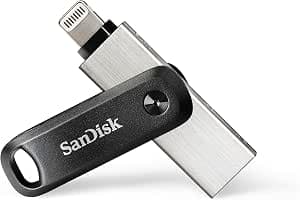
SANDISK 128GB iXpand Flash Drive Go - For your iPhone 14 or older - Create space on your iPhone - SDIX60N-128G-GN6NE
商品説明
Need more space on your iPhone?(1) The iXpand Flash Drive Go is the easy way to free up memory. Keep your memories safe by simply plugging in the drive to automatically back up your photos, videos and contacts.(2) Once files are on the iXpand Drive, you can use the high-speed USB 3.0 connector to quickly move them onto your computer. You can also password-protect your files, across multiple devices, to keep them private.3 And the dual-purpose swivel protects connectors and features a keyring hole to take your drive on the go. | *1GB=1,000,000,000 bytes. Actual user storage less. | (1)iPhone 5, iPhone 5c, iPhone 5s, iPhone 6, iPhone 6 Plus, iPhone 6s, iPhone 6s Plus, iPhone SE, iPhone 7, iPhone 7 Plus, iPhone 8, iPhone 8 Plus, iPhone X, iPhone Xs, iPhone Xs Max, iPhone XR, iPad Air, iPad mini, iPad mini 4, iPad Pro, iPad with Retina display, iPod 5th Generation and newer; iXpand Drive app and iOS 10.0.2 or higher required. | (2)iXpand Drive app required. Available for download from the App Store. iOS 10.0.2 or higher required. Set up automatic backup within app settings. | (3) Password-protection is supported by iOS 10.0.2 and higher, Mac OS X v10.8 and higher, Windows 7, Windows 8 and Windows 10. | (4) Available for download from the App Store. iOS 10.0.2 or higher required. Terms and conditions apply. | (5)Video first records to internal iPhone storage before automatically moving to iXpand Drive | SanDisk, the SanDisk logo and iXpand are registered trademarks or trademarks of Western Digital Corporation or its affiliates in the US and/or other countries. App Store, iPad, iPad Air, iPad mini, iPhone, iPod, Mac, Mac OS X and Retina are trademarks of Apple Inc. iOS is a trademark or registered trademark of Cisco in the U.S. and other countries and is used under license. All other marks are the property of their respective owners. All rights reserved.
トレードオフを比較
似た商品を並べて比較
同じカテゴリの分析済み商品から無作為に選んでいます。商品が異なれば、単純に置き換えられるとは限りません。

SANDISK 256GB Extreme PRO Dual Drive - Up to 1,000MB/s, USB Type-C, and USB Type-A, High-Performance Flash Drive - SDDDE1-256G-G46

SIMMAX 3 Pack 64GB Memory Stick USB 2.0 Flash Drives Swivel Thumb Drive Pen Drive (64GB Pink Blue Green)

SanDisk 32GB Ultra USB 3.0 Flash Drive - SDCZ48-032G-UAM46
調べる手間をひとつ減らす
購入前によくある質問
Is the SanDisk iXpand Flash Drive compatible with the iPhone 15 or iPad?
The iXpand Flash Drive Go has a built-in Lightning connector, making it natively compatible with iPhones 14 and older, and iPads with a Lightning port. For iPhone 15 models (USB-C) or iPads with USB-C, you will need a separate USB-C to USB-A adapter to use it. Many users with newer devices opt for a dedicated USB-C flash drive for a more seamless experience.
How easy is it to use, and do I need to be tech-savvy?
It's designed for simplicity. Just plug it into your iPhone, download the free SanDisk iXpand Drive app, and you can start moving photos, videos, and contacts with a few taps. The overwhelming feedback is that it's the easiest solution for anyone, especially non-tech-savvy users like parents, to quickly free up precious storage space.
What are the real drawbacks I should know about before buying?
Based on extensive user reviews, the main trade-offs are speed and battery life. Transferring large video files can be slow, and the process can drain your iPhone's battery, so it's best to have it plugged in during big backups. The companion app is functional but not as sleek as native iOS apps. Think of it as a reliable, simple tool rather than a high-speed automated system.
Can I use this to play videos directly on my phone or transfer files to my computer?
Yes, and that's a key benefit! You can watch videos directly from the drive using the iXpand app, saving phone space. The flip side has a standard USB-A connector, allowing you to easily transfer files to and from most Windows PCs and Macs (or use an adapter for USB-C laptops), making it a handy physical bridge between devices.
Is this drive durable, and what if it stops working?
The drive is built for portability, but some users note the flexible Lightning connector hinge requires careful handling. SanDisk typically offers a limited warranty. For peace of mind, we recommend safely ejecting it via the app before unplugging and storing it in the protective cap when not in use. It reliably performs its core function, but like any flash storage, avoid physical shocks and extreme conditions.
同カテゴリーのレビュー数が多い類似商品より: Lexar D40E 64GB Dual USB 3.2 Gen 1 Type-C Jump Drive, Champagne Silver
Does the Lexar D40E work with both newer USB-C devices and older USB-A computers?
Yes. The drive has dual USB Type-A and Type-C connectors, and reviewers say this makes it easy to move files between newer devices and older computers without an adapter.
Do I need to install any software or drivers to use it?
No. The manufacturer describes it as plug and play with no software installation required, and a reviewer confirmed it works immediately when plugged in with no setup.
How fast does the Lexar D40E transfer files?
The listing states transfer speeds up to 100MB/s read and 80MB/s write based on internal testing, and reviewers describe the USB 3.2 Gen 1 speeds as noticeably fast and quick.
Is the drive's housing durable, and does it get hot during transfers?
The listing describes a metal enclosure rated for 0° to 50° C, and reviewers say the metal housing feels premium and strong and cools quickly even when it gets hot from fast transfers.
Does the drive come with a cap to protect the connectors?
No cap is mentioned; the listing describes a 360° swivel design that lets you switch between connectors without the hassle of losing a cap, and one reviewer wished it had a cover for the exposed plug.
回答はメーカーの商品情報と分析対象のレビューの範囲に限られます。これらの情報源で裏付けられない質問には回答していません。
透明性のある設計