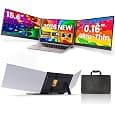
14" Triple Laptop Screen Extender - Ultra Thin & Lightweight (2.2lb) Portable Monitor For Laptop, FHD 1080P Travel Display 13-17" Laptops, Plug & Play USB-C/HDMI, Aluminum Extended Screen for Mac/Win

14" Triple Laptop Screen Extender - Ultra Thin & Lightweight (2.2lb) Portable Monitor For Laptop, FHD 1080P Travel Display 13-17" Laptops, Plug & Play USB-C/HDMI, Aluminum Extended Screen for Mac/Win

4 bei Amazon46 Bewertungenwww.amazon.com
Analysiert am Sep 21, 2026
Zuverlässigkeit der Rezensionen
85/ 100Note A
The reviews are detailed and mostly authentic, their tone lines up closely with the star ratings, popular topics are discussed evenly, ratings lean high with few middling scores, and there’s no promotional language.
Affiliate-Link — die Provision ist unabhängig von der Bewertung immer gleich.

Die 30-Sekunden-Lektüre

Bevor du dich entscheidest

Ein Ausgangspunkt, kein Kaufurteil

Was Kunden gut finden

Light, portable, easy setup

Reviewers frequently praise the extender as lightweight, easy to carry, and quick to set up, making it great for travel and remote work. Many also highlight the clear picture quality and overall productivity boost.

Der wichtigste Vorbehalt

Reliability and support concerns

Some users report screens failing after a few months, damaged cable ports causing flickering, and a lack of customer support. Others mention the specialized USB-C to USB-A cable is hard to replace if lost.

Bevor Sie sich entscheiden

Check ports, weight, and angle

Before buying, verify your laptop has the required USB-C connections or that you can replace the specialized cable. Also consider the weight and stand angle, as some users found it heavy or awkward to view.

Von einem ähnlichen Produkt mit mehr Bewertungen in dieser Kategorie: KOORUI 24 Inch Gaming Monitor, 180Hz 1080P VA Display with 3000:1 Contrast

Was Kunden gut finden

Good value for the price

Several reviewers describe the monitor as a strong budget purchase, citing impressive specs for the money and satisfaction with gaming use.

Der wichtigste Vorbehalt

Durability concerns over time

Several reviewers report the monitor failing or coming apart after months to a couple of years, including a dead screen and a failing power cord.

Bevor Sie sich entscheiden

May need manual calibration

Two reviewers note that setup benefits from adjusting settings in your GPU software, including color, brightness, and VRR.

Erst dein Anwendungsfall

Deine Anliegen

quality

Gemischte Erfahrungen

2 von 8 Erwähnungen beschreiben eine negative Erfahrung (25 %).

screen reliability

Überwiegend negativ

7 von 8 Erwähnungen beschreiben eine negative Erfahrung (88 %).

purchase

Überwiegend negativ

6 von 7 Erwähnungen beschreiben eine negative Erfahrung (86 %).

Eine Rezension kann mehrere Themen ansprechen. Die Prozentsätze beziehen sich auf die von uns analysierten Rezensionen, nicht auf alle Käufer oder die allgemeine Ausfallrate des Produkts.

Vor- und Nachteile vergleichen

Ähnliche Produkte im direkten Vergleich

Eine zufällige Auswahl analysierter Produkte aus derselben Kategorie. Unterschiedliche Produkte sind nicht zwangsläufig austauschbar.

Belege prüfen

Was die Rezensionsauszüge zeigen

Einbezogen bedeutet nicht als authentisch bestätigt. Markiert bedeutet nicht als Fälschung nachgewiesen. Dies sind analytische Einordnungen.

3 veranschaulichende Auszüge werden angezeigt, nicht der gesamte Rezensionsbestand.

In die Analyse einbezogen3.0/5 Sternen

No customer support

“The screen extender itself is great; works well, easy to carry, good quality. However, should you not have 2 USB-C connections and rely on one of the accompanying cables and happen to loose it, you are screwed. The USB-C to USB-A cable is highly specialized and I have yet to find a suitable replacement. Worse, there is absolutely zero product customer support. No web page, no phone numbers, etc...no means to contact the manufacturer at all. So now I have a monitor extender where only 1 half works. (My fault for losing the cable but I wouldn't buy this product unless you have 2 USB C ports on your laptop.)”

Erkannte Signale: Konkretes Detail: entity, process · Erwähnt: quality, purchase · Liest sich wie eine authentische Stimme

In die Analyse einbezogen1.0/5 Sternen

Not what I hoped

“very disappointed in this item. First it took a long while to get the two screens to properly interface. Then it made the laptop run very slow and get very hot. Then the dragging of documents between screens was very cumbersome. You had to literally minimize a document then move the margins over until it popped onto the other screen. But any time you wanted to do anything with that document it would pop back to main screen and you had t start over. And this process was very slow for some reason. Returned it.”

Erkannte Signale: Konkretes Detail: process, scenario · Liest sich wie eine authentische Stimme

In die Analyse einbezogen1.0/5 Sternen

No me funcionó

“No entiendo qué pasa , por no se los displays llegó dañado, ya envié fotos la devolución , todo como lo indican y en dicen que falta información, en atención al cliente no puedo acceder y está frenada mi devolucion, por favor atender mi devolucion, necesito comprar otro display.”

Erkannte Signale: Konkretes Detail: process · Erwähnt: purchase · Liest sich wie eine authentische Stimme

Eine Sache weniger zu suchen

Vor dem Kauf: kurze Fragen

Does this screen extender work with laptops that only have USB-C ports without video support?
Aus dem Angebot des Herstellers

The manufacturer states that before use you must confirm your laptop's USB-C port supports video transmission. Connection options include USB-C + USB-C (both must support video), USB-C (video) + HDMI, or HDMI + USB-A/C using the special H5 cable.

How long do the screens last before failing?
Aus 1 berücksichtigten Rezensionen, die „screen reliability“ erwähnen

One customer reported that after 6 months the left screen stopped working, with a damaged cable port causing flickering on and off. Other reviewers describe the extender as working well and being of good quality, so experiences vary.

Is customer support available if I have a problem or need a replacement cable?
Aus 3 berücksichtigten Rezensionen, die „purchase“ erwähnenAus dem Angebot des Herstellers

One reviewer reported no customer support at all, no web page, and difficulty finding a replacement for the specialized USB-C to USB-A cable. The listing mentions 1 year of after-sales service, but the review describes a different experience.

Is the extender lightweight and easy to carry for travel?
Aus 3 berücksichtigten Rezensionen, die „quality“ erwähnenAus dem Angebot des Herstellers

The listing describes it as ultra-thin at 0.18 inches and 2.2 lbs with an aerospace aluminum build and a leather case. Reviewers also call it easy to carry and set up, though one reviewer said it felt too heavy and pulled the laptop over.

What is included in the box and does it work without installing drivers?
Aus dem Angebot des Herstellers

The listing says it includes Type-C x2, USB-C to USB-A, HDMI, and H5 cables, and works plug-and-play with no software installation. It also notes the device has no integrated battery and must be powered via laptop USB or an external power adapter.

Von einem ähnlichen Produkt mit mehr Bewertungen in dieser Kategorie: KOORUI 24 Inch Gaming Monitor, 180Hz 1080P VA Display with 3000:1 Contrast

Does this monitor really run at 180Hz, and what do I need to enable it?

Yes — it's a native 180Hz panel, but you'll need to switch it on manually. Connect via the included HDMI cable (or a DisplayPort-capable setup), then set 180Hz in your GPU's display settings; it defaults to a lower refresh rate out of the box. Many Reddit and YouTube users note that enabling Adaptive Sync/FreeSync alongside it gives the smoothest experience, and it works with both AMD and NVIDIA cards.

How does the VA panel perform for gaming and everyday work?

The 3000:1 contrast gives noticeably deeper blacks than typical IPS budget monitors, which shines in dark game scenes and movies. For fast-paced competitive shooters, some TikTok and Reddit users mention mild ghosting/smearing in dark transitions — it's great for casual gaming, students, and office work, but color-critical creators or hardcore FPS players may prefer an IPS panel.

The stand looks basic — can I adjust the height or mount it?

Correct, the included stand only tilts (-5° to 20°) and doesn't offer height, swivel, or pivot adjustment, and a few users find the base slightly wobbly. The good news: it's VESA 100×100mm compatible, so a monitor arm or desk mount solves ergonomics entirely — a popular fix among dual-monitor and dorm-room setups.

What if I receive a unit with a dead pixel or backlight bleed?

Budget monitors can vary unit to unit, and some buyers report stuck pixels or corner bleed — but KOORUI backs it with a 3-year manufacturer warranty. If your unit arrives defective, contact the seller for a replacement or refund promptly; most users who did so report a smooth resolution, so inspect the screen within the return window.

Is it good value, and who is it best suited for?

At around $120, it's widely praised as one of the best budget 180Hz options — ideal for students, casual gamers, home-office users, and compact or dual-monitor setups. Just set expectations: no built-in speakers, a single HDMI plus VGA, and basic ergonomics. If you need height adjustment, color accuracy, or built-in audio, consider spending more on an IPS alternative.

Die Antworten beschränken sich auf das Angebot des Herstellers und die von uns analysierten Rezensionen. Fragen, die diese Quellen nicht abdecken, werden hier nicht beantwortet.

Transparent von Grund auf

Die Analyse verstehen