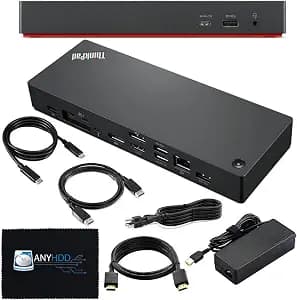
40B00135US Lenovo Thinkpad Docking Station USB C - 1 Year Warranty, Supports 4K Display, Thunderbolt 4 Dock with 135W Adapter, HDMI, DisplayPort, Thunderbolt Cables & Cloth - Lenovo Docking Station
Beschreibung
[Comprehensive Connectivity] - Seamlessly connect your devices with the thinkpad universal usb-c dock, featuring multiple ports including HDMI, DisplayPort, and Thunderbolt Cable; [Enhanced Display Options] - Maximize your productivity with our thunderbolt 4 docking station for laptop, MacBooks, Notebooks comes with a complete package. Expand your horizon with versatile 8K display support or multiple 4K displays support, and enjoy crisp and clear visuals on external monitors or projectors; [Efficient Power Delivery] - This Thinkpad Dock includes a 135W AC adapter with up to 230W Power Delivery to Workstation, ensuring stable power delivery to your devices while they're connected to the docking station; [Package Includes] - Lenovo 40B00135US Thunderbolt 4 Dock, 135W AC Power Adapter, 1x Thunderbolt Cable, 1x 4K HDMI Cable, 1x 4K Display Port Cable + Microfiber Cleaning Cloth; [𝐍𝐎𝐓𝐄] - Before purchasing please make sure your computer is USB C or Thunderbolt Compatible depending on the dock you are purchasing. If you are running into issues please try updating the dock firmware to make it compatible with your computer.
Vor- und Nachteile vergleichen
Ähnliche Produkte im direkten Vergleich
Eine zufällige Auswahl analysierter Produkte aus derselben Kategorie. Unterschiedliche Produkte sind nicht zwangsläufig austauschbar.


Eine Sache weniger zu suchen
Vor dem Kauf: kurze Fragen
क्या यह डॉकिंग स्टेशन डेल, एचपी या एप्पल मैकबुक जैसे अन्य ब्रांड्स के लैपटॉप के साथ संगत है?
हां, यह थंडरबोल्ट 4 या यूएसबी4 पोर्ट वाले किसी भी लैपटॉप के साथ संगत है। हालांकि, उपयोगकर्ता रिपोर्ट्स के आधार पर, एकीकृत सॉफ्टवेयर सपोर्ट के कारण लेनोवो थिंकपैड के साथ कार्यक्षमता सबसे सहज है। गैर-लेनोवो उपयोगकर्ताओं, विशेष रूप से मैकबुक मालिकों को, इष्टतम स्थिरता के लिए अपने लैपटॉप के थंडरबोल्ट ड्राइवरों को अपडेट करने की संभावना के लिए तैयार रहना चाहिए।
क्या यह 60Hz पर दोहरे 4K मॉनिटर को विश्वसनीय रूप से सपोर्ट करता है, और सेटअप कैसा है?
हाँ, यह 60Hz पर दोहरे 4K डिस्प्ले को सपोर्ट करने के लिए डिज़ाइन किया गया है। एक बार कनेक्ट होने के बाद अधिकांश उपयोगकर्ता उत्कृष्ट वीडियो गुणवत्ता की प्रशंसा करते हैं। एक सहज अनुभव के लिए, हम शामिल केबलों का उपयोग करने, पहले डॉक को उसके पावर एडाप्टर से कनेक्ट करने और यह सुनिश्चित करने की सलाह देते हैं कि आपके लैपटॉप के ग्राफ़िक्स और डॉक फ़र्मवेयर ड्राइवर अप-टू-डेट हों, क्योंकि इससे समीक्षाओं में उल्लिखित ज़्यादातर कभी-कभार होने वाली फ़्लिकरिंग या डिटेक्शन समस्याएँ हल हो जाती हैं।
बॉक्स में क्या शामिल है, और क्या मुझे कोई अतिरिक्त केबल खरीदने की आवश्यकता है?
बॉक्स में डॉकिंग स्टेशन, एक विशेष 135W पावर एडॉप्टर, एक थंडरबोल्ट 4 केबल, एक डिस्प्लेपोर्ट केबल, एक सफाई कपड़ा और दस्तावेज़ शामिल हैं। आपके पास दो मॉनिटर (HDMI और डिस्प्लेपोर्ट का उपयोग करके) और अपने लैपटॉप को तुरंत कनेक्ट करने के लिए आवश्यक सभी आवश्यक केबल हैं। बुनियादी सेटअप के लिए किसी अतिरिक्त खरीदारी की आवश्यकता नहीं है।
मैंने पावर डिलीवरी के मुद्दों के बारे में सुना है। क्या यह डॉक मेरे शक्तिशाली लैपटॉप को चार्ज कर सकता है?
यह डॉक अपने थंडरबोल्ट पोर्ट के माध्यम से 100W तक की पावर डिलीवरी प्रदान करता है, जो हाई-एंड थिंकपैड सहित अधिकांश बिजनेस लैपटॉप और अल्ट्राबुक के लिए पर्याप्त है। हालांकि, अत्यधिक प्रदर्शन वाले मोबाइल वर्कस्टेशन या गेमिंग लैपटॉप वाले उपयोगकर्ता जिन्हें 100W से अधिक की आवश्यकता होती है, उन्हें अधिकतम लोड के तहत चार्जिंग अपर्याप्त लग सकती है। ऐसे मामलों में, भारी उपयोग के दौरान लैपटॉप धीरे-धीरे डिस्चार्ज हो सकता है।
वारंटी और सहायता कैसे काम करती है, और अगर मुझे तकनीकी समस्याएँ आती हैं तो क्या होगा?
इस उत्पाद में लेनोवो की 1-वर्षीय निर्माता वारंटी शामिल है। यदि आपको कोई समस्या आती है, तो पहला कदम – जैसा कि कई टेक फोरम उपयोगकर्ता सुझाव देते हैं – लेनोवो वैन्टेज ऐप (थिंकपैड के लिए) या लेनोवो वेबसाइट के माध्यम से फर्मवेयर अपडेट की जाँच करना है। इससे अक्सर कनेक्टिविटी समस्याएँ हल हो जाती हैं। हार्डवेयर दावों के लिए, आपको अपने सीरियल नंबर के साथ सीधे लेनोवो सहायता से संपर्क करना होगा।
Von einem ähnlichen Produkt mit mehr Bewertungen in dieser Kategorie: USB C Laptop Docking Station Dual Monitor HDMI USB C Hub Multiport Adapter
Will this docking station work with my laptop?
It is compatible with laptops that have a full-featured USB-C port supporting DisplayPort, charging, and data transfer, such as Thunderbolt 3/4/5 or USB-C 3.2 Gen 1/Gen 2 with Power Delivery and DisplayPort. Not all USB-C devices are compatible, and incompatible devices cannot use the HDMI, DP, or VGA ports.
Can I use it with multiple monitors?
It supports dual monitors and triple displays for Windows, with single HDMI 1 or DisplayPort up to 4K@60Hz and HDMI 2 up to 4K@30Hz. MacBook laptops only support the same image on external monitors.
Does it charge my laptop while I use the other ports?
Yes, it has a 100W USB-C Power Delivery port, but the safe power out is limited to 87W, and about 8W is allocated to the hub itself. A power charger and cable are not included, and at least a 65W adapter is recommended.
Do reviewers find it reliable?
Experiences vary: one reviewer said it disconnects or does not work off and on and that the insides came apart, while another said bumping it can make the monitor go black for a second or two. Others reported it works well, including one who bought a second one.
Does it get hot during use?
One reviewer noted it gets a little warm, and the listing states the hub will heat up when it works, with 0℃–50℃ being the normal and reasonable range.
Die Antworten beschränken sich auf das Angebot des Herstellers und die von uns analysierten Rezensionen. Fragen, die diese Quellen nicht abdecken, werden hier nicht beantwortet.
Transparent von Grund auf