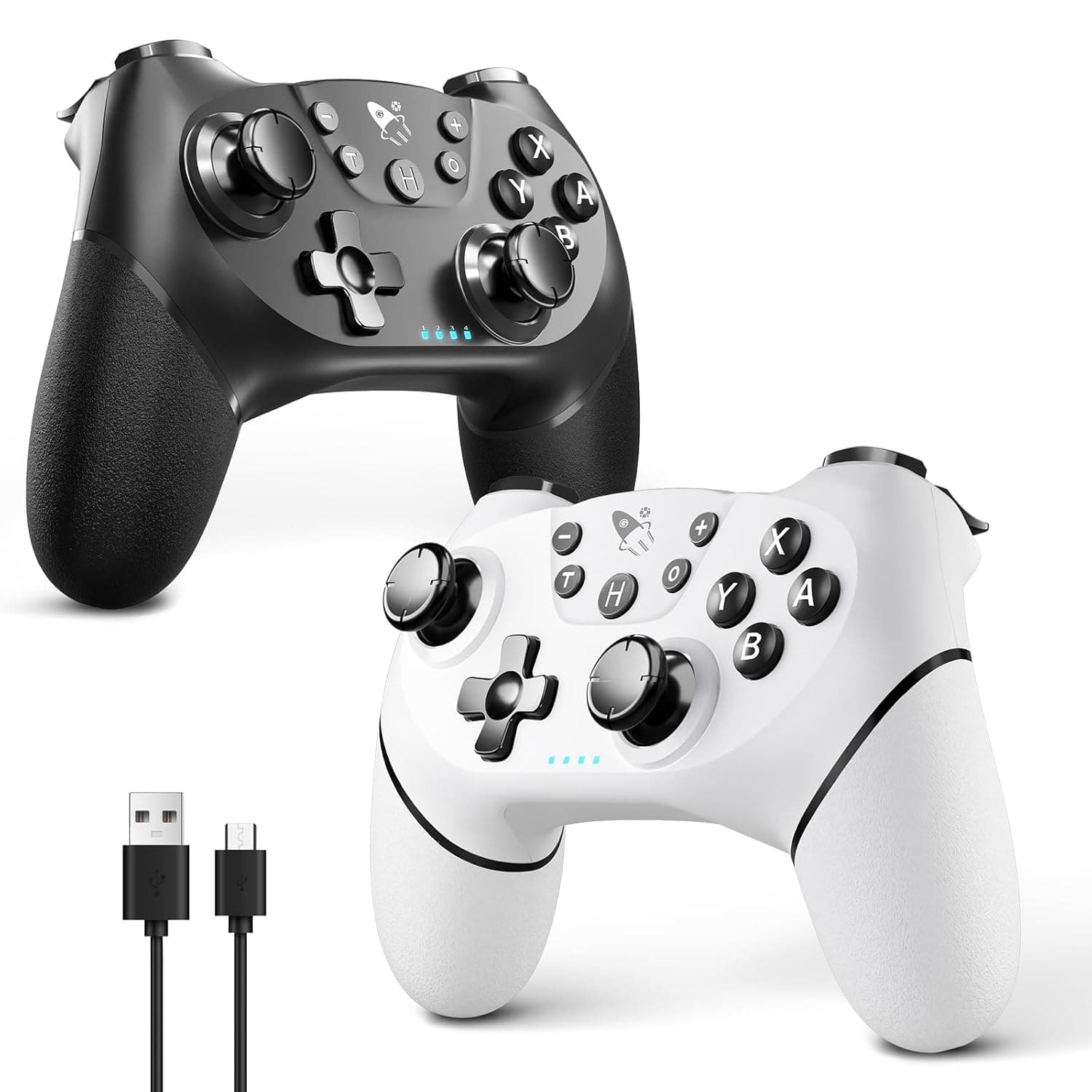
AceGamer Wireless Pro Controller for Nintendo Switch/Lite/OLED/Switch 2/PC, 2 pack, Hall Effect Joystick for Switch 2 Pro Controller with Wake-Up/Dual Vibration/Turbo/Ergonomic ! (Black&White)

AceGamer Wireless Pro Controller for Nintendo Switch/Lite/OLED/Switch 2/PC, 2 pack, Hall Effect Joystick for Switch 2 Pro Controller with Wake-Up/Dual Vibration/Turbo/Ergonomic ! (Black&White)

4.5 bei Amazon1,248 Bewertungenwww.amazon.com
Analysiert am Sep 22, 2026
Zuverlässigkeit der Rezensionen
89/ 100Note A
Reviews mostly sound authentic and specific, with star ratings matching their wording, balanced topic coverage, and few promotional phrases, though most ratings are high with some mid-range reviews.
Affiliate-Link — die Provision ist unabhängig von der Bewertung immer gleich.

Die 30-Sekunden-Lektüre

Bevor du dich entscheidest

Ein Ausgangspunkt, kein Kaufurteil

Was Kunden gut finden

Great value and solid build

Reviewers repeatedly praise the two-pack as an excellent deal, with controllers that feel well-built, connect easily, and perform smoothly. Many highlight the Hall Effect sticks for having no drift and the comfortable, grippy ergonomics.

Der wichtigste Vorbehalt

Macros can't loop automatically

One reviewer was disappointed that the controllers cannot do looping macros, so they won't automate repetitive tasks like shiny hunting or Pokémon battles. The same review also notes the D-Pad is square.

Bevor Sie sich entscheiden

Check compatibility and setup steps

Reviews mention connecting to Switch, Switch 2, and PC, with one detailed guide for enabling wired communication on the original Switch. Confirm the connection mode and setup process match your device before buying.

Von einem ähnlichen Produkt mit mehr Bewertungen in dieser Kategorie: Nintendo Switch 2 System

Was Kunden gut finden

Clear upgrade over original Switch

Several reviewers describe the Switch 2 as a meaningful upgrade, citing better performance, a larger and sharper screen, and smoother gameplay.

Der wichtigste Vorbehalt

Some units arrive defective or incomplete

Several reviewers report serious problems: a non-working screen, missing console or controllers, a dead pixel, and a system that stopped reading SD cards.

Bevor Sie sich entscheiden

Game compatibility and bundle choice matter

Some reviewers note that not all original Switch games are playable, and one warns to buy a game bundle if you want Mario Kart World or Sports Resort.

Erst dein Anwendungsfall

Deine Anliegen

functionality

Gemischte Erfahrungen

36 von 159 Erwähnungen beschreiben eine negative Erfahrung (23 %).

quality

Gemischte Erfahrungen

25 von 159 Erwähnungen beschreiben eine negative Erfahrung (16 %).

value for money

Überwiegend positiv

17 von 130 Erwähnungen beschreiben eine negative Erfahrung (13 %).

battery life

Gemischte Erfahrungen

15 von 53 Erwähnungen beschreiben eine negative Erfahrung (28 %).

ergonomics

Überwiegend positiv

5 von 36 Erwähnungen beschreiben eine negative Erfahrung (14 %).

connectivity

Gemischte Erfahrungen

42 von 112 Erwähnungen beschreiben eine negative Erfahrung (38 %).

button responsiveness

Überwiegend negativ

19 von 31 Erwähnungen beschreiben eine negative Erfahrung (61 %).

joystick drift

Überwiegend negativ

18 von 31 Erwähnungen beschreiben eine negative Erfahrung (58 %).

Eine Rezension kann mehrere Themen ansprechen. Die Prozentsätze beziehen sich auf die von uns analysierten Rezensionen, nicht auf alle Käufer oder die allgemeine Ausfallrate des Produkts.

Belege prüfen

Was die Rezensionsauszüge zeigen

Einbezogen bedeutet nicht als authentisch bestätigt. Markiert bedeutet nicht als Fälschung nachgewiesen. Dies sind analytische Einordnungen.

3 veranschaulichende Auszüge werden angezeigt, nicht der gesamte Rezensionsbestand.

In die Analyse einbezogen5.0/5 Sternen

Connecting a Controller to Your Original Nintendo Switch

“Forget those confusing official instructions—they're pretty much worthless for this. Here's a straightforward way to get your controller hooked up to the original Nintendo Switch. I'll walk you through it step by step. 1. **Enable Wired Communication on the Switch**: Head into the System Settings menu (it's the gear icon on the home screen). Scroll down to "Controllers and Sensors," and toggle on "Pro Controller Wired Communication." This lets the Switch recognize wired controllers properly. 2. **Hook Up the Cable**: Grab a USB cable and plug one end into the back of your Nintendo Switch TV dock (the USB port there). Connect the other end directly to your controller. Make sure everything's snug—no loose connections. 3. **Prep the Controller Pairing**: From the Switch's home screen, go to the "Controllers" option (it's at the bottom). Then select "Change Grip/Order." If your Switch isn't already docked, go ahead and dock it now—this helps with the connection process. 4. **Activate Pairing Mode on the Controller**: Press and hold the "H" button on the controller (it's usually the home button). Keep it held down for about 5 seconds until the blue lights numbered 1 through 4 start flashing back and forth quickly. That's your sign it's ready to pair. 5. **Finalize the Connection**: Once those lights are flashing, press the L and R buttons on the controller at the same time. The Switch should detect it and sync up. Give it a second—if it doesn't connect right away, try holding the buttons a bit longer or restarting the process. ### Pairing the Controller to Other Devices via Bluetooth If you want to use this controller with something else, like a PC, phone, or another console, it's super easy. Just press and hold that same "H" button for about 5 seconds to kick it into Bluetooth pairing mode. The lights will flash to let you know. Then, on the device you're connecting to, go into its Bluetooth settings, scan for devices, and select the controller when it pops up. Boom, paired. Once it's connected—whether wired to the Switch or Bluetooth to whatever—it performs like a champ. No annoying stick drift, no noticeable lag, just smooth gameplay. The build quality is rock-solid too; it feels premium in your hands, like it could survive a frustrated toss or two across the room and keep on trucking. Definitely worth it if you're looking for a reliable alternative.”

Erkannte Signale: Konkretes Detail: process · Erwähnt: connectivity · Liest sich wie eine authentische Stimme

In die Analyse einbezogen5.0/5 Sternen

So good I bought 4

“So I bought 4 of these for my Nintendo Switch to use when family comes over. They are perfect substitutions for the switch sticks and feel great in hand. Hall Effects: so the major sell for me was the Hall Effects and so far they have been perfect. No drift at all. Motion Gyro: the motion controls work perfectly fine. Very responsive for games like Super Mario Galaxy. No complaints. Button Response: so as far as response time I have notice very minor delay when playing Smash Bro’s Ultimate. It’s not game breaking or even bad at all in fact it’s very minimal, it’s just noticeable for anyone who is competitive. Do not let it discourage you from buying the controller. Battery Life: So far the battery life has been good. No complaints seeing as I’ve gotten about 8 hours of play in before I need to charge it. OVERALL: the control is great and perfect for any switch or switch 2 user who doesn’t like the switch sticks. No issues so far and I’m sure they’ll last for a long time with the Hall Effect. Would recommend and have recommended the controller to friends.”

Erkannte Signale: Konkretes Detail: quantity, entity, scenario · Erwähnt: joystick drift, button responsiveness, functionality · Liest sich wie eine authentische Stimme

In die Analyse einbezogen5.0/5 Sternen

Amazing Value

“I don’t usually take the time to leave reviews, but this Nintendo Switch double pack controller set genuinely impressed me so much, that I purchased another pack. Right out of the box, both controllers felt solid, responsive, and well-built. Setup was quick and easy, and they paired with my Switch without any hassle. The controls are smooth and accurate, which makes a big difference whether I’m playing casually or getting competitive. I also appreciate the comfortable grip great for longer gaming sessions without hand fatigue. Having two controllers in one pack is perfect for multiplayer, and it’s a great value for the price. Overall, this is a fantastic option if you’re looking for reliable, high quality controllers without breaking the bank. Definitely worth it!”

Erkannte Signale: Konkretes Detail: quantity, process, entity · Erwähnt: quality, connectivity, button responsiveness, functionality · Liest sich wie eine authentische Stimme
Eine Sache weniger zu suchen

Vor dem Kauf: kurze Fragen

Does this controller suffer from joystick drift?
Aus 1 berücksichtigten Rezensionen, die „joystick drift“ erwähnenAus dem Angebot des Herstellers

Reviewers specifically highlight the Hall Effect joysticks, with one noting "no drift at all" so far. The listing also confirms Hall Effect Joystick technology is used.

Is this controller compatible with the Nintendo Switch 2 and PC?
Aus 6 berücksichtigten Rezensionen, die „connectivity“ erwähnenAus dem Angebot des Herstellers

The listing states it is fully compatible with Switch/Switch Lite/Switch OLED/Switch 2/PC and Android Phone with no driver installation needed. A reviewer confirmed it "connects to the Switch 2 easily in settings."

How do you connect this controller to the Switch 2?
Aus dem Angebot des Herstellers

The listing provides steps: go to controller settings and click "Change grip/Order," then press and hold the HOME button for 3-5 seconds until the LED flashes, and LED1 will remain lit once paired.

Is this controller a good value compared to the official Switch Pro controller?
Aus 4 berücksichtigten Rezensionen, die „value for money“ erwähnenAus dem Angebot des Herstellers

Reviewers repeatedly call it a great deal, with one saying it "must be the best controller deal in all of Amazon" and another noting they "could not justify spending $80 on the Switch Pro controller." The listing also emphasizes that two controllers in one box is less costly than buying separately.

How comfortable is the controller to hold for long gaming sessions?
Aus 3 berücksichtigten Rezensionen, die „ergonomics“ erwähnenAus dem Angebot des Herstellers

Reviewers say the grips are "awesome," it fits comfortably in the hand with grippy handles to prevent sweat, and has an ergonomic design. The listing also describes an ergonomic, anti-slip silicone grip design for comfortable long play.

Von einem ähnlichen Produkt mit mehr Bewertungen in dieser Kategorie: Nintendo Switch 2 System

Will my existing Nintendo Switch games and save data work on the Switch 2?

In most cases, yes — the Switch 2 plays both physical and digital Switch games, and many players report a smooth transition. That said, Nintendo notes some titles may not be fully supported, so it's worth checking the compatibility list on Nintendo's website before you buy. A common tip from Reddit users: verify your must-have games first, then dive in.

Do I need a subscription or extra gear to use GameChat?

GameChat requires internet access, a Nintendo Switch Online membership, and a Nintendo Account. Voice chat and screen-sharing work with the built-in microphone, but video chat needs the Switch 2 camera or a compatible USB-C camera (sold separately). Many TikTok users flag this as the biggest hidden cost — factor it into your budget if video chat matters to you.

Is the 256GB storage enough, and can I expand it?

It's a solid starting point, but after system software and a few large titles, space disappears faster than expected. You can expand storage with a microSD Express card (sold separately) — just note that standard microSD cards won't work, and Express cards cost more. If you plan to go all-digital, budget for a card up front.

How durable are the new magnetic Joy-Con 2 controllers, and is mouse mode worth it?

Early adopters describe the magnetic snap as satisfying and secure, and the controllers stay firmly attached in normal play. Durability worries are mostly speculative so far, though some users recommend a gentle attach/detach habit to be safe. Mouse mode is a fun bonus in compatible games but isn't a system-seller on its own — think of it as a nice extra.

Is the Switch 2 worth upgrading from the original Switch, and what's the warranty situation?

If you play handheld often or want 4K/120fps on a compatible TV, the bigger HDR screen and sharper docked output are meaningful upgrades — and exclusives like Mario Kart World sweeten the deal. Casual players may find the Switch OLED a better value, and some buyers regret not waiting for a bundle. The system carries a 1-year manufacturer warranty, and returns depend on the retailer's policy, so confirm both before purchasing.

Die Antworten beschränken sich auf das Angebot des Herstellers und die von uns analysierten Rezensionen. Fragen, die diese Quellen nicht abdecken, werden hier nicht beantwortet.

Transparent von Grund auf

Die Analyse verstehen