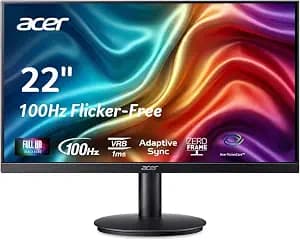
Acer KB220Q H2bi 21.5" Full HD (1920 x 1080) Zero-Frame Home Office Monitor | Adaptive-Sync Support (FreeSync Compatible) | Up to 100Hz Refresh | 1ms (VRB) | sRGB 99% | Tilt | HDMI & VGA Ports
Beschreibung
Ideal for everyday computing, the Acer KB220Q features a ZeroFrame design, thin profile, Full HD Resolution. Making it a sleek addition to your home or office setup. Get fast refresh rates thanks to the Adaptive-Sync Support product that matches the refresh rate of your monitor with your graphics card. Plus, users can enjoy comfortable viewing experiences while gaming via flicker-less and low dimming display. The design saves space on your desk and lets you place multiple monitors side by side to build a seamless big-screen display. (UM.WK0AA.201)
Eine Sache weniger zu suchen
Vor dem Kauf: kurze Fragen
What cables are included, and do I need to buy an HDMI cable separately?
The monitor includes a VGA cable only. If your device uses HDMI, you’ll need to purchase an HDMI cable separately. Many users on Reddit and Amazon noted this, but the trade-off is that the monitor delivers solid picture quality at a lower price than similar models.
How good are the built-in speakers?
They’re functional for basic alerts or quick YouTube clips, but they’re not great for music, movies, or calls. TikTok reviewers often point out they sound like a smartphone speaker. For everyday home office or media use, we recommend external speakers or headphones.
Can I get 100Hz refresh rate to work, and how?
Yes, the monitor supports up to 100Hz, but it may default to 60Hz on some systems. To enable 100Hz, go into your display settings (Windows or macOS) and adjust the refresh rate manually. Also, ensure you’re using an HDMI cable that supports 100Hz—older or low-quality cables can limit performance. It’s not plug-and-play for everyone, but a quick settings fix works.
Is this monitor suitable for gaming?
It works well for casual gaming thanks to Adaptive-Sync (FreeSync compatible), a 1ms visual response boost, and 100Hz refresh rate. It supports smoother animations in less demanding games like *Fortnite* or *Valorant*. However, competitive players who want ultra-high refresh rates (144Hz+) or height adjustment should look at gaming-specific models with sturdier stands.
Can I mount it on an arm or wall, and does the stand allow height adjustment?
Yes, the monitor has a standard 100x100mm VESA mount, so it works with most monitor arms and wall mounts. The included stand only offers tilt adjustment (no height or swivel). If you need height adjustability, you’ll need to use a VESA arm—a common recommendation from YouTube setup guides for this monitor.
Die Antworten beschränken sich auf das Angebot des Herstellers und die von uns analysierten Rezensionen. Fragen, die diese Quellen nicht abdecken, werden hier nicht beantwortet.
Transparent von Grund auf