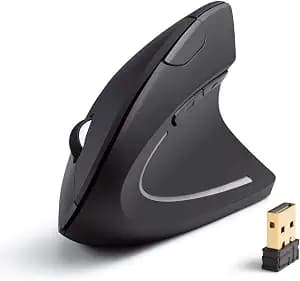
Anker 2.4G Wireless Vertical Ergonomic Optical Mouse for Work, Multi-Device Connectivity, 800/1200 /1600 DPI, 5 Buttons for Laptop, Desktop, PC - Black
Beschreibung
Experience enhanced comfort and productivity with the Anker 2.4G Wireless Vertical Ergonomic Optical Mouse. Its scientifically designed ergonomic structure promotes a healthy neutral "handshake" wrist and arm position, reducing strain and amplifying your productivity.; Enjoy superior sensitivity and precision with this wireless mouse. It boasts 800/1200/1600 DPI Resolution Optical Tracking Technology, offering more sensitivity than standard computer mice. This ensures smooth and precise tracking on a diverse range of surfaces, making it ideal for both work and leisure activities.; The Anker Ergonomic Mouse is not only convenient but also user-friendly. It comes with next/previous buttons for effortless webpage browsing, making it an excellent choice for internet enthusiasts, gamers, and those who spend prolonged periods on their computer.; This computer mouse is not just ergonomic but also energy-efficient and durable. It transitions into a power-saving mode after 8 minutes of inactivity, entirely disconnecting power. A simple press of the right or left button wakes it up. Product dimensions: 120*62.8*74.8 mm; product weight: 3.4 oz.; The package offers a comprehensive set and warranty. It includes: 1 Anker Wireless Vertical Ergonomic Optical Mouse (2 AAA batteries not included), 1 2.4G USB receiver (stored in the mouse's bottom), 1 instruction manual. We extend an 18-month hassle-free warranty for your peace of mind.
Vor- und Nachteile vergleichen
Ähnliche Produkte im direkten Vergleich
Eine zufällige Auswahl analysierter Produkte aus derselben Kategorie. Unterschiedliche Produkte sind nicht zwangsläufig austauschbar.

Logitech M196 Bluetooth Wireless Mouse, Compact and Portable Mouse for Laptops, Tablets and More, 12-Month Battery, Smooth Tracking, Compatible with PC and Mac, Windows and macOS - Graphite

Amazon Basics 3-Button USB Wired Mouse with Responsive Tracking, Plug & Play, Compatible with Windows and Mac, Black

cimetech Type C Wireless Mouse, USB C Mouse 2.4G Silent Cordless Portable Computer Mice for Laptop, Notebook, MacBook Pro Air, Windows, Linux - Ambidextrous Black
Eine Sache weniger zu suchen
Vor dem Kauf: kurze Fragen
I have larger hands. Will this mouse be comfortable for me?
This is a common point in reviews. The Anker vertical mouse has a compact, contoured design. Users with medium to smaller hands typically find it very comfortable. However, several users with larger hands (especially those who mention glove sizes above Large) have reported their fingers can curl over the top, forcing a more "claw-like" grip. If you have particularly large hands, you might want to consider a model specifically designed with a larger grip profile.
How long does it take to get used to a vertical mouse, and will my wrist hurt at first?
This is perfectly normal! Almost every reviewer mentions a short adjustment period of 3 to 7 days. Your muscles are used to a flat mouse, so switching to a vertical orientation can feel strange and may even cause new, temporary strain as you adapt. The overwhelming consensus from social media and reviews is to persist through this phase. Most users who stick with it find the initial discomfort fades and significant long-term relief for their wrist, forearm, and shoulder follows.
What's the real-world durability like? Is it built to last for daily 8-hour work use?
For its price point, the build quality is generally praised as solid. It holds up well for standard office and home use. However, some power users on forums have noted that after 6-12 months of very heavy, daily use, components like the scroll wheel or side buttons can show wear (e.g., becoming less tactile or squeaky). It's an excellent, durable entry into ergonomic mice, but if you're a very intensive user clicking thousands of times a day, a more premium model might offer greater longevity.
Does it work seamlessly with multiple computers, like a laptop and a desktop?
Yes, multi-device connectivity is one of its most loved features. You can pair it with up to three devices: two via Bluetooth and one via the included 2.4GHz USB dongle. Switching between them is as simple as pressing the connection button on the base. It's perfect for users who switch between a personal laptop, a work desktop, and perhaps a tablet. Many TikTok and YouTube creators highlight this feature for streamlined workstation setups.
How does this compare to more expensive vertical mice from brands like Logitech?
This is the #1 question from prospective buyers. The Anker mouse is consistently hailed as the "best value" entry. The key differences are in premium materials, more advanced sensors, on-the-fly DPI adjustment (the Anker's DPI switch is on the bottom), and often more robust software. The pricier alternatives might feel more solid and offer finer control for specialized tasks. For most people seeking ergonomic relief without breaking the bank, the Anker provides 90% of the benefit at a fraction of the cost, making it an ideal first vertical mouse.
Von einem ähnlichen Produkt mit mehr Bewertungen in dieser Kategorie: TECKNET Wireless Mouse, BT 5.0/2.4G, Rechargeable 6-DPI Silent, Grey
How long does the battery last on a full charge?
The listing states a full charge takes 1.5 to 2 hours and delivers 3 months of use at 2 hours per day. Reviewers back this up, with one reporting no charge needed after a month and a half of roughly 9 hours daily use, and another saying one charge lasts for months.
Are the mouse clicks actually quiet?
Yes. The manufacturer describes silent technology for noiseless clicks, and reviewers consistently call the left and right clicks "super silent," "quiet but satisfying," and a good fit for offices and quiet environments.
How do I connect it, and can I use it with more than one device?
It supports both a USB-A dongle and Bluetooth (3.0/5.0), and you can connect two devices at once and switch between them with a slide switch. Reviewers confirm both the USB and Bluetooth connections work well and are easy to set up, and the dongle is stored in a slot underneath the mouse.
Is this mouse suitable for small hands?
The listing notes it is better suited for small to medium-sized hands, though larger-handed users who prefer a smaller mouse may still like it. A reviewer who wears a small women's glove said it fits perfectly, and another described it as somewhat small but still comfortable in a man's hand.
Does it work with macOS?
The listing says it is compatible with Windows, macOS, Chrome OS, and Linux, but notes that the side buttons are not compatible with macOS.
Die Antworten beschränken sich auf das Angebot des Herstellers und die von uns analysierten Rezensionen. Fragen, die diese Quellen nicht abdecken, werden hier nicht beantwortet.
Transparent von Grund auf