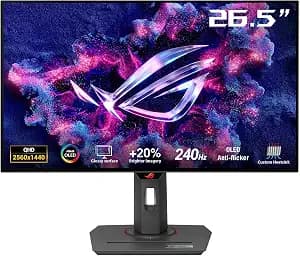
ASUS ROG Strix 27” 1440P OLED Gaming Monitor (XG27AQDMG) - QHD, Glossy OLED, 240Hz, 0.03ms, Custom Heatsink, Anti-flicker,Uniform Brightness, G-SYNC Compatible, 99% DCI-P3, DisplayWidget, 3yr warranty
Beschreibung
The 27-inch ROG Strix OLED XG27AQDMG gaming monitor boasts an exclusive 1440p glossy WOLED panel with a 240 Hz refresh rate, OLED Anti-flicker technology and 0.03 ms gray-to-gray (GTG) response time for immersive, fast-paced gaming. A large custom heatsink provides exceptional cooling performance, while ASUS OLED Care functions reduce the risk of burn-in to ensure longevity of the OLED panel.
Vor- und Nachteile vergleichen
Ähnliche Produkte im direkten Vergleich
Eine zufällige Auswahl analysierter Produkte aus derselben Kategorie. Unterschiedliche Produkte sind nicht zwangsläufig austauschbar.

KOORUI 24-inch Computer Monitor Full HD 1920 x 1080p 100Hz VA Display 4000:1 Contrast Ratio with HDMI VGA, TÜV Rheinland Certified, 100 x 100 mm VESA Mountable, Ultra-Slim Design, Tilt, Black, E2412F

LG 27UP850K-W 27-inch UltraFine 4K UHD IPS DisplayHDR 400 Computer Monitor

Sceptre 27-Inch FHD LED Gaming Monitor 75Hz 2X HDMI VGA Build-in Speakers, Ultra Slim Metal Black
Eine Sache weniger zu suchen
Vor dem Kauf: kurze Fragen
चमकदार OLED स्क्रीन कमरे की रोशनी को कैसे संभालती है, और क्या ऑटो-डिमिंग फीचर समायोज्य है?
चमकदार कोटिंग आश्चर्यजनक कॉन्ट्रास्ट और जीवंत रंग प्रदान करती है, लेकिन तेज रोशनी और खिड़कियों को प्रतिबिंबित कर सकती है। अंधेरे या नियंत्रित रोशनी वाले वातावरण के लिए, यह असाधारण है। ऑटो-डिमिंग (ABL) पैनल की सुरक्षा के लिए OLED तकनीक की एक अंतर्निहित सुविधा है। हालांकि इसे पूरी तरह से अक्षम नहीं किया जा सकता, आप OSD सेटिंग्स में "यूनिफ़ॉर्म ब्राइटनेस" को सक्षम करके इसके प्रभाव को कम कर सकते हैं, जिसे मिश्रित गेमिंग और डेस्कटॉप उपयोग के लिए कई रेडिट उपयोगकर्ता सलाह देते हैं।
क्या 3 साल की वारंटी संभावित OLED बर्न-इन को कवर करती है?
हां, यह एक उत्कृष्ट विशेषता है। ASUS इस मॉनिटर के लिए अपनी 3 साल की वारंटी के तहत स्पष्ट रूप से OLED बर्न-इन सुरक्षा शामिल करता है, जो खरीदारों के इसे अन्य विकल्पों पर चुनने का एक प्रमुख कारण है। यह दीर्घकालिक निवेश के लिए महत्वपूर्ण मानसिक शांति प्रदान करता है।
मैं इसे एक मॉनिटर आर्म पर माउंट करना चाहता हूं। क्या कोई संगतता संबंधी समस्याएं हैं?
हां, यह एक सामान्य प्रतिक्रिया है। VESA माउंट पॉइंट धंसा हुआ है। अधिकांश मानक मॉनिटर आर्म को ठीक से जोड़ने के लिए आपको संभवतः लंबे M4 स्क्रू (अक्सर 12-16 मिमी लंबाई के) या स्पेसर/वॉशर के एक सेट की आवश्यकता होगी। पहले अपने आर्म के शामिल हार्डवेयर की जांच करना एक अच्छा विचार है।
क्या यह मॉनिटर प्रतिस्पर्धी गेमिंग और सामान्य उत्पादकता/काम दोनों के लिए अच्छा है?
यह 240Hz रिफ्रेश रेट और त्वरित प्रतिक्रिया समय के साथ गेमिंग के लिए शीर्ष-स्तरीय प्रदर्शन करता है। उत्पादकता के लिए, यह सक्षम है लेकिन OLED की कुछ सीमाएँ हैं। टेक्स्ट बहुत स्पष्ट है, लेकिन स्थिर विंडोज़ के साथ ऑटो-डिमिंग विचलित कर सकती है, और चमकदार स्क्रीन पर प्रतिबिंब दिख सकते हैं। यदि आपका उपयोग 70%+ गेमिंग/मीडिया है, तो यह शानदार है। यदि यह एक उज्ज्वल कमरे में 50/50 है, तो एक उच्च-स्तरीय आईपीएस या मैट-कोटेड एलजी विकल्प कम निराशाजनक हो सकता है।
मेरा ग्राफ़िक्स कार्ड एक [RTX 3060 Ti / RX 6700 XT] है। क्या यह इस 1440p 240Hz मॉनिटर के लिए अत्यधिक है?
बिल्कुल नहीं! हालांकि आप नवीनतम AAA शीर्षकों में अधिकतम सेटिंग्स पर 240 FPS तक नहीं पहुंच सकते हैं, लेकिन आपको ईस्पोर्ट्स शीर्षकों (Valorant, CS2) और पुराने गेम्स में बहुत लाभ होगा। इसके अलावा, मॉनिटर की G-SYNC संगत प्रमाणन एकदम सहज, टियर-मुक्त अनुभव सुनिश्चित करता है, तब भी जब आपका FPS उतार-चढ़ाव करता है। यह एक "भविष्य-सुरक्षित" डिस्प्ले है जिसका आपके अगले GPU अपग्रेड पूरी तरह से उपयोग करेगा।
Von einem ähnlichen Produkt mit mehr Bewertungen in dieser Kategorie: KOORUI 24 Inch Gaming Monitor, 180Hz 1080P VA Display with 3000:1 Contrast
Does this monitor really run at 180Hz, and what do I need to enable it?
Yes — it's a native 180Hz panel, but you'll need to switch it on manually. Connect via the included HDMI cable (or a DisplayPort-capable setup), then set 180Hz in your GPU's display settings; it defaults to a lower refresh rate out of the box. Many Reddit and YouTube users note that enabling Adaptive Sync/FreeSync alongside it gives the smoothest experience, and it works with both AMD and NVIDIA cards.
How does the VA panel perform for gaming and everyday work?
The 3000:1 contrast gives noticeably deeper blacks than typical IPS budget monitors, which shines in dark game scenes and movies. For fast-paced competitive shooters, some TikTok and Reddit users mention mild ghosting/smearing in dark transitions — it's great for casual gaming, students, and office work, but color-critical creators or hardcore FPS players may prefer an IPS panel.
The stand looks basic — can I adjust the height or mount it?
Correct, the included stand only tilts (-5° to 20°) and doesn't offer height, swivel, or pivot adjustment, and a few users find the base slightly wobbly. The good news: it's VESA 100×100mm compatible, so a monitor arm or desk mount solves ergonomics entirely — a popular fix among dual-monitor and dorm-room setups.
What if I receive a unit with a dead pixel or backlight bleed?
Budget monitors can vary unit to unit, and some buyers report stuck pixels or corner bleed — but KOORUI backs it with a 3-year manufacturer warranty. If your unit arrives defective, contact the seller for a replacement or refund promptly; most users who did so report a smooth resolution, so inspect the screen within the return window.
Is it good value, and who is it best suited for?
At around $120, it's widely praised as one of the best budget 180Hz options — ideal for students, casual gamers, home-office users, and compact or dual-monitor setups. Just set expectations: no built-in speakers, a single HDMI plus VGA, and basic ergonomics. If you need height adjustment, color accuracy, or built-in audio, consider spending more on an IPS alternative.
Die Antworten beschränken sich auf das Angebot des Herstellers und die von uns analysierten Rezensionen. Fragen, die diese Quellen nicht abdecken, werden hier nicht beantwortet.
Transparent von Grund auf