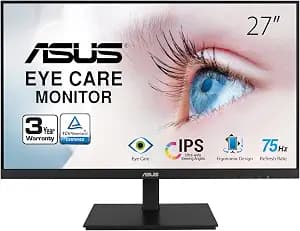
ASUS VA27DQSB 27” Monitor, 1080P Full HD, 75Hz, IPS, Adaptive-Sync, Eye Care, HDMI DisplayPort VGA USB Hub, Frameless, Ergonomic Design, VESA Wall Mountable,Black
Beschreibung
27-inch Full HD (1920 x 1080) LED backlight display with IPS 178° wide viewing angle panel; Up to 75Hz refresh rate with Adaptive-Sync technology to eliminate tracing and ensure crisp and clear video playback; Extensive connectivity including HDMI, DisplayPort, D-sub and USB hub; VESA wall-mountable to save on desktop space plus ergonomically-designed stands with full tilt, swivel, pivot, and height adjustment; ASUS Eye Care technology features TÜV Rheinland-certified Flicker-free and Low Blue Light technologies to ensure a comfortable viewing experience, Color Augmentation for better color differentiation, and Rest Reminder to prevent eye fatigue caused by long screen viewing time; 1-month Adobe Creative Cloud: Receive complimentary access with the purchase of this product (valid until 08/31/2026)
Vor- und Nachteile vergleichen
Ähnliche Produkte im direkten Vergleich
Eine zufällige Auswahl analysierter Produkte aus derselben Kategorie. Unterschiedliche Produkte sind nicht zwangsläufig austauschbar.

ROADOM 7" Touchscreen Monitor, 1024x600 IPS Raspberry Pi Screen, HDMI

Hosyond 7 Inch Touchscreen IPS DSI Display Compatible with Raspberry Pi 5/4/3, 800x480 Pixel Capacitive Screen MIPI Driver-Free Interface

10.3 Inch Small Touchscreen Monitor, 400cd/m², IPS Stretched Bar LCD Mini Travel Touch Display 1920 * 720 HDMI USBC, Portable Touch Screen for Laptop Computer Windows Aida64 GPU CPU RAM Monitoring
Eine Sache weniger zu suchen
Vor dem Kauf: kurze Fragen
Is the stand really stable, and is it easy to mount this on a monitor arm?
The included ergonomic stand offers great adjustability (height, tilt, swivel, pivot) for the price. Some users on Reddit have noted a slight wobble on uneven surfaces, but it's generally stable on a typical desk. For mounting, yes, it's VESA compatible (100x100mm), but you must first detach the neck of the original stand from the monitor's backplate—a step that can be tricky but is doable with the right screwdriver.
I'm worried about getting a monitor with dead pixels or backlight bleed. What's your quality control like?
While the vast majority of units are problem-free, as with any IPS panel, there is a small chance of minor backlight bleed in the corners or a single stuck pixel. Our 4.6-star average from over 1,200 reviews indicates these are not widespread issues. We recommend purchasing from an authorized retailer with a straightforward return policy for peace of mind, as many satisfied customers have done.
Is this monitor good for both office work and casual gaming, or should I look for a higher refresh rate?
This monitor excels as a productivity powerhouse. The 75Hz refresh rate and Adaptive-Sync provide a noticeably smoother experience than standard 60Hz for scrolling, windows movement, and casual gaming. However, if your primary focus is competitive, fast-paced gaming, dedicated gamers on forums often suggest investing in a 144Hz+ monitor. For office work, multimedia, and casual/strategy games, the ASUS VA27DQSB offers outstanding value.
What exactly does the "Eye Care" feature do, and is the USB hub convenient to use?
ASUS Eye Care includes flicker-free backlighting and a blue light filter to reduce eye strain during long sessions—a feature many remote workers and students appreciate. The built-in USB hub (with two ports) is very convenient for connecting peripherals like a webcam or keyboard, but note it requires connecting the included upstream USB-B cable to your computer for power and data.
Who is this monitor best suited for, and what are its main advantages over a basic 60Hz monitor?
This monitor is a perfect upgrade for students, hybrid workers, and general users replacing an older 60Hz screen. Its main advantages are the fluid 75Hz motion, the vibrant IPS colors with wide viewing angles, and the highly adjustable stand—features rarely found together at this price point. It's designed for anyone who spends hours at their desk and values comfort, clarity, and clean cable management.
Von einem ähnlichen Produkt mit mehr Bewertungen in dieser Kategorie: KOORUI 24 Inch Gaming Monitor, 180Hz 1080P VA Display with 3000:1 Contrast
Does this monitor really run at 180Hz, and what do I need to enable it?
Yes — it's a native 180Hz panel, but you'll need to switch it on manually. Connect via the included HDMI cable (or a DisplayPort-capable setup), then set 180Hz in your GPU's display settings; it defaults to a lower refresh rate out of the box. Many Reddit and YouTube users note that enabling Adaptive Sync/FreeSync alongside it gives the smoothest experience, and it works with both AMD and NVIDIA cards.
How does the VA panel perform for gaming and everyday work?
The 3000:1 contrast gives noticeably deeper blacks than typical IPS budget monitors, which shines in dark game scenes and movies. For fast-paced competitive shooters, some TikTok and Reddit users mention mild ghosting/smearing in dark transitions — it's great for casual gaming, students, and office work, but color-critical creators or hardcore FPS players may prefer an IPS panel.
The stand looks basic — can I adjust the height or mount it?
Correct, the included stand only tilts (-5° to 20°) and doesn't offer height, swivel, or pivot adjustment, and a few users find the base slightly wobbly. The good news: it's VESA 100×100mm compatible, so a monitor arm or desk mount solves ergonomics entirely — a popular fix among dual-monitor and dorm-room setups.
What if I receive a unit with a dead pixel or backlight bleed?
Budget monitors can vary unit to unit, and some buyers report stuck pixels or corner bleed — but KOORUI backs it with a 3-year manufacturer warranty. If your unit arrives defective, contact the seller for a replacement or refund promptly; most users who did so report a smooth resolution, so inspect the screen within the return window.
Is it good value, and who is it best suited for?
At around $120, it's widely praised as one of the best budget 180Hz options — ideal for students, casual gamers, home-office users, and compact or dual-monitor setups. Just set expectations: no built-in speakers, a single HDMI plus VGA, and basic ergonomics. If you need height adjustment, color accuracy, or built-in audio, consider spending more on an IPS alternative.
Die Antworten beschränken sich auf das Angebot des Herstellers und die von uns analysierten Rezensionen. Fragen, die diese Quellen nicht abdecken, werden hier nicht beantwortet.
Transparent von Grund auf