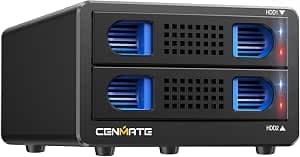
CENMATE Hard Drive Case Aluminium RAID 2 Bay with Fan for 2.5/3.5 SATA HDD/SSD, USB A/C 3.0, Toolless, 4 Modes (Support 1/0/JBOD/NORMAL)
Beschreibung
Reliable external storage system for individuals and businesses: The hard drive case supports 2.5/3.5 inch HDD and SSDs, with maximum capacity up to 20TB per hard drive, it is an ideal external hard drive case for personal or business use. Save space on your desktop or laptop.; 4 Raid Modes: ! ! !NOTE: Press and hold the "Reset" button for 5 seconds after resetting the RAID array!! !This case raid supports 4 RAID modes (RAID 0, RAID 1, normal, JBOD). RAID design can result in data loss. MAC OS does not have Raid software.; Low heat, less noise: The 2 bay hard drive case is built with aluminum alloy materials and 2 inch silent fans. Maximize the security of your data. The fan requires connecting a USB cable before working. We provide sleep mode installation files, which allow you to set the duration of the product's sleep mode according to your needs.; Up to 6Gbps: This 2 bay raid hdd case is equipped with JMS561 chip and USB 3.0 output interface, with up to 6Gbps under UASP control.; Wide compatibility, Plug and Play: Equipped with USB A/C 3.0 cable. Compatible with Windows 7 and above, Mac 9.1 and above, Linux.; Quality Assurance: cenmate provides technical assistance. If you have any questions about the product, please feel free to contact us, we will reply and solve your problem within 24 hours.
Eine Sache weniger zu suchen
Vor dem Kauf: kurze Fragen
Is the "toolless" design really tool-free, and how easy is it to install my drives?
While the design minimizes tools, some users find the drive trays require firm pressure to open and close. It's best described as "tool-minimal." For the most secure fit, especially with thicker 3.5" drives, having a small flathead screwdriver on hand to help lever the tray open can make the process smoother, as mentioned in several community discussions.
How loud and reliable is the cooling fan? Can it be replaced if needed?
The active fan is effective at cooling but is the component most frequently mentioned in reviews for noise or early failure. Some report a noticeable whirring sound. While not officially user-replaceable by CENMATE, tech-savvy users on forums have successfully swapped in compatible 40mm fans. If absolute silence is crucial, you may want to consider a fanless enclosure, though drive temperatures may run higher.
I'm not a RAID expert. How difficult is it to set up the different modes (JBOD, RAID 0, etc.)?
The mode switch is physical, but the included manual is brief. Many new users find watching a short setup video online more helpful than the printed guide. For basic use as two separate drives or one large volume (JBOD), it's quite straightforward. For RAID 0 or 1, we recommend checking your OS's disk management tool after switching the physical mode.
What's the real build quality like? I've seen mixed comments about the aluminum finish.
The enclosure uses an aluminum shell which gives it a solid, heat-dissipating core and a sleek look. However, as with many value-oriented products, some units may have minor cosmetic imperfections like slight sharpness on edges or finish variances. The consensus from over 400 reviews is that it offers good structural durability for its price point, even if the fit and finish might not match premium brands costing twice as much.
Is this suitable for a complete beginner, or is it better for someone with some tech knowledge?
This enclosure is best suited for budget-conscious users with intermediate technical comfort. If you're familiar with formatting drives and are comfortable looking up a tutorial if needed, you'll appreciate its features and value. Complete beginners seeking a zero-hassle, set-it-and-forget-it experience might find the physical mode switch and tray mechanism slightly more hands-on than simpler single-bay options.
Die Antworten beschränken sich auf das Angebot des Herstellers und die von uns analysierten Rezensionen. Fragen, die diese Quellen nicht abdecken, werden hier nicht beantwortet.
Transparent von Grund auf