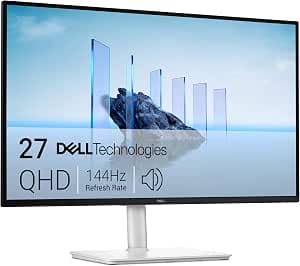
Dell 27 Plus QHD USB-C Monitor S2725DC, QHD IPS Panel, 144Hz, 1ms, FreeSync | Anti-Glare, 99% sRGB, 1500:1 Contrast, Dual 3W Speakers, USB-C 65W PD, Height-Adjustable, VESA 100x100
Beschreibung
Dell 27 Plus QHD USB-C Monitor - S2725DC. Elevate all your entertainment needs with this 27-inch QHD monitor. Featuring a 144Hz refresh rate, USB-C connectivity, built-in speakers, and TÜV 4-star certification for eye comfort.
Vor- und Nachteile vergleichen
Ähnliche Produkte im direkten Vergleich
Eine zufällige Auswahl analysierter Produkte aus derselben Kategorie. Unterschiedliche Produkte sind nicht zwangsläufig austauschbar.

WUAWE Portable Monitor 14" Kickstand Portable Monitor for Laptop, Ultra Slim Built-in 180° Adjustable Stand, Second Screen for Laptop, Desktop, Tablet, Phone, Xbox, PS4/PS5, GEEKOM.

Acer EK241Y Gbi 24in IPS FHD 1920 x 1080 120Hz 1ms Frameless Gaming Monitor with Freesync and Ergonomic Tilt 1 x HDMI & 1 x VGA (HDMI Cable Included)

AISHICHEN 11.26" Mini Monitor FHD 1920x440 Small Wide Monitor for PC Case, LCD Screen IPS Display with HDMI & Type-C for Raspberry Pi Laptop CPU GPU Temperature Aida64 Monitoring
Eine Sache weniger zu suchen
Vor dem Kauf: kurze Fragen
Will the USB-C port with 65W Power Delivery charge my laptop while I am gaming or editing videos?
It depends on your laptop’s power demands. If you are using a compact ultrabook (like a MacBook Air or Dell XPS 13) for office work, browsing, and light media, 65W is more than enough to keep it topped up. However, if you are pushing a high-performance 16-inch laptop during intensive gaming or heavy rendering, the monitor may only slow down the battery drain rather than charge it fully. For max performance, we recommend plugging in your original high-wattage power adapter for heavy workloads.
I have an Nvidia graphics card. Will AMD FreeSync work with it, or am I out of luck?
You’re in luck. While this monitor supports AMD FreeSync natively, Nvidia GPUs are generally compatible via the "G-Sync Compatible" mode. You’ll need to ensure your Nvidia drivers are up to date and then enable "G-SYNC" in the Nvidia Control Panel. Most users report a smooth, tear-free experience when playing games between 60 and 144 FPS, though you may need to cap your frame rate slightly below the maximum refresh to avoid flickering in certain titles.
How is the build quality of the stand, and does it offer full ergonomic adjustments like swivel?
The stand is primarily metal with a plastic backing, which feels sturdy and looks professional. It offers a nice range of height adjustment (approximately 5.9 inches), tilt, and swivel. However, a few users on Reddit noted that the monitor can wobble a bit if you type aggressively or bump your desk when the arm is extended to its highest point. It’s a minor issue for most, but if you have a "wobbly" desk, you may want to invest in a heavy-duty monitor arm — the monitor is VESA 100x100 compatible.
Is this monitor good for gaming, or is it more for office productivity?
It’s an excellent hybrid, which is its main selling point. The 144Hz refresh rate and 1ms response time (in overdrive mode) make it incredibly responsive for esports titles like *Valorant*, *Apex Legends*, and *Call of Duty*. At the same time, the QHD resolution, anti-glare panel, and 99% sRGB color coverage make it fantastic for photo editing, spreadsheets, and watching movies. It’s one of the best "do-it-all" monitors in its price range. Just don't expect the deep black levels of an OLED or high-end VA panel for cinematic games in a pitch-black room.
I want a clutter-free desk using USB-C. Can I plug in only one cable and connect my monitor, mouse, and keyboard to my laptop?
Yes, but with one caveat regarding the integrated speakers. The monitor acts as a USB-C hub: plugging a single cable from your laptop gives you the video signal, charges the laptop, *and* connects to the monitor’s built-in USB-A ports for your mouse and keyboard. However, this monitor lacks a LAN port (Ethernet). If you need wired internet, you'll still need a separate adapter or dongle. The dual 3W speakers are built-in and will also route audio through the USB-C connection, though they are best suited for calls and light background audio rather than high-fidelity music listening.
Von einem ähnlichen Produkt mit mehr Bewertungen in dieser Kategorie: Acer EK241Y Gbi 24in IPS FHD 1920 x 1080 120Hz 1ms Frameless Gaming Monitor with Freesync and Ergonomic Tilt 1 x HDMI & 1 x VGA (HDMI Cable Included)
What is the screen size and resolution of this monitor?
The Acer EK241Y Gbi has a 23.8-inch IPS display with a 1920 x 1080 Full HD resolution and a 16:9 aspect ratio.
Does this monitor support AMD FreeSync?
Yes, the listing states it features AMD FreeSync, which syncs the monitor's frames with the graphics card's frames to eliminate screen tearing.
Is the picture quality good for gaming and everyday use?
Reviewers describe the IPS display as clear with good colours, and the 120Hz refresh rate as making everything feel smooth; one reviewer who games daily called it absolutely great, and another said it keeps up with their son's gaming and is very clear.
Is this monitor good value for the price?
Multiple reviewers called it great value, with one saying it was very reasonable in price and very high quality, and another describing it as a very good purchase for the price.
How adjustable is the stand, and can the monitor be wall-mounted?
The listing states the screen tilts from -5 to 20 degrees and is wall-mountable, though one reviewer was disappointed with the overall adjustability and found the on-screen controls frustrating.
Die Antworten beschränken sich auf das Angebot des Herstellers und die von uns analysierten Rezensionen. Fragen, die diese Quellen nicht abdecken, werden hier nicht beantwortet.
Transparent von Grund auf