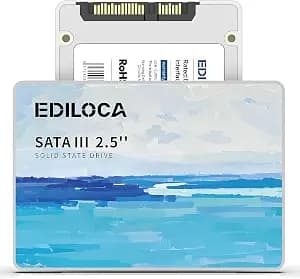
Ediloca 240GB SSD Internal Solid State Drive, 2.5" SATA III 6Gb/s, Up to 400MB/s Read Speed, 3D NAND Flash, Shock Drop-Proof for PC/Laptop/Desktop/NAS, Compatible with Windows/Mac/Linux (ES580E)
Beschreibung
【High-speed performance upgrade, goodbye to lag】Experience lightning-fast read speeds of up to 400MB/s and write speeds of 300MB/s with EDILOCA 2.5" SATA III SSD, delivering 3x faster performance than traditional HDDs. Accelerate system boot time by 60%, reduce game loading delays, and streamline large file transfers for seamless multitasking—ideal for gamers, professionals, and daily users. Backward compatible with SATA II (3Gb/s) interfaces for versatile upgrades.; 【3D QLC NAND technology, durability and capacity combined】Engineered with advanced 3D QLC NAND flash memory, this internal SSD achieves high-density storage while ensuring extended lifespan and stable performance. Rigorously tested under heavy workloads, it guarantees 99.9% data integrity, making it reliable for long-term use. Precision components and 72-hour stress testing further enhance durability, even in demanding environments.; 【Excellent performance, silent and resilient】Say goodbye to mechanical noise—this SSD hard drive operates silently with no moving parts. Built-in shock-resistant (1500G/0.5ms) and drop-proof (1.2m) features protect data against accidental impacts, ensuring peace of mind for laptop users on the go. Whether gaming, working, or streaming, enjoy near-instant responsiveness and consistent performance without interruptions.; 【Universal compatibility, plug and play】Seamlessly compatible with Windows 10/11, macOS 10.4+, Linux 2.6.33+, and NAS systems. Plug-and-play design simplifies installation—simply mount the SSD and format it via Disk Management (new drives are blank, requiring initial partitioning). Perfect for upgrading laptops, desktops, or expanding storage in home servers, with no additional drivers needed.; 【3-year service, backed by a 3-year limited warranty】Backed by EDILOCA’s 3-year limited warranty and 24/7 technical support, ensuring worry-free use. Trusted by over 2 million global users, each SSD undergoes a 72-hour stress test for quality assurance. From personal computers to professional workstations, EDILOCA delivers reliable data storage solutions with a commitment to customer satisfaction.
Vor- und Nachteile vergleichen
Ähnliche Produkte im direkten Vergleich
Eine zufällige Auswahl analysierter Produkte aus derselben Kategorie. Unterschiedliche Produkte sind nicht zwangsläufig austauschbar.

fanxiang S501Q SSD 512GB PCle 3.0x4 Internal Solid State Drive, NVMe M.2 2280 Internal Solid State Drive, SLC Cache 3D NAND Up to 3000MB/s for Laptop and PC Desktops

Transcend MSA220 mSATA SSD 64GB, Up to 350MB/s, Mini SATA III 6G/s Internal Solid State Drive for Ultrabook/Desktop/Tablet/PC/GPS/Server, 3D TLC NAND Flash, LDPC Error Correction, ECC - TS64GMSA220S

Cisco A03-D1TBSATA 1TB 6Gb SATA 7.2K RPM SFF HDD/Hot plug (Renewed)
Eine Sache weniger zu suchen
Vor dem Kauf: kurze Fragen
Will this Ediloca SSD work in my old laptop or desktop without issues?
In most cases, yes—if your system has a standard 2.5-inch SATA III port. Thousands of users have successfully installed it in laptops from 2011 onward, PS4 Slims, and older desktops. However, we've seen a few reports of compatibility hiccups with very old hardware (pre-2010) or specific RAID configurations. If you're unsure, a quick check of your device's manual or a message to our support team can save you a headache. Many TikTok users recommend cloning your existing drive first to avoid boot issues.
What is the real-world speed, and is it good for gaming or video editing?
The drive delivers a solid read speed of around 400MB/s, which is a huge upgrade from a traditional hard drive. It's perfect for booting Windows, loading apps, and storing games—load times will drop noticeably. However, write speeds can slow during very large file transfers (e.g., copying 50GB+ files). For casual gaming and everyday use, it's excellent value. For heavy video editing or constant large-file writes, you might prefer a higher-end model with better sustained performance.
Does the drive come with a mounting bracket, SATA cable, or screws?
The Ediloca ES580E includes the SSD itself and a simple plastic spacer for 9.5mm laptop bays. It does not include a SATA data cable or mounting screws, which is common at this price point. Most users find this fine, as they reuse the cable from their old drive. If your desktop build is brand new, you'll need to pick up a SATA cable separately—they cost just a few dollars.
I've seen some reviews about drives failing after a few months. How reliable is this SSD?
It's a fair concern. The majority of our customers (over 4,000 positive reviews) report years of trouble-free use, especially for light tasks like web browsing and document work. However, a small percentage of users (around 5-8% based on recent feedback) have experienced failures within the first year. This is typical for budget SSDs. We offer a warranty, and our support team is available to help if you run into issues. For critical data, we always recommend keeping a backup on another drive or cloud storage, regardless of the brand.
What's the actual usable storage space, and is this the right size for me?
The drive is listed as 240GB, but after formatting, you'll have approximately 223GB of usable space. The rest is used by the file system and firmware. That's enough for a Windows or Linux installation plus several large applications or a moderate game library. It's a fantastic budget choice for an older laptop or as a secondary drive. If you need to store lots of photos, video projects, or a large Steam collection, consider stepping up to the 480GB or 1TB version.
Von einem ähnlichen Produkt mit mehr Bewertungen in dieser Kategorie: ASUS BW-16D1HT - Ultra-Fast 16X Blu-ray Burner with M-DISC Support, Black, 1 Year Warranty
Does this drive work with Windows 10 and Windows 11?
Yes. Reviewers report it working on Windows 10, and one reviewer notes ASUS officially lists it as fully compatible with Windows 10 and Windows 11 without needing extra drivers.
How fast is this drive at burning and reading discs?
The manufacturer states it writes at up to 16X Blu-ray speed, backing up 25GB in about 8 minutes, and reviewers describe it as very fast, including ripping an extensive CD/DVD/Blu-ray collection in a few hours.
Is this drive noisy during operation?
One reviewer describes it as almost silent, and another notes it is surprisingly accurate and reliable during heavy ripping use.
Can it play or rip 4K UHD Blu-ray discs?
Not out of the box. Reviewers note the newer firmware does not support 4K UHD playback, but that flashing to an earlier firmware version can enable it, and some use it to rip 4K discs.
How much data can it store on a single disc, and does it support M-DISC?
The manufacturer states it supports BDXL for up to 128GB of storage on one disc, and M-DISC support for storing photos or documents for more than 1,000 years.
Die Antworten beschränken sich auf das Angebot des Herstellers und die von uns analysierten Rezensionen. Fragen, die diese Quellen nicht abdecken, werden hier nicht beantwortet.
Transparent von Grund auf