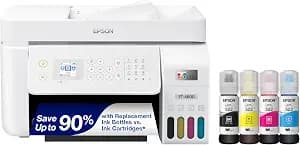
Epson EcoTank ET-4800 Wireless All-in-One Cartridge-Free Supertank Printer with Scanner, Copier, Fax, ADF and Ethernet – Ideal-for Your Home Office, White
Beschreibung
Your home office needs a printer that’s fast, affordable, and easy to use. That’s why we developed the EcoTank ET-4800 – an innovative cartridge-free solution that uses high-capacity, easily refillable ink tanks. So you’ll worry less about running out of ink, and save a lot on replacement ink (1). The ET-4800 features genuine Epson print quality, an auto document feeder, fax, a high-resolution flatbed scanner, and convenient color display – making it the perfect basic home office printer. Epson strongly recommends the use of genuine ink to ensure optimal print quality and performance. Use of non-genuine ink could cause damage not covered under the printer’s ltd. wnty. | 1. Actual savings and costs will vary considerably based on print tasks, print volumes and usage conditions. Savings and cost per ISO page are based on the cost of replacement ink bottles and the cost of enough standard cartridges to achieve the total page yields of the bottles using the MSRP (USD) and yields for Epson standard-capacity ink cartridges for similarly featured Epson consumer inkjet printers as of March 2024. | 2. Individual cartridges estimate based on print yields of an included or replacement set of black and color ink bottles as compared to Epson standard-capacity ink cartridges for similarly featured printers as of March 2024. | 3. Part of the ink from the included bottles is used for initial setup; yields are lower than those of replacement ink bottles. Replacement and included ink bottle yields based on the ISO/IEC 24712 pattern with Epson’s methodology. Actual ink yields will vary considerably for reasons including images printed, print settings, temperature and humidity. Yields may be lower when printing infrequently or predominantly with one ink color. All ink colors are used for printing and printer maintenance, and all colors must be available for printing. For more information, visit www.epson.com/inkinfo | 4. Based on average monthly document print volumes of about 125 pages. | 5. See www.epson.com/voice for device compatibility. Epson Connect account and voice-activated account registration required. | 6. Most features require an Internet connection to the printer, as well as an Internet- and/or email-enabled device. For a list of Epson Connect enabled printers and compatible devices and apps, visit www.epson.com/connect | 7. Requires Epson Smart Panel app download. Data usage fees may apply.
Vor- und Nachteile vergleichen
Ähnliche Produkte im direkten Vergleich
Eine zufällige Auswahl analysierter Produkte aus derselben Kategorie. Unterschiedliche Produkte sind nicht zwangsläufig austauschbar.

Epson EcoTank ET-3850 Wireless Color All-in-One Supertank Printer

Epson EcoTank ET-3950 Wireless All-in-One Color Supertank Printer with up to 3 Years of Ink Refillable Tanks, Perfect for Home Office, 18 PPM, 2.4" Colorful Touchscreen, Auto Document Feeder - White

Epson EcoTank ET-2800 Wireless Color All-in-One Cartridge-Free Supertank with Scan and Copy, The Ideal Basic Home Printer - White
Eine Sache weniger zu suchen
Vor dem Kauf: kurze Fragen
Does the ET-4800 print double-sided automatically?
No, it does not have an automatic duplexing function. To print on both sides of the page, you will need to manually reinsert the paper after the first side prints. This is a common point of feedback from users who print lengthy documents, so if automatic two-sided printing is essential for your workflow, you may want to consider a different model.
Is the setup as difficult as some online reviews say?
The initial setup can be meticulous, particularly the Wi-Fi configuration and ink tank priming. While many users get it working smoothly, it's a frequent topic in tech forums. For the most reliable connection, using the Ethernet port is highly recommended. Taking your time with the instructions and ensuring you use the Epson app for guidance will help significantly.
I only print occasionally. Will the printheads clog?
Inkjet printers, including EcoTanks, can be prone to clogging if unused for extended periods. Many social media users who print infrequently (less than once a week) have mentioned this. To maintain it, Epson recommends printing a few pages in color and black & white at least once a week. If you print very rarely, a basic laser printer might be a more maintenance-free option.
How good is the value for money, really?
The value is exceptional for high-volume printers. The included ink bottles can last for years, slashing your cost per page to pennies. The trade-off is the higher upfront cost. Users on platforms like TikTok who print hundreds of pages monthly are its biggest fans, often stating it "pays for itself" compared to cartridge models. For light users, the upfront cost may be harder to justify.
Who is this printer best suited for?
It's ideal for home offices, students, or families with substantial printing needs who prioritize low long-term ink costs and good print quality. It's less ideal for users who require fully automatic duplexing, demand the most robust build quality, or want a completely plug-and-play wireless experience. The scanner/copier with ADF is a great bonus for digitizing documents.
Von einem ähnlichen Produkt mit mehr Bewertungen in dieser Kategorie: HP Envy 6555e Wireless All-in-One Color Inkjet Printer, Portobello, Print, scan, Copy, Duplex Printing Best-for-Home, 3 Month Instant Ink Trial Included, AI-Enabled (714N5A)
How easy is it to set up this printer?
Most customer reviews describe setup as easy, with one reviewer calling it the easiest setup they've ever done, though another reviewer reported setup was a nightmare that took hours. One reviewer needed a YouTube video to find the correct steps to connect to Wi-Fi.
Does this printer support automatic two-sided printing?
Yes. The manufacturer's listing states it has auto 2-sided printing, and customer reviews confirm it prints automatically on both sides and handles double-sided documents without difficulty.
Can I print from my phone?
Yes. The listing states it offers wireless and mobile printing and works with the HP app for printing, scanning, copying, or faxing from a smartphone, PC, or tablet. One reviewer said the phone app was very easy to use and they liked being able to print from their phone.
What is included with the Instant Ink trial?
The listing states it includes 3 months of Instant Ink with HP+ activation, after which a monthly fee applies unless cancelled.
What are the print speeds?
The listing states print speeds up to 7 ppm color and 10 ppm black.
Die Antworten beschränken sich auf das Angebot des Herstellers und die von uns analysierten Rezensionen. Fragen, die diese Quellen nicht abdecken, werden hier nicht beantwortet.
Transparent von Grund auf