
GeeekPi 7-Inch Screen for Raspberry Pi, 1024x600 IPS LCD Display, HDMI Portable Monitor for Pi 5/4B/3B+/3B, Win11/10/8/7, Free-Driver
Beschreibung
The GeeekPi 7-inch monitor holds an average rating of 4.3 stars, though the feedback shows significant polarization between highly positive and strongly negative experiences. While some reviews are aligned with their ratings, the analysis indicates that the topics and sentiment distribution are poorly balanced, limiting the representativeness of the overall score. The lack of detailed, practical insights and uneven rating distribution suggest the feedback may not fully capture typical user experiences. As a result, buyer sentiment appears moderately favorable, but the overall reliability of the review data is questionable.
Vor- und Nachteile vergleichen
Ähnliche Produkte im direkten Vergleich
Eine zufällige Auswahl analysierter Produkte aus derselben Kategorie. Unterschiedliche Produkte sind nicht zwangsläufig austauschbar.

8.8 Inch Mini Touchscreen Stretched Bar Monitor 1920 * 480, Metal Shell IPS Portable Touch Display, HDMI, USB-C, Small Screen for Raspberry Pi Laptop Aida64 GPU CPU RAM Monitoring PC Case

SAMSUNG 34' Odyssey G5 Ultra-Wide Gaming Monitor with 1000R Curved Screen, 165Hz, 1ms, FreeSync Premium, Large Display, Eye Comfort, Multiple Ports, WQHD, LC34G55TWWNXZA, Black
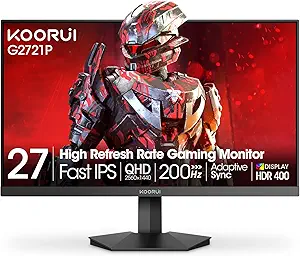
KOORUI 27" Gaming Monitor, 200Hz 1ms Fast IPS, WQHD (2560 x 1440p) HDR 400 Display, DCI-P3 95% Color Gamut, FreeSync Premium, Adaptive G-Sync, HDMI x 2, DisplayPort, G2721P
Eine Sache weniger zu suchen
Vor dem Kauf: kurze Fragen
Will this monitor work immediately with my Raspberry Pi 5, or do I need extra components?
It will connect out of the box via HDMI, but many users on Reddit and YouTube note that the Raspberry Pi's USB ports may not provide enough power to run both the board and the screen reliably. To avoid flickering or a blank display, we recommend using a dedicated 5V/3A power supply for the monitor, especially with Pi 4 or Pi 5 models. Some hobbyists also suggest a short, right-angle HDMI cable for cleaner builds. ---
Is this a touchscreen display?
No, this specific GeeekPi model is display-only. Several buyers have mentioned confusion about this because the product images and title can suggest interactivity. If you're planning a project that requires touch input—like an interactive dashboard or a tablet-style control panel—you'd be better off looking at dedicated touchscreen displays, such as the official Raspberry Pi 7” touchscreen. ---
How is the build quality and durability for long-term projects?
For the price, most users are satisfied with the plastic casing and overall sturdiness. It holds up well in retro console builds or embedded projects where it's mounted securely. However, a few reviewers mention that the included HDMI cable feels flimsy and short, and the built-in speakers are weak. If you're planning to move the monitor around frequently or mount it in a portable rig, you may want to invest in a better cable and use external speakers or headphones. ---
I want to use this as a secondary monitor for my Windows laptop. Will I need to install drivers?
No drivers are needed. It works as a standard HDMI or VGA monitor with Windows 7 and newer versions. You can plug it in and it will be detected as a second display. Just keep in mind that the 1024x600 resolution is on the lower side—ideal for reading code, simple documents, or dashboards, but not great for watching high-definition video or heavy multitasking. A few TikTok reviewers recommend increasing the text zoom in Windows settings for a more comfortable experience. ---
What's the return or refund situation if the screen arrives damaged or gets worse over time?
GeeekPi generally provides a 30-day return window and a standard 12-month warranty for defective units. If your monitor arrives with dead pixels, flickering, or a broken connector, it's recommended to contact the seller (especially if buying through Amazon) within the first week to speed up the process. To make a claim smoother, take a short video of the issue right away. Many community members advise testing the screen with both HDMI and VGA inputs during the return period to ensure all ports work properly.
Von einem ähnlichen Produkt mit mehr Bewertungen in dieser Kategorie: KOORUI 24 Inch Gaming Monitor, 180Hz 1080P VA Display with 3000:1 Contrast
Does this monitor really run at 180Hz, and what do I need to enable it?
Yes — it's a native 180Hz panel, but you'll need to switch it on manually. Connect via the included HDMI cable (or a DisplayPort-capable setup), then set 180Hz in your GPU's display settings; it defaults to a lower refresh rate out of the box. Many Reddit and YouTube users note that enabling Adaptive Sync/FreeSync alongside it gives the smoothest experience, and it works with both AMD and NVIDIA cards.
How does the VA panel perform for gaming and everyday work?
The 3000:1 contrast gives noticeably deeper blacks than typical IPS budget monitors, which shines in dark game scenes and movies. For fast-paced competitive shooters, some TikTok and Reddit users mention mild ghosting/smearing in dark transitions — it's great for casual gaming, students, and office work, but color-critical creators or hardcore FPS players may prefer an IPS panel.
The stand looks basic — can I adjust the height or mount it?
Correct, the included stand only tilts (-5° to 20°) and doesn't offer height, swivel, or pivot adjustment, and a few users find the base slightly wobbly. The good news: it's VESA 100×100mm compatible, so a monitor arm or desk mount solves ergonomics entirely — a popular fix among dual-monitor and dorm-room setups.
What if I receive a unit with a dead pixel or backlight bleed?
Budget monitors can vary unit to unit, and some buyers report stuck pixels or corner bleed — but KOORUI backs it with a 3-year manufacturer warranty. If your unit arrives defective, contact the seller for a replacement or refund promptly; most users who did so report a smooth resolution, so inspect the screen within the return window.
Is it good value, and who is it best suited for?
At around $120, it's widely praised as one of the best budget 180Hz options — ideal for students, casual gamers, home-office users, and compact or dual-monitor setups. Just set expectations: no built-in speakers, a single HDMI plus VGA, and basic ergonomics. If you need height adjustment, color accuracy, or built-in audio, consider spending more on an IPS alternative.
Die Antworten beschränken sich auf das Angebot des Herstellers und die von uns analysierten Rezensionen. Fragen, die diese Quellen nicht abdecken, werden hier nicht beantwortet.
Transparent von Grund auf