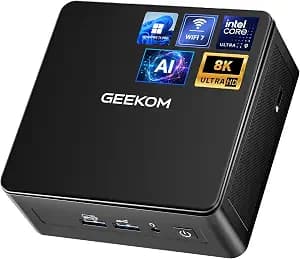
GEEKOM IT15, The Most Powerful AI Mini PC with Intel Ultra 9 285H(15th Gen) 99 Tops | 32GB DDR5, 1TB SSD | Arc 140T GPU | WiFi 7, 8K Quad Display, Win11 Pro, Video Editing, Coding, and Multitasking
Beschreibung
[𝙑𝙤𝙡𝙪𝙢𝙚 𝙥𝙧𝙞𝙘𝙞𝙣𝙜 𝙖𝙫𝙖𝙞𝙡𝙖𝙗𝙡𝙚, 𝙧𝙚𝙦𝙪𝙚𝙨𝙩 𝙮𝙤𝙪𝙧 𝙦𝙪𝙤𝙩𝙚] GEEKOM IT15 with Intel Core Ultra 9 285H (16 cores, up to 5.4 GHz) delivers powerful performance for multi-display business deployments. Ideal for finance enterprises, retail digital signage, conference rooms, medical reception kiosks, government terminals, and enterprise front desks. Supports quad 8K/4K displays via dual HDMI and dual USB4, idea for data visualization. 2.5GbE LAN, Wi-Fi 7, efficient cooling, and upgradeable to 64GB RAM. Backed by a 3-Year Support.; [GEEKOM IT15 For Video Editing, Coding & AI Tasks] Need to edit 4K/8K video, compile code, or run AI models? The GEEKOM IT15 ai mini computer is built for you. Powered by Intel Ultra 9 285H with 99 TOPS AI performance (13 TOPS NPU + 77 TOPS Arc GPU + 9 TOPS CPU), it generates 4K concept art in just 8.3 seconds. Optimized for Adobe, Blender, Unreal Engine, and 3,500+ plugins – this is your portable AI workstation; [Reliable Business Performance for Office, Education & Warehouse Data Processing] From running complex spreadsheets and video conferencing to handling warehouse data processing and educational software, the geekom it15 285h delivers. With 32GB DDR5 RAM (upgradeable to 128GB) and a 1TB NVMe Gen 4 SSD (75% faster than Gen 3), multitasking across dozens of applications is effortless. Also supports Linux and Ubuntu; [Arc 140T Graphics Ready for Casual Gaming & Streaming] Yes, you can game on this gaming mini PC. The Intel Arc 140T GPU runs popular titles like League of Legends, Fortnite, and CS:GO smoothly, plus many mid-tier AAA games. Stream 8K content via WiFi 7 (3D beamforming antennas) or 2.5Gbps Ethernet – lag-free remote editing and real-time cloud collaboration included; [Support 8K Quad Display Setups & eGPU Expansion] Run up to four displays simultaneously (two 8K + two 4K) via dual HDMI (4K@120Hz) and two USB4 Type-C ports (40Gbps with PD 4.0). Connect external GPUs, high-speed drives, and accessories. Perfect for traders, programmers, and content creators who need a command center on their desk; [Ultra-Fast WiFi 7 & Bluetooth 5.4, Enterprise-Grade Connectivity] Next-gen WiFi 7 with 3D beamforming antennas, Bluetooth 5.4, and 2.5Gbps Ethernet. Stay connected even in crowded environments – ideal for 8K video conferencing, real-time cloud collaboration, and lag-free remote editing; [Built for 24/7 Operation – Silent, Durable & Backed by 3-Year Warranty] Unlike plastic-clad mini PCs, the IT15 features a PC+ABS metal frame rated for 441 lbs(200kg) pressure protecting against drops and impacts. Advanced cooling keeps it quiet (<35dB) even under heavy loads. Multi-certified (FCC, UL, ENERGY STAR, CE, RoHS) and backed by a 3-year warranty because we build mini PCs to last
Vor- und Nachteile vergleichen
Ähnliche Produkte im direkten Vergleich
Eine zufällige Auswahl analysierter Produkte aus derselben Kategorie. Unterschiedliche Produkte sind nicht zwangsläufig austauschbar.

BOSGAME Gaming PC Radeon 780M 2400Mhz, Mini PC Ryzen 9 7940HS Mini Computers, 32B DDR5+1TB PCIe 4.0 SSD, Built-in Dual Speakers, USB4 *2, WiFi 6/BT 5.2, Dual 2.5GbE LAN

GEEKOM AX8 Pro Mini PC,AMD Ryzen R7-8745HS (8C/16T,up to 4.9GHz) Mini Computers, 32GB DDR5 5600Mhz RAM& 512GB PCIe Gen 4 SSD, Mini Desktop Windows 11 Pro, AMD Radeon 780M /WiFi 6E/BT5.2/2.5G LAN

Beelink SER5 Mini PC,AMD Ryzen 5 5500U(up to 4.0 GHz,6C/12T),Mini Computer with 16GB DDR4/500GB M.2 PCle4.0 SSD,Support Triple Screen Display,WiFi6,BT5.4,Type-C,2.5Gbps LAN
Eine Sache weniger zu suchen
Vor dem Kauf: kurze Fragen
I’ve seen some reviews mention random shutdowns. Is this a widespread issue, or is it just a bad batch?
We understand that stability is non-negotiable, especially for work. While the vast majority of our users report rock-solid performance for daily multitasking and heavy productivity, we have seen a small number of reports regarding unexpected power-offs. We take these reports very seriously. If you experience this, our technical support team is ready to assist with diagnostics or a replacement, as this is not considered standard behavior for the unit. We are committed to ensuring your system runs reliably.
I’m a video editor. Can the Intel Ultra 9 285H and Arc 140T GPU really handle 4K editing, or will it stutter?
Absolutely. For editing, this is a powerhouse. The Arc 140T GPU includes dedicated hardware encoders that make a huge difference in Premiere Pro and DaVinci Resolve. You can scrub through 4K timelines smoothly and export videos significantly faster than on older laptops. Many users on YouTube have highlighted its performance for exactly this use case. Just keep in mind that for complex 8K timelines or heavy motion graphics, you might want to use proxy workflows, just as you would on any laptop.
How does this compare to a Mac Mini M4 or a gaming laptop in the same price range?
It depends on your software ecosystem. If you rely on Windows-only applications, specific coding tools, or DirectX gaming, the GEEKOM IT15 is a more versatile choice than the Mac Mini. Compared to a gaming laptop, you lose the built-in screen and battery, but you gain a much smaller footprint, quieter operation, and similar CPU performance for a lower price. It’s the ideal middle ground for those who want desktop power without the tower.
Can I upgrade the RAM and SSD later, or is everything soldered to the motherboard?
We’ve designed the IT15 with future-proofing in mind. The two SODIMM slots are upgradeable up to 64GB of DDR5 RAM, and the M.2 SSD slot is accessible for easy replacement or adding a second drive. You won’t need to send it back to us for an upgrade; a simple screwdriver is all you need to boost your storage or memory down the line.
Is the fan noisy during normal office work, like browsing or using spreadsheets?
For standard office tasks, the IT15 is whisper-quiet. The cooling system is designed to keep the fan off or at a very low RPM during light loads, making it perfect for a quiet office or living room environment. The fan will only become audible when you’re pushing the CPU or GPU hard—like during a 4K export or gaming session—which is expected for a machine this powerful in such a compact chassis.
Von einem ähnlichen Produkt mit mehr Bewertungen in dieser Kategorie: GMKtec M5S Mini PC AMD Ryzen 5400U 16GB DDR4 (Upgradable RAM) 256GB SSD
Is the Ryzen 3 5400U actually powerful enough for everyday work, or will I regret not buying something faster?
For office apps, web browsing, video calls, streaming, and light photo editing, the 5400U is genuinely capable — its 4 cores/8 threads boost to 4.0GHz and handle multitasking smoothly. Where it falls short is heavy gaming and serious video editing, and that's the honest caveat many Reddit and YouTube reviewers raise. If your day looks like spreadsheets, browser tabs, and Netflix, you'll be happy; if you're chasing AAA games, look at the M6 Ultra instead.
The 256GB SSD seems small — can I upgrade it, and is it easy?
Yes, and it's one of the M5S's best features. You get two M.2 2280 PCIe 3.0 slots (up to 8TB each) plus dual SO-DIMM slots for up to 64GB RAM, so upgrading is straightforward with a screwdriver. That said, plenty of TikTok and forum users admit 256GB fills up fast once Windows and updates settle in — budgeting for a second SSD from day one is a smart move, and the spare slot means you don't have to clone your drive.
I keep seeing "dual 2.5G LAN" mentioned — who actually needs that, and is the WiFi good enough on its own?
The dual Realtek 2.5Gbps ports are the M5S's secret weapon for homelab fans running NAS, pfSense/OPNsense, or home servers — it's why this model gets recommended so often in self-hosting communities. WiFi 6E and Bluetooth 5.2 are solid for normal use, though some users note internal antennas give weaker range than a laptop, so if your router is far away, the wired ports are your friend.
Can it drive multiple monitors, and does it come ready to use with Windows installed?
Absolutely — you get HDMI 2.0 (4K@60Hz), DisplayPort (up to 8K@60Hz), and USB-C (PD/DP/Data) for triple-display setups, a setup office users consistently praise for productivity. It ships with Windows 11 pre-installed and activated, and it also runs Ubuntu/Linux well if that's your preference. Just note the USB-C port handles display and data, not charging — the included 19V adapter powers the unit.
What if the fan noise or performance isn't what I expected — is it a safe buy?
It's a low-risk purchase for the right user. The fan is near-silent at idle and only becomes noticeable under sustained load, which most reviewers call acceptable rather than annoying, and the standard return window covers you if it's not to your taste. The main "regret" pattern online comes from gamers expecting more than the Radeon iGPU can give — so if you're a casual gamer, student, office worker, or homelab tinkerer, this is excellent value; if you need serious GPU horsepower, size up to the M6 Ultra.
Die Antworten beschränken sich auf das Angebot des Herstellers und die von uns analysierten Rezensionen. Fragen, die diese Quellen nicht abdecken, werden hier nicht beantwortet.
Transparent von Grund auf