Was Kunden gut finden
Fast, compact, great value
Reviewers repeatedly praise the strong performance in a tiny footprint, with fast boots and smooth everyday use, and many call it excellent value for the price.
Die 30-Sekunden-Lektüre
Was Kunden gut finden
Reviewers repeatedly praise the strong performance in a tiny footprint, with fast boots and smooth everyday use, and many call it excellent value for the price.
Der wichtigste Vorbehalt
One reviewer reported a persistent whistling and buzzing noise that made the unit unusable, so noise may be a risk for some buyers.
Bevor Sie sich entscheiden
Reviews cover several different GMKtec models and configurations, so confirm the exact model, RAM/SSD size, and port layout you need before buying.
Von einem ähnlichen Produkt mit mehr Bewertungen in dieser Kategorie: KAMRUI P1 Mini PC W-11 pro, AMD Ryzen 7330U Mini Computer (Βeats 3550H/R3 5300U,Max 4.3GHz,4C/8T), 16GB RAM 256GB M.2 SSD, Triple 4K Display, WiFi/BT/for Business Home Office Mini PC
Was Kunden gut finden
Reviewers repeatedly praise the small form factor, quick performance, and simple setup, with several noting it handles everyday work and even Linux well.
Der wichtigste Vorbehalt
One reviewer reports weak wireless due to a tiny antenna, and another says the unit did not include a valid Windows 11 Pro license despite being advertised with it.
Bevor Sie sich entscheiden
Some reviews mention limited storage that may need upgrading and setup complications with Bluetooth keyboards or mice, so confirm your needs before buying.
Erst dein Anwendungsfall
8 von 34 Erwähnungen beschreiben eine negative Erfahrung (24 %).
1 von 30 Erwähnungen beschreiben eine negative Erfahrung (3 %).
2 von 16 Erwähnungen beschreiben eine negative Erfahrung (13 %).
3 von 11 Erwähnungen beschreiben eine negative Erfahrung (27 %).
1 von 8 Erwähnungen beschreiben eine negative Erfahrung (13 %).
1 von 7 Erwähnungen beschreiben eine negative Erfahrung (14 %).
1 von 6 Erwähnungen beschreiben eine negative Erfahrung (17 %).
4 von 6 Erwähnungen beschreiben eine negative Erfahrung (67 %).
Eine Rezension kann mehrere Themen ansprechen. Die Prozentsätze beziehen sich auf die von uns analysierten Rezensionen, nicht auf alle Käufer oder die allgemeine Ausfallrate des Produkts.
Von einem ähnlichen Produkt mit mehr Bewertungen in dieser Kategorie: KAMRUI P1 Mini PC W-11 pro, AMD Ryzen 7330U Mini Computer (Βeats 3550H/R3 5300U,Max 4.3GHz,4C/8T), 16GB RAM 256GB M.2 SSD, Triple 4K Display, WiFi/BT/for Business Home Office Mini PC
23 von 118 Erwähnungen beschreiben eine negative Erfahrung (19 %).
4 von 41 Erwähnungen beschreiben eine negative Erfahrung (10 %).
1 von 26 Erwähnungen beschreiben eine negative Erfahrung (4 %).
0 von 21 Erwähnungen beschreiben eine negative Erfahrung (0 %).
0 von 20 Erwähnungen beschreiben eine negative Erfahrung (0 %).
1 von 15 Erwähnungen beschreiben eine negative Erfahrung (7 %).
1 von 10 Erwähnungen beschreiben eine negative Erfahrung (10 %).
3 von 8 Erwähnungen beschreiben eine negative Erfahrung (38 %).
Vor- und Nachteile vergleichen
Eine zufällige Auswahl analysierter Produkte aus derselben Kategorie. Unterschiedliche Produkte sind nicht zwangsläufig austauschbar.
Belege prüfen
Einbezogen bedeutet nicht als authentisch bestätigt. Markiert bedeutet nicht als Fälschung nachgewiesen. Dies sind analytische Einordnungen.
3 veranschaulichende Auszüge werden angezeigt, nicht der gesamte Rezensionsbestand.
Works Flawlessly with Kodi
“I am very pleased with this tiny powerhouse. I have purchased a ton of mini pc for 2 main reasons and this has stomped the competition in regards to performance and stability. My main purpose was to setup a Debian minimal standalone kodi box to run as a Kodi media center. And this performs beautifully no lag whatsoever. So if your looking for a solid performance mini pc look no further I only have one con and as a dedicated media center it does not have onboard HDMI-CEC CONTROL. However I knew that before my purchase so no fault of manufacture so I’m using usb flirt adapter so I can scroll media and navigate with my tv remote. I’m running debian 12.04 minimal setup without a desktop environment I have it setup from power on to Kodi screen and this is exreamly fast from bios post to Kodi. It’s faster than an actual android Kodi box. Now with all that said GMKTEK kudos for this baby power house. I can not speak for windows performance and stability because I don’t use windows. I would definitely recommend for a Linux box hands down. Boot live Linux and wipe windows partitions and format drive to ext4 Boot Debian 12.04 Bookworm minimal install main system when tasksel loads uncheck gnome and desktop environment after reboot Switch to root by issuing su - not su root. Then give your user sudo rights. By installing sudo from repository by issuing apt update then apt install sudo. Now that sudo is installed. You can add your user to sudo group by issuing usermod -aG sudo kodi now kodi is my user I created during install so if your user is not Kodi change accordingly. Next we install some basic software needed to run Kodi. From this point you can switch back to your user in my case by issuing su Kodi. Now to install the final software. sudo apt install xorg-xserver xinit dbus kodi kodi-repository-kodi -y. Wait for packages to install. Once installed we need one more command to give us the ability to use mouse and keyboard in our Kodi environment. So issue sudo usermod -aG input kodi. Remember if your user is not kodi change kodi to your user. At this point Kodi is ready to load so simply issue kodi and kodi will start. If you want kodi to auto start on boot there is a bit more work but it is quite easy to setup. There are many ways of doing this some more complex then others due to security but if your not worried about security and just want simple then it’s as easy as setting up a crontab -e and adding @reboot kodi-standalone however if you want full use of reboot or shutdown from Kodi you need to auto boot with root instead of your user. Again easy to accomplish by editing getty@.service google for how to do that it involves changing one line of code and once your happy with your setup make sure to create a backup or full image I recommend rdrive image paid version or free rescuezill gui version of clonezilla. Enjoy”
Erkannte Signale: Konkretes Detail: process, scenario, comparison · Erwähnt: performance, setup · Liest sich wie eine authentische Stimme
Good value on sale and a better purchase than Raspberry Pi 5
“I'm using this mini PC to drive a projector in my living room and it's incredible what it's capable of; it's replacing (and far superior to) a 65-watt AMD Kaveri-based APU system that's pretty old now and really showing its age. I've read that in CPU terms the cores in this mini PC are very similar to the E-cores in Intel's modern high-end CPUs and that matches my experience. Everyday PC tasks are accomplished effortlessly, classic games run perfectly, video playback is flawless, and web browsing is responsive. Not as nice as a high-end PC of course but for the $240 I paid, very good. 12GB of RAM is quite generous for everyday tasks; 16GB is what's expected for high-end gaming. This uses an N150 instead of a N100 as in older Intel mini PCs. If you're looking at buying this in early 2025 and intend to use it with Linux, be aware that driver support for this chip is still incomplete and video playback will suffer as a result. This will be fixed in time, but right now it's not worth the bother. I investigated AMD-based mini PCs but AMD still hasn't released any low-power APUs with modern video codec support. N100/N150 will effortlessly decode 4K60 AV1 while AMD will struggle as it lacks AV1 support. My unit arrived with a corrupt Windows install and I had to start from scratch. Windows by default doesn't include all the necessary drivers for wifi and other mystery devices in Device Manager, so make sure to download a copy from the manufacturer's website to have on-hand in case you need them in the future. It's very easy to install them all, you just double-click a batch file and it silently handles everything in a few minutes. The performance improvement from N100 to N150 is negligible, always less than 10%, often less than 5%. However this unit does include 12GB of DDR5 while older, cheaper N100 mini PCs commonly only have 8GB or use DDR4. The RAM is soldered, so it makes sense to get DDR5 since it does improve performance (more than the switch from N100 to N150 in fact). It also includes a DisplayPort video output instead of 3 HDMIs and this makes it a more flexible product than others. As with most mini PCs, this one runs virtually silent even when set to the high performance (15w) mode in BIOS. One other noteworthy advantage over some other mini PCs is that the wifi card appears to be upgradeable, which will extend its useful lifespan. A small downside is that it doesn't support the "2030" M.2 form factor, it looks like the much less common "2042" is used. I wish this model featured faster ethernet ports but they're only gigabit. If it had 2.5gb it would have more possible use-cases. As I said earlier, N100 to N150 is a tiny increase in performance, don't pay a premium for it. If you can get a good price, this mini PC does exactly what it should.”
Erkannte Signale: Konkretes Detail: comparison, entity, scenario, quantity · Erwähnt: performance, value for money · Liest sich wie eine authentische Stimme
Very capable mini PC, Good for any office work
“I bought the GMKtec G10 mainly as an everyday office and home machine, and after a few weeks of daily use I'm impressed by how much computer you get for this price. With 16GB RAM and 512GB SSD, it's at a very good price in this RAMpocalypse. This combination of hardware makes a real difference in day-to-day responsiveness. Windows boots in seconds (keep in mind that it comes with Win 11 Pro, not home, so extra features are unlocked), apps launch instantly, and there's none of the lag you'd expect from a machine this small and affordable. For the kind of work most people actually do: email, Word, Excel, big spreadsheets, PDFs, a browser with a dozen-plus tabs open, plus Teams or Zoom running in the background, it just handles it. The thing that genuinely surprised me is the multitasking headroom. I regularly have multiple HD video streams going at once. A YouTube video in one window, a webinar in another, and a video file playing on a second monitor, all while I'm typing in a document and flipping through browser tabs. The integrated graphics plays the video smoothly, no stutter, no fans screaming. Even the integrated speakers are, while not great, very usable. Connectivity is excellent for the size. I was very surprised to see 2.5GbE LAN port in a machine this small. The triple 4K display support via HDMI, DisplayPort, and USB-C let me run a multi-monitor setup without any docks or adapters. Plenty of USB ports up front and back, so peripherals were a non-issue. A few honest notes: this is a 15W mobile-class chip, so it's built for productivity and media rather than serious gaming or heavy video rendering. If you go in expecting an office and daily-driver machine, you'll be delighted; if you expect a gaming rig, that's the wrong tool. It runs cool and quiet under normal load, which I appreciate on a desk. Bottom line: for the price, this is one of the best value office mini PCs I've used. As a fan of mini PC's, this is not my first time buying from GMKTEC and they did not disappoint. Easy recommendation for a home office, small business, or anyone who wants a tidy, capable everyday desktop that fits under or behind their monitor.”
Erkannte Signale: Konkretes Detail: quantity, entity, process, scenario · Erwähnt: performance, value for money, setup · Liest sich wie eine authentische Stimme
Eine Sache weniger zu suchen
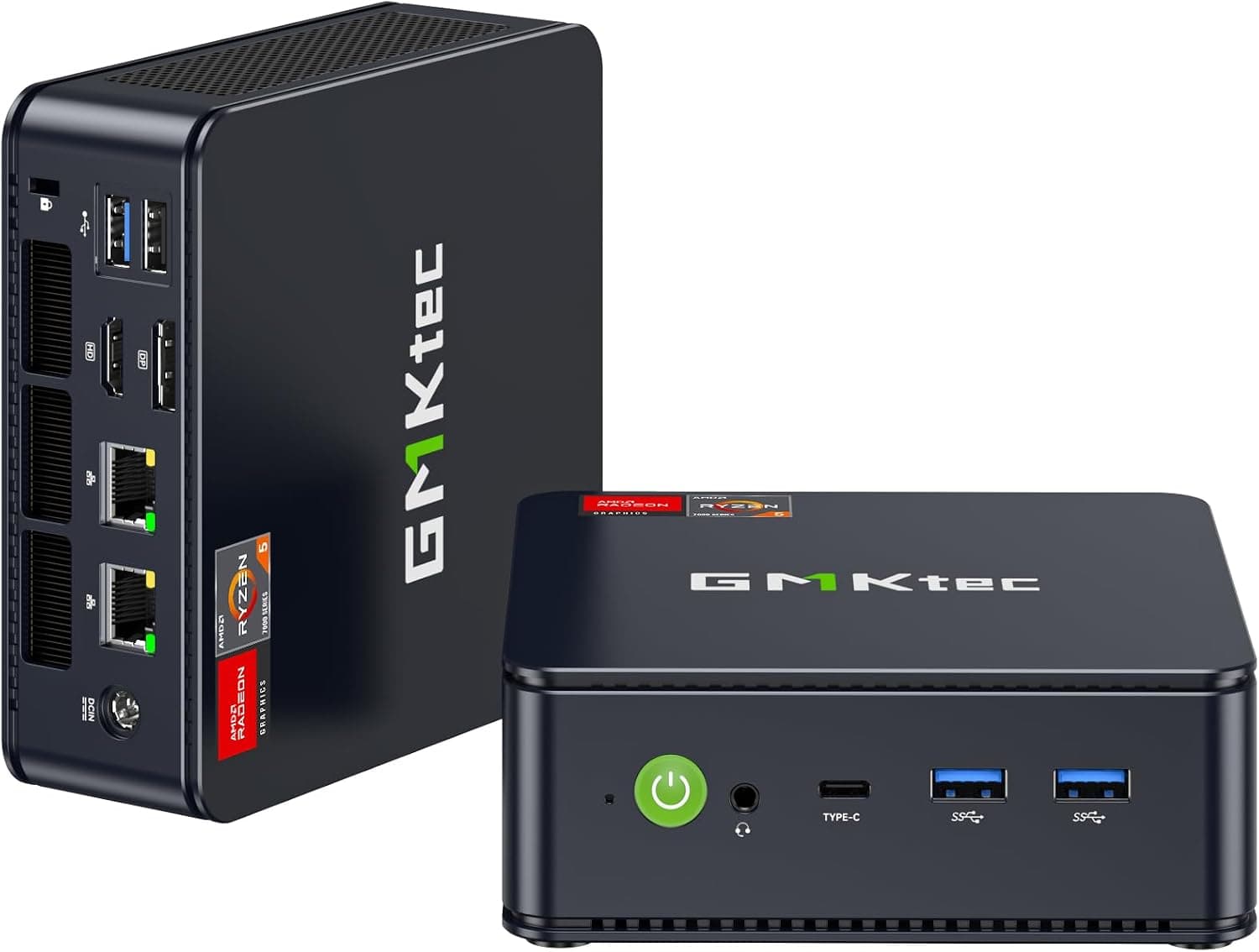
Yes. The manufacturer lists triple display output via HDMI 2.0 (4K@60Hz), DP (4K@144Hz), and Type-C (USB 4.0), and one reviewer noted they bought this model for its potential to run up to three monitors.
Reviewers describe it as very capable for office work and everyday use, with fast boot times and responsive day-to-day performance.
It ships with 16GB DDR5 (8GB*2) dual channel 4800MHz and a 1TB PCIe 3.0 M.2 2280 NVMe SSD. It supports expansion via dual SO-DIMM slots up to 128GB and dual M.2 SSD 2280 PCIe 3.0/4.0 slots with a max of 8TB per slot.
Yes. The listing specifies dual LAN 2500Mbps*2 RJ45 ports, and a reviewer also mentioned the two gigabit ports.
The listing states it uses dual air cooling fans, but one customer review reported a whistling and buzzing noise they found too noisy to tolerate.
Von einem ähnlichen Produkt mit mehr Bewertungen in dieser Kategorie: KAMRUI P1 Mini PC W-11 pro, AMD Ryzen 7330U Mini Computer (Βeats 3550H/R3 5300U,Max 4.3GHz,4C/8T), 16GB RAM 256GB M.2 SSD, Triple 4K Display, WiFi/BT/for Business Home Office Mini PC
The listing describes the operating system as OS(64bit), and one customer reported that the unit arrived with Windows 11 pre-installed, while another customer stated that no Microsoft license was included and that continued use required purchasing a valid license. The material does not consistently confirm that a Windows 11 Pro license is included.
Customers describe it as fitting in the palm of a hand, shorter than a mouse, and about the size of a breakfast English muffin, with one calling it very compact.
The listing states the P1 supports triple 4K@60Hz display via USB3.2 Gen2 Type-C, DP1.4, and HDMI2.0, and one customer reported connecting three 4K HDR monitors along with a mouse, keyboard, and speakers.
The listing says the P1 starts with 16GB DDR4 RAM (upgradable to 64GB, not included) and a 256GB M.2 SSD, and states storage is expandable to 4TB.
Customers report it is fast and easy to set up, with good performance for everyday tasks and cloud-based applications, and the listing cites an AMD Ryzen 7330U with boost clock up to 4.3 GHz for multitasking, 4K video playback, and light games.
Die Antworten beschränken sich auf das Angebot des Herstellers und die von uns analysierten Rezensionen. Fragen, die diese Quellen nicht abdecken, werden hier nicht beantwortet.
Transparent von Grund auf


