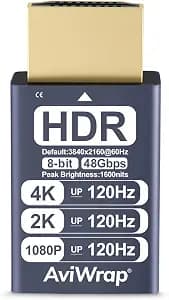
HDMI Dummy Plug 4K/120hz HDR,HDMI 2.1 Virtual Display Adapter | Headless EDID emulator,4K/2K/1080p@120Hz,activates GPU,for remote desktop/gaming/mining/VR,for Windows/Mac Mini/Linux
Beschreibung
New HDMI 2.1 + HDR Dual Excellence:Boasts a bandwidth of up to 48Gbps, supports Enhanced Audio Return Channeland Variable Refresh Rate. Enhanced with HDR,it delivers brighter,clearer visuals for superior remote control image quality.Supports up to 4K@120Hz and 23 customizable resolutions.Note:HDMI 2.1 port on the graphics card is required to achieve the 4K@120Hz refresh rate output.; Advantages:No need to purchase physical monitors, easily enabling headless HDMI setups for computer headless operation. It features low energy consumption and electrostatic protection, making it an ideal solution for server room operation, home remote devices, and GPU mining clusters, providing a low-cost, highly adaptable option; Convenience:With plug-and-play functionality, no drivers, software, or additional power supply is required, and it works seamlessly with hot-swapping. Low energy operation ensures no lag, perfectly suited for GPU mining, video rendering, HDMI display simulation, and other applications; Compatibility:Compatible with various HDMI output devices, including dedicated graphics cards, laptops, and mini-PCs. Supports Windows, Mac Mini OSX, and Linux operating systems. Whether it's Luna Display, multi-screen gaming, streaming, VR setup, or displayport dummy plug for mining servers, it provides stable compatibility; Premium Quality:Equipped with gold-plated connectors, ensuring stable signal transmission, and built with high-durability materials to maintain consistent performance over time, even in high-demand work environments
Vor- und Nachteile vergleichen
Ähnliche Produkte im direkten Vergleich
Eine zufällige Auswahl analysierter Produkte aus derselben Kategorie. Unterschiedliche Produkte sind nicht zwangsläufig austauschbar.

HDMI EDID Emulator 2K/4K HDR Dummy Plug, Headless Ghost Display Adapter, 2560×1440 60Hz Default, RGB UHD EDID for Remote Access, GPU Servers, KVM & 120Hz-Compatible Systems

Linsoul 3.5mm Plug 2 Pin Detachable OFC Braided Cable for KZ ZS10 Pro Earphones(with mic)
Eine Sache weniger zu suchen
Vor dem Kauf: kurze Fragen
Will this HDMI dummy plug actually give me 4K at 120Hz, or is that just a marketing claim?
Great question! The plug outputs a 4K/120Hz EDID signal to your GPU, so your graphics card “thinks” a true 120Hz display is attached. This allows Windows or macOS to render at that refresh rate. However, it doesn’t boost your GPU’s raw power—your HDMI cable, GPU, and the remote streaming app (like Parsec or Moonlight) must all support 4K/120Hz for you to see that performance. Many TikTok miniserver builders find it works perfectly for 1080p/120Hz or 4K/60Hz, which is the sweet spot for most home setups.
Can I use two of these on a Mac Mini or a PC to create a virtual multi-monitor setup?
Yes, absolutely. As long as your device has at least two HDMI ports (or you use a USB-C adapter), Windows and macOS will recognize each plug as a separate, active display. A few Reddit users mentioned that if you mix resolutions (like one 4K plug and one 1080p plug), your OS might occasionally reset the EDID after a reboot. For a clean setup, we recommend using two identical plugs at the same resolution.
Is it safe to leave plugged in 24/7, and will it overheat?
It's safe to leave plugged in indefinitely. The plug only passes EDID data and draws negligible power—it does not process video. Some users have noted that the casing can get slightly warm to the touch in a hot room, but there’s no internal processing to cause dangerous heat. For extra peace of mind, make sure the HDMI port is in a well-ventilated area, just like any other connected device.
Will this work on my M1/M2 Mac Mini or a Linux headless server?
Yes, it’s fully plug-and-play on macOS (including M1/M2/M3), Windows, and Linux (Ubuntu, Proxmox, etc.). Mac Mini users in our reviews confirmed that the system immediately detects it as a standard display, enabling proper GPU rendering for remote desktop software. On Linux, you may need to refresh your display settings once, but it usually gets recognized without drivers.
I’m a gamer, not an IT pro. Is this just a “trick,” or is it useful for me?
It’s a legitimate tool, but it’s not a performance booster. If you use cloud gaming (like GeForce NOW or Steam Link) or stream your PC to a TV or tablet, this plug ensures your GPU stays fully active and doesn’t lower resolution when the physical monitor is off. So if your goal is reliable remote gaming or keeping your VR desktop active, this is a very practical, low-cost add-on. If you expected it to give you more FPS in games, this isn't that—it’s more of a “virtual screen” than a graphics upgrade.
Von einem ähnlichen Produkt mit mehr Bewertungen in dieser Kategorie: HDMI Switch 4k@60hz Splitter, GANA Aluminum Bidirectional HDMI Switcher 2 in 1 Out, Manual HDMI Hub Supports HD Compatible with Xbox PS5/4/3 Blu-Ray Player Fire Stick Roku
Can I use this to connect two devices to one TV and switch between them?
Yes. In Switch mode it offers 2 HDMI inputs to connect with 1 HDMI display, and you switch between them by pressing the "select" button manually. Reviewers confirm using it to switch between two devices on one TV or monitor.
Does it switch automatically between inputs?
No. The manufacturer states this HDMI switch cannot switch automatically and works ONLY by manually pressing the SELECT button.
Does it support 4K at 60Hz?
Yes, it supports up to 4K@60Hz and is backward compatible with lower resolutions. The listing notes you should use a standard HDMI 2.0 cable with total cable length no more than 3M for vivid 4K video, and some 4K@120Hz input devices need the resolution lowered to 4K@60Hz.
Does it require external power?
No. It is plug and play with no external power needed; you simply press the button on the switch box to change the input or output source.
Can I connect one source to two displays and show them at the same time?
No. In Splitter mode it offers 1 HDMI device with 2 external HDMI displays, but only 1 display can be displayed at a time.
Die Antworten beschränken sich auf das Angebot des Herstellers und die von uns analysierten Rezensionen. Fragen, die diese Quellen nicht abdecken, werden hier nicht beantwortet.
Transparent von Grund auf