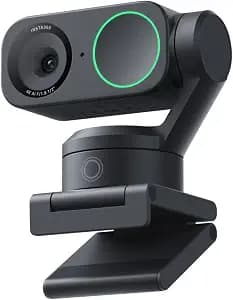
Insta360 Link 2 - PTZ 4K Webcam for PC/Mac, 1/2" Sensor, AI Tracking, HDR, AI Noise-Canceling Mic, Gesture Control for Streaming, Video Calls, Gaming, Works with Zoom, Teams, Twitch & More
Beschreibung
Premium Image Quality: Upgrade to Link 2 4K webcam with a 1/2" sensor. Captures true-to-life webcam 4K visuals with HDR and low-light performance for stunning video in any lighting condition.; Professional Audio: Experience best-in-class audio with advanced AI noise-canceling algorithms. Filter out unwanted background noise for clear communication, even in busy environments.; True Focus: Insta360 Link 2 streaming camera with Phase Detection Auto Focus (PDAF). No more blurry shots—this web cam ensures instant focusing and crisp video for every stream.; Natural Bokeh: Get a DSLR-like look with this Insta360 Link 2 web camera. Replicates natural depth of field straight from the Link Controller, making it a superior camera for computer setups.; AI Tracking: Insta360 Link 2 physically pans and tilts to follow your movements around the room, keeping you or your group perfectly in frame.; Gesture & Remote Smartphone Control: Control your webcam remotely from your smartphone, or use simple hand gestures to start AI Tracking/Auto Framing, zoom in or out and activate Whiteboard Mode.; Specialized Modes: Features DeskView and Whiteboard modes. Link 2 is ultimate webcam for streaming and creativity, functioning perfectly as a versatile webcam for Mac and Windows.; Advanced Desktop Software: Fine-tune settings, access advanced features and personalize your experience with the free dedicated Link Controller software.; Privacy Mode: Insta360 Link 2 automatically tilts down after 10 seconds of inactivity, or you can manually adjust it.; Compatibility: Fully compatible with all major video conferencing software and live streaming platforms, including Microsoft Teams, Zoom, Twitch and more, for a seamless experience.Hardware Note: Currently not compatible with ARM-based Windows systems or Windows Hello Face Recognition.
Vor- und Nachteile vergleichen
Ähnliche Produkte im direkten Vergleich
Eine zufällige Auswahl analysierter Produkte aus derselben Kategorie. Unterschiedliche Produkte sind nicht zwangsläufig austauschbar.

Logitech Brio 100 Full HD 1080p Webcam for Meetings, Streaming, Desktop, Laptop, PC - Built-in Mic, Shutter, Works with Zoom, Microsoft Teams, Nintendo Switch 2’s new GameChat Mode-Off -White

UGREEN 2K Webcam for PC Ultra HD 1080P Computer Webcam with Microphone, PC Camera with Privacy Cover, USB Web Camera for Streaming, Conference, Video Calling, Zoom, Skype, Teams, FaceTime, Grey

TONGVEO All-in-One Conference Room Video Camera System Al Auto-Tracking HD1080P 60fps 3X Optical Zoom USB3.0 HDMI PTZ Camera and Bluetooth Conference Speakerphone with Microphones
Eine Sache weniger zu suchen
Vor dem Kauf: kurze Fragen
Is the AI tracking smooth and reliable, or is it jumpy and distracting on calls?
The AI tracking is widely praised for being remarkably smooth and accurate, especially for presentations or when moving around during a stream. However, like any AI, it can occasionally lose the subject in very low light or get confused by fast movements. Most users on platforms like YouTube find it a game-changer, not a distraction. You can also easily disable it or set a fixed framing with a tap in the app if needed for a specific call.
I'm a Mac user. Are there any compatibility issues I should know about before buying?
The Insta360 Link 2 is fully compatible with Mac. The core setup is straightforward. However, as some Reddit users have noted, advanced use with third-party software like OBS may require granting additional security permissions, which isn't always covered in universal setup guides. Once configured, it works great. It's a good idea to check Insta360's official support page for Mac-specific instructions if you plan to use it with streaming or recording software.
How does the build quality feel, especially the magnetic mount and stand?
The camera unit itself has a solid, premium feel. The magnetic attachment mechanism is clever and secure for the camera. The primary feedback from user reviews concerns the *included folding tripod stand*, which some find a bit lightweight and prone to slight wobbles if your desk is bumped. For a rock-steady setup, many users recommend mounting it directly to a monitor or using a heavier third-party tripod.
Is the noise-canceling microphone good enough to replace my standalone mic?
The AI noise-canceling mic is excellent for a webcam and does a fantastic job suppressing keyboard clicks, background chatter, and ambient noise. For crystal-clear, broadcast-quality voice for professional streaming or podcasting, dedicated USB/XLR microphones like those from Blue Yeti or Rode will still outperform it. For the vast majority of video calls, streaming, and even casual content creation, the built-in mic is more than sufficient and a huge upgrade from laptop or monitor mics.
Who is this webcam really best for, and who might want to consider something simpler?
The Link 2 shines for users who actively benefit from its smart features: professionals giving dynamic presentations, online tutors, fitness coaches, and streamers who want automatic framing and gesture controls. If your use case is primarily static, face-forward video conferences (like daily team stand-ups), a excellent but simpler 4K webcam like the Logitech Brio 500 might offer better value. The Link 2 is for those who want a production assistant in a camera.
Von einem ähnlichen Produkt mit mehr Bewertungen in dieser Kategorie: Webcam with Privacy Cover
Does this webcam work with both PC and Mac?
One reviewer reported it is easy plug and play on both PC and Mac. The listing also states it is compatible with laptop, personal computer, tablet, and smartphone.
How is the video quality in low light?
Reviewers describe the image as clear and sharp even in low light, crediting the automatic light correction. The listing confirms the webcam includes Auto Light Correction as a special feature.
Does the built-in microphone pick up sound clearly?
Reviewers say the built-in microphone works well and picks up sound clearly, with one noting the noise cancellation keeps their voice clear without picking up much background noise. The listing lists Noise Cancellation as a special feature.
Does it have a privacy cover?
The listing lists Privacy Shield as a special feature, and the product title is "Webcam with Privacy Cover."
Is the webcam bulky?
One reviewer described it as a bit on the bulky side, though they felt the quality made up for it.
Die Antworten beschränken sich auf das Angebot des Herstellers und die von uns analysierten Rezensionen. Fragen, die diese Quellen nicht abdecken, werden hier nicht beantwortet.
Transparent von Grund auf