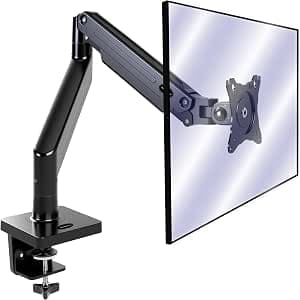
Invision Monitor Arm Bracket Mount for 24-40 Inch Screens VESA 75-100mm Ergonomic Height Adjustable Desktop Clamp Tilts Extends 2-15kg (MX450)
Beschreibung
WIDER RANGE OF MOTION VS POLE OR NON-GAS MOUNTED ARMS – The MX450 offers easy manoeuvrability vs pole mounted or mechanical arm which means you can always find the perfect viewing angle without the use of tools to adjust your screen. The Invision MX450 offers the perfect amount of height and reach adjustment for an improved range of viewing angles. Optimising your workstation and screen position can bring positive change your productivity, health and wellbeing; EASY INSTALLATION & WORLD CLASS CUSTOMER SUPPORT - The MX450 is extremely versatile and installation is simple. It has two installation methods to ensure the arm securely fixes to your desk. The MX450 is covered by our Compatibility Promise to ensure your screen is compatible and you have a trouble-free installation. Some monitors have a recess that maybe non VESA complaint we have an easy solution to resolve this. Should you need us our friendly customer support team are always here to help; EXTRA STRONG & STURDY CONSTRUCTION - The MX450 is designed with extra strength and stability in mind and built to last. Made with a reinforced streamline die cast alloy frame and steel ring compression swivel fittings to ensure reliable positioning and zero sagging. Compared to mechanical arms this far outweighs others on the market. All moving parts are tested to Invision’s 20,000 real-life motion test ensuring years of trouble-free adjustment and backed with a 2-year warranty; LARGE ERGONOMIC MONITOR ARM - IDEAL FOR LARGE SCREENS - The MX450 monitor arm is designed for larger monitors and delivers an optimum ergonomic solution by virtue of its size, flexibility and range of viewing angles. Its gas spring counterbalances the weight of the screen allowing easy adjustment to the required position allowing a safe and comfortable working position. Delivers best-in-class for height and reach and is capable of 360° screen rotation from landscape to portrait; MAXIMISE DESK SPACE & OPTIMISE YOUR WORKLIFE - The MX450 allows you to transform your working environment by freeing up precious desk space and improving your productivity. The +85°/-30° incline adjustment means you can tilt the screen forwards or backwards (great for a reading view or a standing break) and will remain completely stable at any angle.
Vor- und Nachteile vergleichen
Ähnliche Produkte im direkten Vergleich
Eine zufällige Auswahl analysierter Produkte aus derselben Kategorie. Unterschiedliche Produkte sind nicht zwangsläufig austauschbar.

Eine Sache weniger zu suchen
Vor dem Kauf: kurze Fragen
Will this monitor arm fit my specific desk and monitor?
It's compatible with most desks up to 3.3 inches thick and monitors 24-40 inches with VESA 75x75mm or 100x100mm patterns. We recommend measuring your desk thickness first—if it's under 1.2 inches, the clamp may require a simple shim (like a wood block) for a truly secure fit. For your monitor, check its manual or back panel for the VESA specification.
Is it difficult to install and adjust?
Most users find installation straightforward with the included tools, though the initial tension adjustment for your monitor's weight is the key step. A common tip from YouTube setup guides is to fully tighten the tension knob first, then slowly loosen it until the monitor moves smoothly and stays in place. It might take a few minutes of fine-tuning, but once set, daily adjustments are effortless. A3: Absolutely. The primary benefit praised in over 7,500 reviews is the dramatic space saving and ergonomic freedom it provides. You can easily pull the screen closer, raise it to eye level, or tilt it to reduce glare—all of which can help minimize neck and eye strain during long work sessions. It's a popular, cost-effective upgrade for home office setups.
How does it handle cable management, and is it sturdy?
The arm itself has a very sturdy, steel construction that holds monitors rock-steady. It includes cable routing channels and clips. While some Reddit users suggest the clips work best for standard power/HDMI cables, if you have many thick cables (like a bulky USB-C), you might want to supplement with your own velcro ties for a perfectly clean look.
What if my monitor is very heavy or light, or I'm not satisfied?
The arm is rated for 2-15kg (4.4-33 lbs). Monitors at the heavier end of this range may not hold extreme extended positions as firmly. If your monitor is under 2kg, you may need to fully tighten the tension. If you're unsure, we recommend checking your monitor's weight first. The product is backed by our standard return policy if you are not completely satisfied with its performance for your specific setup.
Von einem ähnlichen Produkt mit mehr Bewertungen in dieser Kategorie: Nylavee Computer Speakers for Desktop PC, Bluetooth & AUX PC Soundbar
How do I connect the Nylavee computer speakers to my device?
They support two connection methods: Bluetooth 5.0 and a 3.5mm AUX wired connection, and are compatible with laptop, desktop PC, phone, tablet, Xbox, and PS5. Reviewers report setup was quick and easy, with one using the direct AUX input and another connecting via Bluetooth to a laptop.
Do these speakers fit under a monitor?
The compact, slim design allows it to fit neatly under a desktop monitor, as noted by multiple reviewers, including one who needed it to fit beneath a 24" monitor with limited desk space.
How is the sound quality?
The listing describes two double-layer neodymium magnet speaker units and two independent bass diaphragms for rich high pitch and powerful bass. Reviewers describe clear sound with decent bass and treble, and one notes that even at higher volumes the sound remains clean without noticeable distortion.
How do I control the volume and other functions?
All functions of the soundbar can be operated by the side knob, and reviewers confirm the sound wheel on the side makes it easy to control the volume manually, with a pause and play button also mentioned.
Does it need a battery or separate power source?
There is no built-in battery; you plug the USB into any power source and it turns on automatically. One reviewer used a USB power adapter plugged into a dedicated outlet with the AUX connection.
Die Antworten beschränken sich auf das Angebot des Herstellers und die von uns analysierten Rezensionen. Fragen, die diese Quellen nicht abdecken, werden hier nicht beantwortet.
Transparent von Grund auf