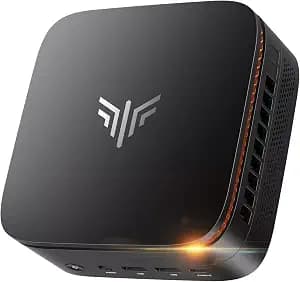
KAMRUI Pinova P1 Mini PC Computer, AMD Ryzen 4300U (Beats i3-10110U/3500U), 16GB RAM 256GB SSD, Mini Desktop Computer Support Triple 4K, USB-C, WiFi, Bluetooth, Ethernet for Business, Education, Home
Beschreibung
Next-Gen Performance in a Compact Powerhouse: Meet the KAMRUI Pinova P1 Mini PC—powered by the AMD Ryzen 4300U processor (4 cores / 4 threads, base 2.7GHz, boost up to 3.7GHz). With a 25% higher base clock and ~10% better multi-threaded performance than typical entry-level chips like N-series, it outperforms the i3-10110U by 50% and the Ryzen 5 3500U by 15%, it handles demanding tasks—like multitasking, light video editing, or even basic 3D rendering—with noticeably smoother responsiveness; Memory & Storage That Grows With You: Equipped with 16GB DDR4 RAM (single-channel) and a fast 256GB M.2 SSD. It supports dual-channel DDR4-3200 when upgraded-dramatically improving system fluidity during heavy workloads. And for storage, It features two M.2 2280 slots: One PCIe 3.0 x4 NVMe slot, One SATA/NVMe PCIe 3.0 x2 slot, RAM expansion capacity is up to 64GB (2x 32GB), SSD expansion capacity is up to 4TB (2x 1TB)—perfect for media libraries, backups, or NAS use; Triple 4K Display Support – Not Just Dual: Why settle for dual monitors when you can go triple 4K? The Pinova P1 Mini Desktop PC delivers what most entry-level mini PCs can’t: simultaneous output via HDMI 2.0, DisplayPort 1.4, and USB-C (with DP Alt Mode). Powered by AMD Radeon graphics (up to 1.4GHz), it offers 3–4× the graphics performance of UHD integrated solutions, making multi-screen productivity or immersive entertainment truly seamless; All the Ports You Need, No Dongles Required: 6× USB 3.2 ports (for keyboards, drives, peripherals), 1× USB-C port (data + DisplayPort 1.4 video output), HDMI 2.0 + DisplayPort 1.4, Gigabit Ethernet, 3.5mm audio jack. Plus smart features like Auto Power-On, RTC Wake, and Wake-on-LAN—ideal for digital signage, home servers, or always-ready workstations; Business-Grade Reliability, Home-Friendly Simplicity: Built for 24/7 operation, the Pinova P1 PC passes rigorous stability tests—making it perfect for home NAS, media centers, or light server duties. It features dual-band Wi-Fi 5 (802.11ac) with speeds up to 450 Mbps (2.4GHz) or 1300 Mbps (5GHz), ensuring lag-free streaming, browsing, and video calls. A quiet, efficient cooling fan keeps temperatures low—even under sustained load
Vor- und Nachteile vergleichen
Ähnliche Produkte im direkten Vergleich
Eine zufällige Auswahl analysierter Produkte aus derselben Kategorie. Unterschiedliche Produkte sind nicht zwangsläufig austauschbar.

ACEMAGIC K1 Mini PC AMD Ryzen 5425U(Beats 5400U/3500U/3200U), 16GB RAM 512GB SSD, Up to 4.1GHz/4C/8T/Win 11 Pro/Triple 4K Display/Type-C+HDMI+DP/WiFi/BT, Business, Home Office Mini Computers

4.6 Inch IPS HD Screen Retro Gaming Console

BOSGAME M4 Mini PC Desktop Computers, AMD Ryzen 7 8745HS, 32GB DDR5, 1TB PCle SSD, 4K Triple Display, USB4.0, Dual 2.5G LAN & Wi-Fi 6E & BT5.2, Compact Silent PC for Gaming, Office, Design
Eine Sache weniger zu suchen
Vor dem Kauf: kurze Fragen
Does this mini PC come with Windows 11 pre-installed, or will I need to set it up myself?
This unit is sold as hardware only and does not include a licensed operating system. You will need to purchase a Windows license (or use a free OS like Linux) and install it yourself. Many tech reviewers on YouTube have simple guides for this process, and the setup is generally straightforward for anyone comfortable following online tutorials.
I've read about WiFi issues. How is the wireless performance, and what can I do to ensure a strong connection?
The KAMRUI P1 features WiFi 6, which most users find excellent for daily tasks and streaming. However, like many compact PCs, its internal antennas can be sensitive to placement. For the absolute best performance, especially for gaming or in media cabinets, using the included Ethernet port is highly recommended. If you must use WiFi, placing the mini PC in an open area improves signal strength significantly.
Is this powerful enough for 4K video streaming and light gaming like Minecraft or indie titles?
Absolutely. The AMD Ryzen 4300U is more than capable of driving triple 4K displays for office work and streaming video. For gaming, it handles 1080p gaming on low-to-medium settings for many popular titles and runs classics, indie games, and esports titles like *League of Legends* very well. It's a fantastic media center or casual gaming box, but not intended for AAA gaming at high settings.
How easy is it to upgrade the RAM and storage later on?
Very easy! This is one of the most praised features. You simply remove four screws on the base to access the interior. The 256GB SSD and 16GB RAM are both user-replaceable standard components. Many Reddit users have shared their successful upgrade stories, often swapping in a 1TB or 2TB SSD in just a few minutes.
Who is this mini PC best suited for, and who might want to look at other options?
The KAMRUI P1 is an outstanding value for home theater enthusiasts, remote workers, students, and small businesses needing a compact, powerful, and quiet computer. It's perfect if you're comfortable with a simple DIY OS install or upgrading hardware. If you need a PC that works perfectly out of the box with Windows included, or if your primary use is demanding AAA gaming, you may want to consider other models that bundle an OS or have more powerful graphics.
Von einem ähnlichen Produkt mit mehr Bewertungen in dieser Kategorie: GMKtec M5S Mini PC AMD Ryzen 5400U 16GB DDR4 (Upgradable RAM) 256GB SSD
Is the Ryzen 3 5400U actually powerful enough for everyday work, or will I regret not buying something faster?
For office apps, web browsing, video calls, streaming, and light photo editing, the 5400U is genuinely capable — its 4 cores/8 threads boost to 4.0GHz and handle multitasking smoothly. Where it falls short is heavy gaming and serious video editing, and that's the honest caveat many Reddit and YouTube reviewers raise. If your day looks like spreadsheets, browser tabs, and Netflix, you'll be happy; if you're chasing AAA games, look at the M6 Ultra instead.
The 256GB SSD seems small — can I upgrade it, and is it easy?
Yes, and it's one of the M5S's best features. You get two M.2 2280 PCIe 3.0 slots (up to 8TB each) plus dual SO-DIMM slots for up to 64GB RAM, so upgrading is straightforward with a screwdriver. That said, plenty of TikTok and forum users admit 256GB fills up fast once Windows and updates settle in — budgeting for a second SSD from day one is a smart move, and the spare slot means you don't have to clone your drive.
I keep seeing "dual 2.5G LAN" mentioned — who actually needs that, and is the WiFi good enough on its own?
The dual Realtek 2.5Gbps ports are the M5S's secret weapon for homelab fans running NAS, pfSense/OPNsense, or home servers — it's why this model gets recommended so often in self-hosting communities. WiFi 6E and Bluetooth 5.2 are solid for normal use, though some users note internal antennas give weaker range than a laptop, so if your router is far away, the wired ports are your friend.
Can it drive multiple monitors, and does it come ready to use with Windows installed?
Absolutely — you get HDMI 2.0 (4K@60Hz), DisplayPort (up to 8K@60Hz), and USB-C (PD/DP/Data) for triple-display setups, a setup office users consistently praise for productivity. It ships with Windows 11 pre-installed and activated, and it also runs Ubuntu/Linux well if that's your preference. Just note the USB-C port handles display and data, not charging — the included 19V adapter powers the unit.
What if the fan noise or performance isn't what I expected — is it a safe buy?
It's a low-risk purchase for the right user. The fan is near-silent at idle and only becomes noticeable under sustained load, which most reviewers call acceptable rather than annoying, and the standard return window covers you if it's not to your taste. The main "regret" pattern online comes from gamers expecting more than the Radeon iGPU can give — so if you're a casual gamer, student, office worker, or homelab tinkerer, this is excellent value; if you need serious GPU horsepower, size up to the M6 Ultra.
Die Antworten beschränken sich auf das Angebot des Herstellers und die von uns analysierten Rezensionen. Fragen, die diese Quellen nicht abdecken, werden hier nicht beantwortet.
Transparent von Grund auf