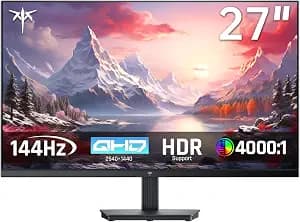
KTC 27 Inch QHD Computer Monitor, 2K 144Hz 1440P Gaming Monitor, Eye Care PC Monitor for Office Gamers, HDMI/DP, FreeSync & G-Sync, HDR10, VESA, Tilt Adjustable, H27T27S
Beschreibung
Stunning Visuals: Equipped with a 27-inch HVA panel, QHD (2560x1440) resolution and 144Hz high refresh rate deliver ultra-smooth motion for gaming and daily use. Compatible with G-SYNC and FreeSync technologies to effectively eliminate screen tearing, bringing you fluid and lag-free visual enjoyment.; Outstanding Image Quality: Boasts 129% sRGB wide color gamut (8-bit) to reproduce rich and lifelike colors. With a high 4000:1 contrast ratio and 300 nits brightness, it presents distinct layered details. Perfect for immersive gaming, daily office work and content creation, delivering vivid and realistic visual effects.; Frameless Gaming Office Monitor: This 144Hz computer monitor adopts a frameless and ultra-thin design, making it easy to install. You can adjust the tilt from -5° to 15°, VESA support allows you to mount your monitor in any environment. The 16:9 aspect ratio provides an immersive cinematic viewing experience.; Multiple Ports: Provides video connectivity via HDMI and DisplayPort. You can connect the display to game consoles, PC, laptops, etc. to transmit high-quality images. It also includes a headphone output jack to switch between work and entertainment.; Low Blue Light & Flicker-Free: Eye care computer monitor reduces blue light, protecting you from eye strain, irritation and fatigue. This makes it more comfortable for you to work on documents, watch movies, or play games for long periods of time.
Vor- und Nachteile vergleichen
Ähnliche Produkte im direkten Vergleich
Eine zufällige Auswahl analysierter Produkte aus derselben Kategorie. Unterschiedliche Produkte sind nicht zwangsläufig austauschbar.

Sceptre New 24-inch Gaming Monitor 100Hz FreeSync 2X HDMI 1X DP Build-in Speakers, Machine Black 2026 (E248W-FW100T Series)

SANSUI 27 Inch Curved Gaming Monitor 240Hz 1ms FHD 1080P Computer Monitor

VisionOwl Portable Monitor 15.6 Inch 1080P FHD 85% sRGB Second Screen, USB-C HDMI HDR FreeSync Travel Monitor for Laptop PC MacBook PS5 Xbox, VESA Mountable, with Speakers, Cover Stand, Silver
Eine Sache weniger zu suchen
Vor dem Kauf: kurze Fragen
I’ve seen complaints about blurry text on this monitor. Is it good for office work and coding, or just gaming?
Great question. At 27 inches with QHD (2560x1440), text scaling can look small on some operating systems—Windows users may need to adjust scaling to 125% for comfortable reading. Many users on Reddit note that for heavy spreadsheet or coding sessions, the lack of sharp pixel density compared to 4K can be noticeable. However, for mixed use—gaming plus light productivity—it’s a solid choice. If text clarity is your top priority, we’d suggest trying it with scaling settings first before returning.
The included stand looks flimsy in videos. Can I replace it easily with a VESA mount?
Yes, absolutely. The monitor supports standard 100x100mm VESA mounting, so you can attach any aftermarket arm or bracket. TikTok reviewers often point out that swapping the stock stand for a gas-spring arm drastically improves stability and ergonomics. Note that the stand only offers tilt adjustment, so if you need height or swivel, plan to budget for a separate VESA mount.
Everyone says HDR10 is fake HDR on this monitor. Should I still buy it if I want HDR gaming?
You’ve spotted the main trade-off. The HDR10 support here is basic—it accepts the HDR signal but lacks the brightness, local dimming, and wide color gamut for true HDR. For casual HDR content or games that don’t rely on deep blacks, it’s passable. But if you want impactful HDR visuals, this isn’t the monitor for you. Most budget QHD monitors have this limitation. The real value here is the 144Hz refresh rate and good color accuracy out of the box.
Will my MacBook work with this monitor without an adapter?
The monitor comes with HDMI and DisplayPort cables, but no USB-C connection. If you have a newer MacBook, you’ll need a USB-C to HDMI or USB-C to DisplayPort adapter. Some Mac users on YouTube report that 144Hz works via DisplayPort adapters, but HDMI may be limited to 120Hz. Also, text clarity on macOS sometimes appears fuzzier than on Windows—adjusting font smoothing in terminal can help.
What’s the return policy if I get dead pixels or backlight bleed?
This varies by seller, but KTC typically offers a 30-day return window and a 1-year warranty. Dead pixel policies are not explicitly generous—most require 5+ dead pixels for a replacement, which is standard for budget monitors. If you notice severe backlight bleed or pixel issues, document with photos immediately and contact customer support. Several buyers on forums suggest ordering through Amazon or a retailer with easy returns, as KTC’s direct support can be slow.
Von einem ähnlichen Produkt mit mehr Bewertungen in dieser Kategorie: KOORUI 24 Inch Gaming Monitor, 180Hz 1080P VA Display with 3000:1 Contrast
Does this monitor really run at 180Hz, and what do I need to enable it?
Yes — it's a native 180Hz panel, but you'll need to switch it on manually. Connect via the included HDMI cable (or a DisplayPort-capable setup), then set 180Hz in your GPU's display settings; it defaults to a lower refresh rate out of the box. Many Reddit and YouTube users note that enabling Adaptive Sync/FreeSync alongside it gives the smoothest experience, and it works with both AMD and NVIDIA cards.
How does the VA panel perform for gaming and everyday work?
The 3000:1 contrast gives noticeably deeper blacks than typical IPS budget monitors, which shines in dark game scenes and movies. For fast-paced competitive shooters, some TikTok and Reddit users mention mild ghosting/smearing in dark transitions — it's great for casual gaming, students, and office work, but color-critical creators or hardcore FPS players may prefer an IPS panel.
The stand looks basic — can I adjust the height or mount it?
Correct, the included stand only tilts (-5° to 20°) and doesn't offer height, swivel, or pivot adjustment, and a few users find the base slightly wobbly. The good news: it's VESA 100×100mm compatible, so a monitor arm or desk mount solves ergonomics entirely — a popular fix among dual-monitor and dorm-room setups.
What if I receive a unit with a dead pixel or backlight bleed?
Budget monitors can vary unit to unit, and some buyers report stuck pixels or corner bleed — but KOORUI backs it with a 3-year manufacturer warranty. If your unit arrives defective, contact the seller for a replacement or refund promptly; most users who did so report a smooth resolution, so inspect the screen within the return window.
Is it good value, and who is it best suited for?
At around $120, it's widely praised as one of the best budget 180Hz options — ideal for students, casual gamers, home-office users, and compact or dual-monitor setups. Just set expectations: no built-in speakers, a single HDMI plus VGA, and basic ergonomics. If you need height adjustment, color accuracy, or built-in audio, consider spending more on an IPS alternative.
Die Antworten beschränken sich auf das Angebot des Herstellers und die von uns analysierten Rezensionen. Fragen, die diese Quellen nicht abdecken, werden hier nicht beantwortet.
Transparent von Grund auf