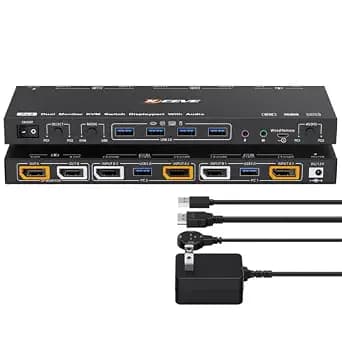
KVM/USB Mode KVM Switch 2 Monitors 2 Computers with Audio, ANXQQ 8K@30Hz 4K@144Hz USB 3.0 Dual Monitor KVM Switch Displayport, Share 4 USB Devices with Wired Control and Power Adapter
Beschreibung
【Dual-Mode KVM switch 2 monitors 2 computers Displayport with Audio】Newly upgraded! With this KVM Switch Displayport, not only can you share two monitors and four USB devices between two computers as before, you are free to choose the KVM/USB mode and also the computer that outputs the audio, no longer fixed as before. Adding a sense of freedom to neatness and efficiency, this dual monitor kvm is really a perfect choice!; 【Two Customized Usage Modes】KVM Mode: two monitors simultaneously display only the content from the same computer, at this time the product is both a monitor switch and a USB switch. You can also press ”Windows”+”P” to choose mirror/extended mode. USB Mode: monitor 1 displays content from PC1 and monitor 2 displays content from PC2, which is equivalent to a USB switch. Freely switch between the functions you want at any time, displayport kvm is really a wise choice!; 【Immerse yourself in the stunning world of 8K】Unlike 4k KVM switch, it is a superior level of enjoyment! Equipped with DP1.4 port for up to 8K@30Hz/4K144Hz resolution. Whether it's for office, entertainment or study you'll have a great experience. Note: Please use one meter of 8K cables for best results. Using a docking station/conversion cable may reduce the original resolution. Experience immersive effects to your heart's content, displayport switch is really a enjoyable choice!; 【5Gbps Ultra-fast USB 3.0 Data Transmission】Unlike USB 2.0, this displayport switch has ten times the speed. Whether you're transferring files, photos or other data, it's done quickly and in seconds! Works perfectly with cameras, camcorders, printers and more, kvm switch 2 monitors 2 computers display port is also backward compatible with USB 2.0 devices. Note: Each computer needs to be connected to the displayport switch with a USB cable to work properly. Greatly improve your using experience, 2 monitor kvm switch 2 computers is really a efficient choice!; 【Two Easy and Fast Switching Methods】KVM displayport supports both physical buttons and 1.5m wired remote switching, you can choose your favorite or the nearest method. Note: this kvm switches displayport not support keyboard hotkey control. With the customer in mind, kvm switch dual monitor is really a user-friendly choice!; 【Plug & Play with Universal Compatibility】No plug-ins required, this monitor switch for 2 computers is simple plug and play for any modern operating system: Windows, Mac OS, Chrome OS, and Linux computers, etc. You can press the audio button on the kvm switches dual monitor to freely select the audio output and connect your 3.5mm audio device directly to the kvm 2 monitors 2 computers displayport. Meeting the needs of most clients, dual display port kvm is really a practical choice!; 【First-class Service Awareness】Whether it's pre-sale or after-sale, please feel free to contact us, we will be happy to serve you anytime. ANXQQ provides 12 months of after-sales service (including product replacement, technical support, etc.) You can buy our product with confidence!; 【Note】1. Before placing an order, please connect your devices and monitors directly to ensure that multi-screen output is supported. 2. In KVM Mode, each computer require 2*DP + 1*USB connections. In USB Mode, the signal source of OUT A is INPUT A1, and the signal source of OUT B is INPUT B2,so make sure you connect INPUT A1 and INPUT B2. 3. Please connect the DC12V power supply to ensure that sufficient power can be provided.
Vor- und Nachteile vergleichen
Ähnliche Produkte im direkten Vergleich
Eine zufällige Auswahl analysierter Produkte aus derselben Kategorie. Unterschiedliche Produkte sind nicht zwangsläufig austauschbar.

KVM Switch 3 Monitors 4 Computers with Audio, HDMI + DisplayPort 8K@30Hz/4k@144Hz DP KVM Switcher, USB 3.0 KVM Switches for 4 PC Share 3 Display, Suitable for Office/Work from Home, Programmer Setup

USB 3.0 HDMI KVM Switch 1 Monitors 2 Computers, 4K@60Hz KVM Switches for 2 Computers Sharing Monitor Keyboard Mouse Hard Drives Printer, with EDID Adaptive, 2USB Cable and Controller

8K DisplayPort KVM Switch 2 Monitors 2 Computers, 4K@144Hz Dual Monitor KVM
Eine Sache weniger zu suchen
Vor dem Kauf: kurze Fragen
How long does this KVM switch typically last before having issues?
Most users report excellent performance for the first 3–4 months. However, based on early feedback, a small number have experienced sudden power failure after this period. We recommend plugging the power adapter into a surge protector and ensuring adequate ventilation. If you run into trouble, our customer support team can help with a replacement or refund within the warranty window.
Are the indicator lights adjustable or can they be turned off?
The LEDs are fixed brightness and quite noticeable in low-light settings. Many TikTok users have shared creative fixes like dimming stickers or electrical tape over the lights. We're listening to feedback and exploring a dimmer option for future revisions. For now, it's a minor trade-off for the fast, reliable switching performance.
Will this work with two different monitor brands and high refresh rates?
Yes. The ANXQQ KVM switch supports dual monitors from any brand (e.g., Dell + LG) and handles up to 4K@144Hz on both displays simultaneously. It also supports 8K@30Hz for future-proof setups. Just ensure your cables are rated for the resolution and refresh rate you need.
Can I use this with a MacBook and a Windows PC at the same time?
Absolutely. This switch works with any combination of computers—Mac, Windows, Linux, even gaming consoles via USB-C adapters. It's fully plug-and-play, so no drivers or software needed. Simply connect the USB and DisplayPort cables from each computer to the switch, and toggle between them with the wired button.
What should I do if the power adapter fails or I lose it?
The included power adapter is standard 5V/2A. If it stops working, any third-party replacement with the same specs and a matching barrel connector will work. For peace of mind, we recommend keeping the original as a backup. If yours fails within the first year, contact our support for a free replacement.
Von einem ähnlichen Produkt mit mehr Bewertungen in dieser Kategorie: Unitek HDMI KVM Switch 1 Monitor 2 Computers with Power Adapter
Can I switch between computers with a keyboard shortcut, or do I have to press a button?
This model uses a physical button on the unit — there's no hotkey switching. That's the most common complaint in reviews, so if keyboard shortcuts are a must-have for your workflow, you'll want to look at a hotkey-capable KVM instead. If you're fine reaching for a button (or placing the switch within arm's reach), it works reliably.
Do I need to use the included power adapter, or can it run without it?
Use the adapter. While some users have tried bus-powering it, the most stable experience — especially with wireless peripherals — comes from plugging in the included DC adapter. Several reviewers noted mouse dropouts when running unpowered, so treat the adapter as required, not optional.
Will it work with my Mac and Windows PC together, and does it handle 4K?
Yes, mixed Mac/Windows setups are one of its most common use cases, and it's plug-and-play for both. For resolution, check your monitor's specs against the switch's rated maximum before buying — some users with high-refresh or 4K@60Hz displays ran into EDID handshake issues (blank screen after sleep), which is the second-most-cited complaint. Standard 1080p and 4K@30Hz setups report smooth sailing.
Are the cables included, and are they long enough for a desktop tower?
Yes — HDMI and USB cables are in the box, which reviewers consistently call a nice bonus. That said, they're on the short side (roughly 3 ft), so they're ideal for laptop docks or monitors sitting close to both computers. If your tower lives under the desk, plan on buying longer cables.
Who is this KVM best suited for — and who should skip it?
It's a great fit for remote workers, students, or anyone sharing one monitor, keyboard, and mouse between two computers on a budget, especially if you value compact size, included cables, and simple setup. Skip it if you need hotkey switching, dual-monitor output, DisplayPort, or rock-solid EDID behavior with a fussy high-refresh display — in those cases, a TESmart or Cable Matters alternative will save you the return shipping.
Die Antworten beschränken sich auf das Angebot des Herstellers und die von uns analysierten Rezensionen. Fragen, die diese Quellen nicht abdecken, werden hier nicht beantwortet.
Transparent von Grund auf