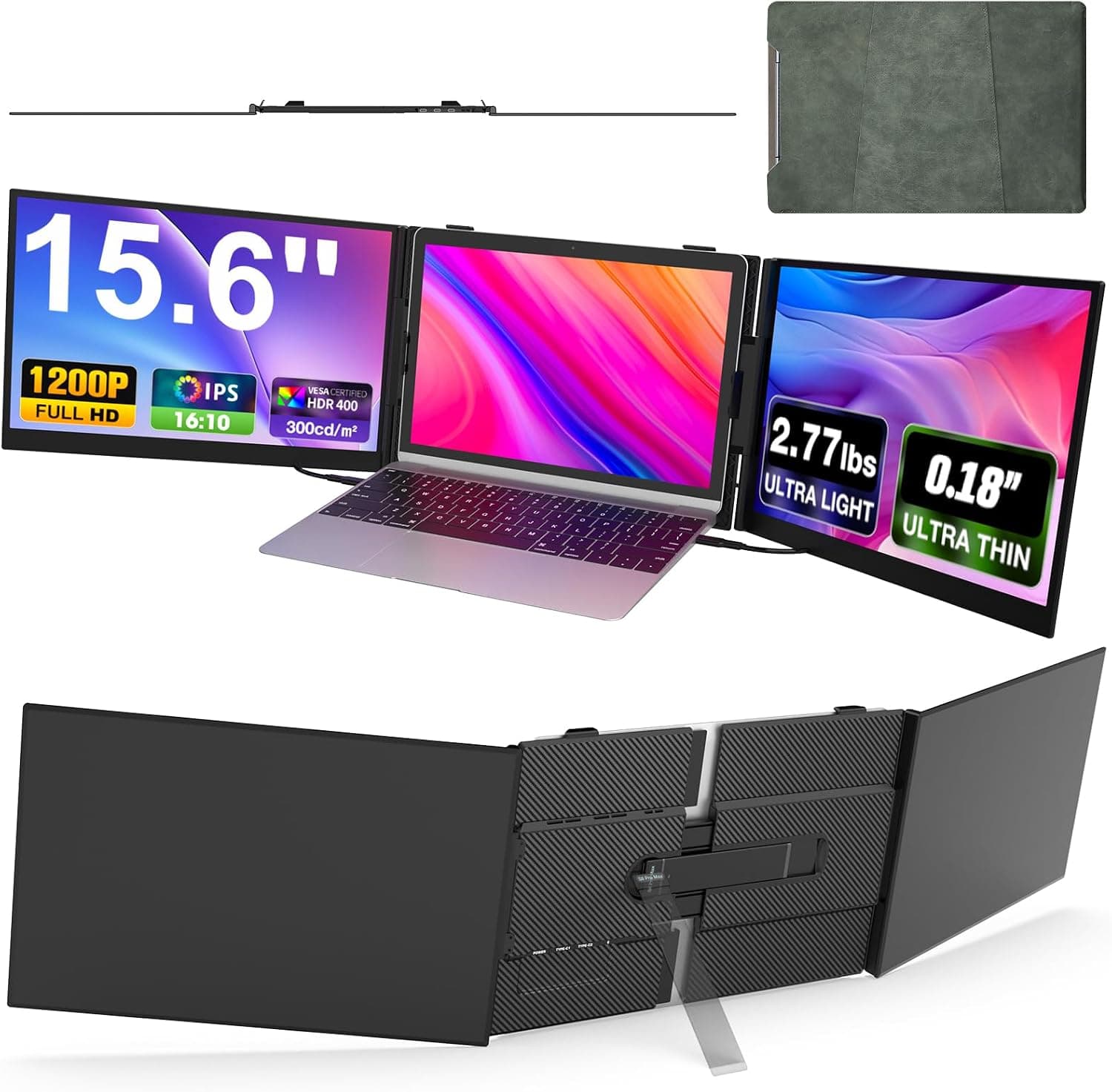
Laptop Screen Extender, Ultra-Thin 15.6" FHD 1200P 16:10 Portable Monitor for Laptop, Lightweight Travel Monitor Extender Plug & Play for 14.2"-17.3" Laptops, Compatible with Wins/Mac/Android/Chrome

Laptop Screen Extender, Ultra-Thin 15.6" FHD 1200P 16:10 Portable Monitor for Laptop, Lightweight Travel Monitor Extender Plug & Play for 14.2"-17.3" Laptops, Compatible with Wins/Mac/Android/Chrome

4.2 bei Amazon515 Bewertungenwww.amazon.com
Analysiert am Sep 21, 2026
Zuverlässigkeit der Rezensionen
85/ 100Note A
Reviews match their star ratings closely, all include specific details and cover the topics we track, with many high ratings, few mid-range ones, and little promotional or inauthentic language.
Affiliate-Link — die Provision ist unabhängig von der Bewertung immer gleich.

Die 30-Sekunden-Lektüre

Bevor du dich entscheidest

Ein Ausgangspunkt, kein Kaufurteil

Was Kunden gut finden

Crisp display, easy plug-and-play setup

Reviewers consistently praise the sharp, bright screen and simple plug-and-play connection with no software needed. Many also highlight the lightweight, portable design that adds little bulk.

Der wichtigste Vorbehalt

May not fit smaller 14-inch laptops

One reviewer with a 14-inch Lenovo T14 found the laptop body too small and said the seller's description was wrong. Check sizing carefully before buying for smaller laptops.

Bevor Sie sich entscheiden

Confirm compatibility with your laptop

Reviews mention working with Windows, Chrome, Samsung DeX, and HDMI/USB-C connections, but compatibility can vary. Verify your laptop size and ports match the product's supported range before ordering.

Von einem ähnlichen Produkt mit mehr Bewertungen in dieser Kategorie: KOORUI 24 Inch Gaming Monitor, 180Hz 1080P VA Display with 3000:1 Contrast

Was Kunden gut finden

Good value for the price

Several reviewers describe the monitor as a strong budget purchase, citing impressive specs for the money and satisfaction with gaming use.

Der wichtigste Vorbehalt

Durability concerns over time

Several reviewers report the monitor failing or coming apart after months to a couple of years, including a dead screen and a failing power cord.

Bevor Sie sich entscheiden

May need manual calibration

Two reviewers note that setup benefits from adjusting settings in your GPU software, including color, brightness, and VRR.

Erst dein Anwendungsfall

Deine Anliegen

quality

Überwiegend positiv

8 von 130 Erwähnungen beschreiben eine negative Erfahrung (6 %).

performance

Gemischte Erfahrungen

26 von 100 Erwähnungen beschreiben eine negative Erfahrung (26 %).

setup

Gemischte Erfahrungen

16 von 90 Erwähnungen beschreiben eine negative Erfahrung (18 %).

portability

Überwiegend positiv

0 von 88 Erwähnungen beschreiben eine negative Erfahrung (0 %).

productivity

Überwiegend positiv

2 von 61 Erwähnungen beschreiben eine negative Erfahrung (3 %).

value for money

Gemischte Erfahrungen

12 von 57 Erwähnungen beschreiben eine negative Erfahrung (21 %).

display quality

Überwiegend positiv

3 von 54 Erwähnungen beschreiben eine negative Erfahrung (6 %).

compatibility

Gemischte Erfahrungen

20 von 45 Erwähnungen beschreiben eine negative Erfahrung (44 %).

Eine Rezension kann mehrere Themen ansprechen. Die Prozentsätze beziehen sich auf die von uns analysierten Rezensionen, nicht auf alle Käufer oder die allgemeine Ausfallrate des Produkts.

Vor- und Nachteile vergleichen

Ähnliche Produkte im direkten Vergleich

Eine zufällige Auswahl analysierter Produkte aus derselben Kategorie. Unterschiedliche Produkte sind nicht zwangsläufig austauschbar.

Belege prüfen

Was die Rezensionsauszüge zeigen

Einbezogen bedeutet nicht als authentisch bestätigt. Markiert bedeutet nicht als Fälschung nachgewiesen. Dies sind analytische Einordnungen.

3 veranschaulichende Auszüge werden angezeigt, nicht der gesamte Rezensionsbestand.

In die Analyse einbezogen5.0/5 Sternen

5.0 out of 5 stars

“I’ve been using this portable laptop screen extender for a little over a week now, and I’m honestly impressed with how thin and lightweight it is. The first thing I noticed when I clipped it onto my laptop was that it didn’t add any bulk at all—my laptop still feels easy to carry around the house, and I can toss the extender into my work bag without feeling like I added another heavy device. The setup was simple, and once it was attached, the whole setup looked really clean and professional, almost like it came with my laptop originally. The picture quality is much better than I expected for such a slim screen—bright, sharp, and comfortable to look at for long work sessions. I’ve been using it mainly for multitasking, reviewing forecasting dashboards, and keeping emails open on the side, and having the extra real estate has honestly made my workflow smoother. Even in my photo, you can see how crisp the display looks and how nicely it blends with my laptop. If you need something portable that won’t weigh you down but still gives you a clear, reliable second screen, this one fits perfectly.”

Erkannte Signale: Konkretes Detail: process, scenario · Erwähnt: portability, quality · Liest sich wie eine authentische Stimme

In die Analyse einbezogen4.0/5 Sternen

4.0 out of 5 stars

“The S8 PRO MAX triple screen monitor is excellent. Build quality is solid, both screens look sharp, and it works perfectly with my laptop via HDMI and Samsung DeX via USB-C simultaneously. Pros: Lightweight and portable Great image quality on both screens USB-C ports support video + power passthrough Works flawlessly with Samsung DeX Cute robot charger included (UGREEN 65W) Cons: The included USB-A to USB-C power cable is insufficient. It couldn't deliver enough power, causing overheating issues. Once I switched to a proper USB-C to USB-C cable, everything worked perfectly. Tip for buyers: Use a USB-C to USB-C cable for the POWER port instead of the included USB-A cable. This makes a huge difference. Overall, great product - just upgrade the power cable immediately.”

Erkannte Signale: Konkretes Detail: entity, comparison, scenario · Erwähnt: quality, display quality, compatibility, portability, setup · Liest sich wie eine authentische Stimme

In die Analyse einbezogen5.0/5 Sternen

5.0 out of 5 stars

“I’ve been using this ultra-slim laptop dock for a week now, and it has completely transformed the way I work. The screen is crisp and bright, and although it’s incredibly slim, it feels sturdy and durable. Setup is also extremely simple—just plug it in via the USB-C port and it’s ready to use immediately, with no additional software required. What I love most is how lightweight and portable it is. I can easily slip it into my laptop bag without feeling like I’m carrying any extra weight. It’s perfect for traveling or working at a café. With the second screen, multitasking is a breeze—whether I’m working on spreadsheets, taking notes during a meeting, or watching a video while I work.”

Erkannte Signale: Konkretes Detail: process, entity, scenario · Erwähnt: display quality, setup, portability, quality · Liest sich wie eine authentische Stimme
Eine Sache weniger zu suchen

Vor dem Kauf: kurze Fragen

Is this screen extender truly plug and play, or does it require software installation?
Aus 8 berücksichtigten Rezensionen, die „setup“ erwähnenAus dem Angebot des Herstellers

Multiple reviewers report that setup is plug and play with no additional software required, connecting instantly via USB-C. The manufacturer also states the travel monitor is plug and play with no driver needed.

How portable and lightweight is this monitor extender for travel?
Aus 5 berücksichtigten Rezensionen, die „portability“ erwähnenAus dem Angebot des Herstellers

Reviewers describe it as ultra-thin and lightweight, noting it doesn't add bulk and can be tossed into a work bag. The listing states it weighs 2.77lbs with each screen only 0.18 inches thick.

Will this work with my 14-inch laptop?
Aus 3 berücksichtigten Rezensionen, die „compatibility“ erwähnen

One reviewer with a Lenovo T14 14-inch laptop reported it did not work because the laptop body was too small, and warned against buying for 14-inch or smaller laptops. The listing states compatibility with laptops having specific port configurations but does not guarantee fit for all 14-inch models.

What is the display quality like?
Aus 8 berücksichtigten Rezensionen, die „display quality“ erwähnenAus dem Angebot des Herstellers

Reviewers describe the display as crisp, bright, and vibrant with sharp 1200P resolution and a 16:10 aspect ratio that makes multitasking feel natural. The listing specifies 15.6-inch IPS FHD screens with 300 nits brightness, 100% sRGB color gamut, and a 178-degree viewing angle.

What ports or connections does my laptop need for this to work?
Aus dem Angebot des Herstellers

The listing states it supports laptops with 2 full-function Type-C ports, or 1 full-function Type-C port plus 1 HDMI port, or 1 HDMI port plus 1 standard USB port. MacBooks with M1/M2/M3 chipsets require the included H5-T video expansion cable.

Von einem ähnlichen Produkt mit mehr Bewertungen in dieser Kategorie: KOORUI 24 Inch Gaming Monitor, 180Hz 1080P VA Display with 3000:1 Contrast

Does this monitor really run at 180Hz, and what do I need to enable it?

Yes — it's a native 180Hz panel, but you'll need to switch it on manually. Connect via the included HDMI cable (or a DisplayPort-capable setup), then set 180Hz in your GPU's display settings; it defaults to a lower refresh rate out of the box. Many Reddit and YouTube users note that enabling Adaptive Sync/FreeSync alongside it gives the smoothest experience, and it works with both AMD and NVIDIA cards.

How does the VA panel perform for gaming and everyday work?

The 3000:1 contrast gives noticeably deeper blacks than typical IPS budget monitors, which shines in dark game scenes and movies. For fast-paced competitive shooters, some TikTok and Reddit users mention mild ghosting/smearing in dark transitions — it's great for casual gaming, students, and office work, but color-critical creators or hardcore FPS players may prefer an IPS panel.

The stand looks basic — can I adjust the height or mount it?

Correct, the included stand only tilts (-5° to 20°) and doesn't offer height, swivel, or pivot adjustment, and a few users find the base slightly wobbly. The good news: it's VESA 100×100mm compatible, so a monitor arm or desk mount solves ergonomics entirely — a popular fix among dual-monitor and dorm-room setups.

What if I receive a unit with a dead pixel or backlight bleed?

Budget monitors can vary unit to unit, and some buyers report stuck pixels or corner bleed — but KOORUI backs it with a 3-year manufacturer warranty. If your unit arrives defective, contact the seller for a replacement or refund promptly; most users who did so report a smooth resolution, so inspect the screen within the return window.

Is it good value, and who is it best suited for?

At around $120, it's widely praised as one of the best budget 180Hz options — ideal for students, casual gamers, home-office users, and compact or dual-monitor setups. Just set expectations: no built-in speakers, a single HDMI plus VGA, and basic ergonomics. If you need height adjustment, color accuracy, or built-in audio, consider spending more on an IPS alternative.

Die Antworten beschränken sich auf das Angebot des Herstellers und die von uns analysierten Rezensionen. Fragen, die diese Quellen nicht abdecken, werden hier nicht beantwortet.

Transparent von Grund auf

Die Analyse verstehen