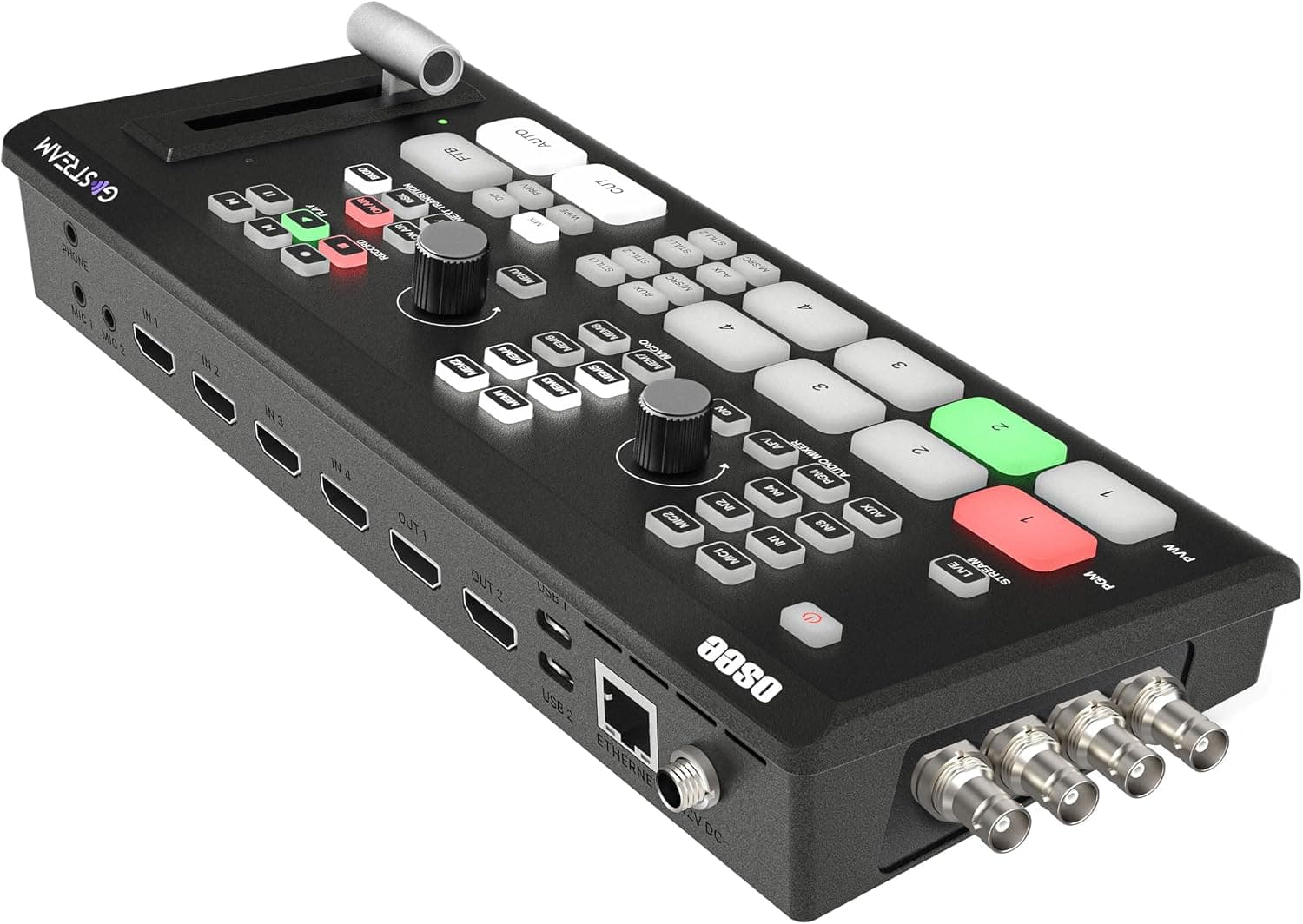
Osee GoStream Duet Multiple Camera SDI and HDMI Live Stream Video Mixer Switcher

Osee GoStream Duet Multiple Camera SDI and HDMI Live Stream Video Mixer Switcher

4.7 bei Amazon164 Bewertungenwww.amazon.com
Analysiert am Sep 25, 2026
Zuverlässigkeit der Rezensionen
89/ 100Note A
Most reviews are high-rated and closely match the star ratings, with lots of specific detail, balanced topic coverage, no promotional phrasing, and strong signs of authentic voices.
Affiliate-Link — die Provision ist unabhängig von der Bewertung immer gleich.

Die 30-Sekunden-Lektüre

Bevor du dich entscheidest

Ein Ausgangspunkt, kein Kaufurteil

Was Kunden gut finden

Feature-rich and great value

Reviewers repeatedly praise the Duet for packing many features at a lower price than competitors like the ATEM Mini, including streaming to multiple sources, low-bandwidth streaming while recording at high quality, and an SD slot for recording.

Der wichtigste Vorbehalt

NDI and 4K limitations

One reviewer could not get NDI through the unit to their church setup, and another noted it should be updated to 4K.

Bevor Sie sich entscheiden

Check mounting and input needs

One reviewer wished the body had holes for mounting a monitor or other equipment, and another highlighted that it accepts any combination of HDMI and SDI inputs, so confirm your mounting and connection needs fit.

Von einem ähnlichen Produkt mit mehr Bewertungen in dieser Kategorie: HDMI Switch 4k@60hz Splitter, GANA Aluminum Bidirectional HDMI Switcher 2 in 1 Out, Manual HDMI Hub Supports HD Compatible with Xbox PS5/4/3 Blu-Ray Player Fire Stick Roku

Was Kunden gut finden

Easy plug-and-play switching, solid 4K

Reviewers consistently praise the simple plug-and-play setup and reliable manual switching between two devices on one screen, with clean 4K@60Hz picture quality and no lag or dropouts.

Der wichtigste Vorbehalt

Some units fail to switch reliably

One reviewer found it only 'kinda works,' needing to unplug one device for the other to work, and said it can't simply switch as expected.

Bevor Sie sich entscheiden

Check your intended setup

It works for two devices into one display or one device into two displays, but one reviewer notes it won't let a computer run two or three monitors with different images on each screen.

Erst dein Anwendungsfall

Deine Anliegen

functionality

Gemischte Erfahrungen

7 von 41 Erwähnungen beschreiben eine negative Erfahrung (17 %).

multichannel

Überwiegend positiv

2 von 14 Erwähnungen beschreiben eine negative Erfahrung (14 %).

value for money

Überwiegend positiv

0 von 13 Erwähnungen beschreiben eine negative Erfahrung (0 %).

compact size

Gemischte Erfahrungen

1 von 6 Erwähnungen beschreiben eine negative Erfahrung (17 %).

compatibility

Überwiegend positiv

0 von 5 Erwähnungen beschreiben eine negative Erfahrung (0 %).

user-friendliness

Gemischte Erfahrungen

1 von 5 Erwähnungen beschreiben eine negative Erfahrung (20 %).

Eine Rezension kann mehrere Themen ansprechen. Die Prozentsätze beziehen sich auf die von uns analysierten Rezensionen, nicht auf alle Käufer oder die allgemeine Ausfallrate des Produkts.

Von einem ähnlichen Produkt mit mehr Bewertungen in dieser Kategorie: HDMI Switch 4k@60hz Splitter, GANA Aluminum Bidirectional HDMI Switcher 2 in 1 Out, Manual HDMI Hub Supports HD Compatible with Xbox PS5/4/3 Blu-Ray Player Fire Stick Roku

quality

Gemischte Erfahrungen

356 von 1485 Erwähnungen beschreiben eine negative Erfahrung (24 %).

ease of use

Gemischte Erfahrungen

205 von 1121 Erwähnungen beschreiben eine negative Erfahrung (18 %).

value for money

Gemischte Erfahrungen

157 von 540 Erwähnungen beschreiben eine negative Erfahrung (29 %).

functionality

Überwiegend positiv

20 von 295 Erwähnungen beschreiben eine negative Erfahrung (7 %).

switching capability

Gemischte Erfahrungen

71 von 266 Erwähnungen beschreiben eine negative Erfahrung (27 %).

compatibility

Überwiegend negativ

270 von 453 Erwähnungen beschreiben eine negative Erfahrung (60 %).

picture quality

Gemischte Erfahrungen

117 von 306 Erwähnungen beschreiben eine negative Erfahrung (38 %).

durability

Überwiegend negativ

329 von 376 Erwähnungen beschreiben eine negative Erfahrung (88 %).

Vor- und Nachteile vergleichen

Ähnliche Produkte im direkten Vergleich

Eine zufällige Auswahl analysierter Produkte aus derselben Kategorie. Unterschiedliche Produkte sind nicht zwangsläufig austauschbar.

Belege prüfen

Was die Rezensionsauszüge zeigen

Einbezogen bedeutet nicht als authentisch bestätigt. Markiert bedeutet nicht als Fälschung nachgewiesen. Dies sind analytische Einordnungen.

3 veranschaulichende Auszüge werden angezeigt, nicht der gesamte Rezensionsbestand.

In die Analyse einbezogen4.0/5 Sternen

Less expensive with lots of features ... Works really well!

“I've been using this for a while now. Several months. Overall very happy with the unit. I also have an ATEM MiniPro. What I like that's different: - You can stream to 3 sources (if your bandwidth allows) - You can stream at low bandwidth, while recording at the highest level (ATEM MiniPro doesn't do that). - There are (2) rows of buttons, which is good. - Most of the functions are available without another computer, although you can use a computer as well if you like. - I can easily adjust the sound for the input, as well as what's going to live stream with buttons. What I don't like: The Picture-in-Picture (PIP) is locked at 25%, 35% and 50%. - You can't size as you'd like with the ATEM MiniPro. - The software is a little odd ... you have to click on the top of buttons to get them to work. Not a big deal once you figure that out. Still, a little annoying at first. I'm used to clicking anywhere on a button with other Windows software. - Does not have an iPhone App that will work with my older iPad, or my iPhone 13. I took off a star for that as there is software (not by ATEM) where I can be at a camera (away from the switcher), and run sound + the switcher while managing the camera. That's NOT a recommended activity ... too much to do at once. However, if you NEED to do that because there's no other way? You can do it with the ATEM ... NOT with the GoStream. I did get fans for this unit, which I also use for the ATEM MiniPro. Even though there's a built in fan (in my unit, not the originals). And a stand, which makes placement of the fans easy. ATEM Mini tells you how much bandwidth you're using ... GoStream does not. It does flash a light when there's caching happening. If you go offline then back on? YouTube will assign a new link ... not use the existing. If you're having bandwidth issues? And you just let the bottleneck bandwidth play out? It's all good ... one link. Overall this is a lot less expensive, and if you use SDI this you can eliminate the need for SDI converters to HDMI, which I REALLY, REALLY like. Fewer conversion points means greater quality. Well built but not industrial grade. Treat it with care and it will take care of your streaming needs.”

Erkannte Signale: Konkretes Detail: process, comparison, quantity, entity · Erwähnt: functionality, value for money · Liest sich wie eine authentische Stimme

In die Analyse einbezogen5.0/5 Sternen

GoStream switch beats the competitors' with features, price and customer service

“I purchased the GoStream Duet video switcher to record and stream a podcast that my friend does, and it has been working well. It is capable of doing so much that I really haven't had time to use all the different functions yet. I did the first test of the podcast using 3 iPhones as cameras with HDMI adapters and the unit worked well. I ran audio from a Tascam Mixcast 4 into the GoStream without issues. I was able to adjust the slight audio delay in the GoStream menu system. We will probably upgrade to PTZ cameras at some point with NDI/HX3 and/or SDI capability, which the GoStream can also handle besides HDMI. (Only one camera can be NDI/HX3.) I choose the Duet model over the basic GoStream model because it includes a (needed) cooling fan, and includes the NDI license (which costs extra in the basic model). They also shifted the memory card slot to the left front side of the unit to make room for the internal fan. The GoStream has the capability to stream to 3 services at the same time, although you'd need serious bandwidth to do that, and most people wouldn't require that many streams at the same time. I also like the fact that it has many features that broadcast switchers I've used professionally have: a preview and program bus, a T-bar and a Multiview output. You can do several types of keying, store stills and video and save macros. There's free software to use the control panel display on a computer, and Companion software is available if you want to use a Elgato Stream Deck to trigger macros (like camera shots and graphics for example). For the price this has everything and more that I could ask for. The company, OSEE has a dedicated Facebook page where there is an excellent FAQ file covering just about any question you could think of, and the developers monitor the page constantly. If you have a question or concern, you can get quick help there from both the company and other users worldwide. Recommended!”

Erkannte Signale: Konkretes Detail: entity, scenario, quantity, process · Erwähnt: functionality, compatibility · Liest sich wie eine authentische Stimme

In die Analyse einbezogen5.0/5 Sternen

Live production game changer!

“I just used this for the first time as part of a mini convention that I do AV for every month and wow! It took care of nearly all my unresolved pain points. The multiview output is super convenient for preparing source selection without interrupting what's currently being displayed (PGM), whether that be a video input or an image/video loaded on the device. Those files can be uploaded from the SD card or from a computer attached via the USB-C port. We can have up to a dozen different speakers, each with their own laptop. Previously, they would have no idea if they were properly outputing a good signal prior to cutover. Now I'm able to run a signal (PVW) to a mini monitor mounted on their mic stand that shows what they're sending. I can see it as well on my multiview monitor. So, between the PVW and multiview there isn't another HDMI output available for PGM, but I have OBS connected to one of the USB-C connections and send the output from my laptop to an HDMI transmitter to display on our projector. On the subject of OBS, this device integrates flawlessly! I used to do video capture with an Elgato HD60 S+ on my M1 MacBook Pro, which was terrible. The video mostly worked fine, but the audio was tempermental to say the least. If a speaker needed to send audio over HDMI it would require opening and closing OBS several times while unplugging and plugging in the capture card. Then it might work. In testing, this unit has worked every time even when switching sources. Of note, OBS has crashed a few of times since adding the GoStream to my setup, but both OBS and macOS updated during that time as well, so it might not have anything to do with the Duet. I've barely scratched the surface of what this thing is capable of and am truly excited to see what else I can do with it. I can't imagine doing a live event again without the osee GoStream Duet!”

Erkannte Signale: Konkretes Detail: scenario, process, entity · Erwähnt: functionality, user-friendliness · Liest sich wie eine authentische Stimme
Eine Sache weniger zu suchen

Vor dem Kauf: kurze Fragen

Can the GoStream Duet accept a mix of SDI and HDMI cameras at the same time?
Aus 2 berücksichtigten Rezensionen, die „compatibility“ erwähnenAus dem Angebot des Herstellers

Yes. The listing states channels 1-4 are HDMI/SDI auto-detection and configurable, and one reviewer reports running 1 SDI camera, 1 HDMI camera and 1 laptop simultaneously.

How many streaming platforms can it stream to at once?
Aus 7 berücksichtigten Rezensionen, die „functionality“ erwähnenAus dem Angebot des Herstellers

Up to 3 platforms simultaneously via Ethernet RTMP, and one reviewer notes you can stream to 3 sources if your bandwidth allows.

Can it record while streaming, and at what quality?
Aus 7 berücksichtigten Rezensionen, die „functionality“ erwähnenAus dem Angebot des Herstellers

Yes. The listing says internal recording and playback is high-quality H.264 up to 70Mb/s while streaming, using an internal SD card or external USB 2.0 SSD, and one reviewer notes you can stream at low bandwidth while recording at the highest level.

Is the GoStream Duet easy to learn and operate?
Aus 2 berücksichtigten Rezensionen, die „user-friendliness“ erwähnen

Reviewers describe it as very user friendly, with one noting the owner's manual is very clear on its features, and another calling the multiview output super convenient for preparing source selection without interrupting the program feed.

What control options are available?
Aus dem Angebot des Herstellers

The listing states control is via internal menu, PC or MAC software, and Stream Deck through a Companion plug-in.

Von einem ähnlichen Produkt mit mehr Bewertungen in dieser Kategorie: HDMI Switch 4k@60hz Splitter, GANA Aluminum Bidirectional HDMI Switcher 2 in 1 Out, Manual HDMI Hub Supports HD Compatible with Xbox PS5/4/3 Blu-Ray Player Fire Stick Roku

Can I use this to connect two devices to one TV and switch between them?
Aus 9 berücksichtigten Rezensionen, die „switching capability“ erwähnenAus dem Angebot des Herstellers

Yes. In Switch mode it offers 2 HDMI inputs to connect with 1 HDMI display, and you switch between them by pressing the "select" button manually. Reviewers confirm using it to switch between two devices on one TV or monitor.

Does it switch automatically between inputs?
Aus dem Angebot des Herstellers

No. The manufacturer states this HDMI switch cannot switch automatically and works ONLY by manually pressing the SELECT button.

Does it support 4K at 60Hz?
Aus dem Angebot des Herstellers

Yes, it supports up to 4K@60Hz and is backward compatible with lower resolutions. The listing notes you should use a standard HDMI 2.0 cable with total cable length no more than 3M for vivid 4K video, and some 4K@120Hz input devices need the resolution lowered to 4K@60Hz.

Does it require external power?
Aus dem Angebot des Herstellers

No. It is plug and play with no external power needed; you simply press the button on the switch box to change the input or output source.

Can I connect one source to two displays and show them at the same time?
Aus dem Angebot des Herstellers

No. In Splitter mode it offers 1 HDMI device with 2 external HDMI displays, but only 1 display can be displayed at a time.

Die Antworten beschränken sich auf das Angebot des Herstellers und die von uns analysierten Rezensionen. Fragen, die diese Quellen nicht abdecken, werden hier nicht beantwortet.

Transparent von Grund auf

Die Analyse verstehen