
Portta HDMI Video Capture Card, Stream and Record in 1080P60 with Ultra-Low Latency, 4K HDMI in/Loop Out, USB 3.0 to PC Compatible with Nintendo Switch 2/PS4/PS5/Xbox/OBS
Beschreibung
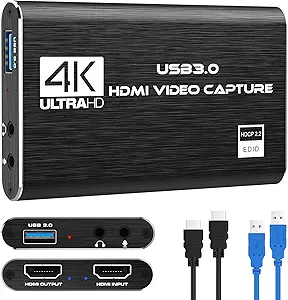
【HDMI Video Capture】PORTTA HDMI Video Capture supports HDMI input and loop-out (up to 4K@60Hz, YUV 4:2:0), 1080p capture via USB 3.0, and includes 3.5mm audio out and mic in. It’s ideal for game streaming, live broadcasts, and content creation. Note: Headphones (TRS Only)/Speaker and HDMI OUT cannot receive microphone audio; 【4K HDMI Input & Loop-Out】Supports 4K@60Hz (YUV 4:2:0), 3D and HDCP 1.4 (input only). Compatible with PS4/PS5/Xbox Series X/PC. Note: Does not support HDR or CEC; 【1080p 60Hz Capture Quality】Enjoy smooth, high-quality recording with 1080p at 60fps capture via USB 3.0—perfect for streaming gameplay, tutorials, or video conferences. Compatible with OBS Studio and other UVC/UAC-compliant applications (not included); 【Broad Compatibility】Plug-and-play, no driver installation needed. The 4K HDMI Video Capture is compatible with Windows 7/8/10/11 or later; macOS 10.8+ (Intel/Apple Silicon; Metal support recommended); Linux (kernel 2.6.38+, e.g., Ubuntu 18.04+; X11/Wayland). System Requirements: CPU: Quad-core Intel Core i5 / Ryzen 5 or higher. Memory: 8 GB RAM or more. Graphics: DirectX 10.1 or OpenGL 3.3 compatible GPU (DirectX 11 / Metal recommended). Storage: SSD recommended for high-bitrate recording. Works with OBS Studio & UVC/UAC apps (not included); 【What You Get】PORTTA HDMI Video Capture x1, USB-C Male to USB 3.0 Female Adapter x1, USB-A to USB-A 3.0 Data Cable x1, HDMI Cable x1, User Manual x1 with hassle-free 2-year warranty and lifetime technical support. Feel free to reach our friendly customer service if you have any questions
Vor- und Nachteile vergleichen
Ähnliche Produkte im direkten Vergleich
Eine zufällige Auswahl analysierter Produkte aus derselben Kategorie. Unterschiedliche Produkte sind nicht zwangsläufig austauschbar.

Video Capture Card, Audio Video Capture Card, USB 3.0 Capture Card 4K HDMI Loop-Out, 1080P 60FPS/2K 30FPS Video Game Capture for Streaming Works for PS5/Switch/Camera/PC/OBS(Black)
Capture Card Nintendo Switch, 4K HDMI Video Capture Card, 1080P 60FPS, HDMI to USB 3.0 Capture Card for Streaming Work with Camera/Xbox/PS4/PS5/PC/OBS
Eine Sache weniger zu suchen
Vor dem Kauf: kurze Fragen
Does this card actually record in 4K, or is that misleading?
The 4K mention refers only to the HDMI passthrough. This means your gaming console (like a PS5) can output 4K to your TV/monitor without downgrading your viewing experience. However, the actual capture and recording to your computer is done at a maximum of 1080p resolution at 60 frames per second. This is a common point of confusion, so we want to be clear: it's an excellent 1080p60 capture card.
Is the setup truly "plug-and-play," or will I need to hunt for drivers?
For most users on modern Windows 10/11 or macOS systems, it is plug-and-play when used with software like OBS, Streamlabs, or VLC. However, some users on Linux or older systems report needing to find specific drivers. A common tip from the community is that if your PC doesn't recognize it immediately, downloading the official OBS software almost always solves the problem, as it includes the necessary drivers.
How does the Portta compare to a more expensive brand like Elgato?
The Portta is widely praised for offering about 80-90% of the core functionality (1080p60 capture, low-latency passthrough) at a fraction of the price. The main trade-offs are in long-term durability (some units may fail sooner), a more basic build, and the lack of dedicated, branded software. For beginners, hobbyists, or those on a tight budget, the Portta represents outstanding value. If you stream daily for hours and need guaranteed reliability and customer support, investing in a premium brand might be worthwhile.
What's in the box, and what else do I need to buy to start streaming?
The box contains only the Portta capture card itself and a short USB 3.0 cable to connect it to your PC. You will need to supply your own HDMI cables. To capture gameplay from a console like a Nintendo Switch, you'll need two HDMI cables: one from your console to the card's "IN" port, and another from the card's "OUT" port to your TV or monitor. Many positive reviews highlight this as a "bare-bones" package, so planning ahead for cables is key.
I've heard about audio sync issues. Is this a common problem?
Significant audio drift is not a widespread issue, but it has been reported by a small number of users during very long, continuous recording sessions (2+ hours). For standard streaming sessions, gameplay clips, or VHS digitization, the audio sync is generally perfect. If you plan on doing marathon recordings, it's a good practice to monitor your stream or create periodic sync points (like a clap) in your recording, which is a standard practice for any capture setup, even high-end ones.
Von einem ähnlichen Produkt mit mehr Bewertungen in dieser Kategorie: ASUS BW-16D1HT - Ultra-Fast 16X Blu-ray Burner with M-DISC Support, Black, 1 Year Warranty
Does this drive work with Windows 10 and Windows 11?
Yes. Reviewers report it working on Windows 10, and one reviewer notes ASUS officially lists it as fully compatible with Windows 10 and Windows 11 without needing extra drivers.
How fast is this drive at burning and reading discs?
The manufacturer states it writes at up to 16X Blu-ray speed, backing up 25GB in about 8 minutes, and reviewers describe it as very fast, including ripping an extensive CD/DVD/Blu-ray collection in a few hours.
Is this drive noisy during operation?
One reviewer describes it as almost silent, and another notes it is surprisingly accurate and reliable during heavy ripping use.
Can it play or rip 4K UHD Blu-ray discs?
Not out of the box. Reviewers note the newer firmware does not support 4K UHD playback, but that flashing to an earlier firmware version can enable it, and some use it to rip 4K discs.
How much data can it store on a single disc, and does it support M-DISC?
The manufacturer states it supports BDXL for up to 128GB of storage on one disc, and M-DISC support for storing photos or documents for more than 1,000 years.
Die Antworten beschränken sich auf das Angebot des Herstellers und die von uns analysierten Rezensionen. Fragen, die diese Quellen nicht abdecken, werden hier nicht beantwortet.
Transparent von Grund auf