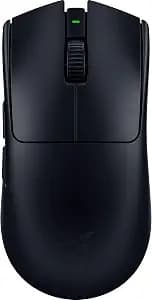
Razer Viper V3 Pro Wireless Esports Gaming Mouse: Symmetrical - 54g Lightweight - 8K Polling - 35K DPI Optical Sensor - Gen3 Optical Switches - 8 Programmable Buttons - 95 Hr Battery - Black
Beschreibung
The GOAT of wireless esports mice returns to reshape the competitive scene. Featuring a 54 g ultra-lightweight design and best-in-class technologies, the Razer Viper V3 Pro is the undisputed choice for peak performance and handling—the perfect weapon designed with and trusted by pros. Experience pro-grade tracking performance on a wide variety of surfaces including glass with the Focus Pro 35K Optical Sensor Gen-2, supported by intelligent functions and 1-DPI step adjustments for more granular aim and control. By combining Razer HyperPolling with the ultra-smooth connection of Razer HyperSpeed, experience flawless wireless performance with a true polling rate of up to 8000 Hz.
Vor- und Nachteile vergleichen
Ähnliche Produkte im direkten Vergleich
Eine zufällige Auswahl analysierter Produkte aus derselben Kategorie. Unterschiedliche Produkte sind nicht zwangsläufig austauschbar.

Redragon M908 Wired MMO RGB Gaming Mouse 12400 DPI Remapping Keys

Redragon M908 Impact RGB MMO Gaming Mouse, Optical Wired Ergonomic Mouse with Max 24,000 DPI, High Precision, 18 Programmable Macro Shortcuts, Comfort Grip, Black & White

Redragon M612 Predator RGB Gaming Mouse, 8000 DPI Wired Optical Mouse with 11 Programmable Buttons & 5 Backlit Modes, Software Supports DIY Keybinds Rapid Fire Button
Eine Sache weniger zu suchen
Vor dem Kauf: kurze Fragen
I have larger hands (over 19cm) or use a palm grip. Will this mouse be comfortable for me?
Based on community feedback from Reddit and YouTube reviews, the Viper V3 Pro's symmetrical, low-profile shape is primarily celebrated by claw and fingertip grip users. Those with larger hands or a strict palm grip often find it less comfortable for long sessions and sometimes experience cramping. If you're a dedicated palm gripper, you might want to consider a more ergonomic shape like the Razer DeathAdder V3 Pro.
Is the 8K polling rate worth it, and how does it affect the famous 95-hour battery life?
The 8K polling rate offers the absolute minimum latency, which top-tier esports players may appreciate. However, many users report the difference from 4K is subtle. It's important to know that the 95-hour battery life is achieved at the standard 1000Hz polling. Using 8000Hz mode significantly increases power draw, requiring more frequent charges—a point highlighted by several detailed reviewers.
Do I need to install Razer Synapse software to use this mouse?
For basic functionality (movement, clicks), no—it's plug-and-play. However, to customize DPI settings, reassign buttons, adjust polling rate, or create profiles, you will need the Razer Synapse software. This is a common point of discussion; users love the hardware but some wish for onboard memory to avoid relying on the software.
How does the build quality hold up, and are there any common quality control issues?
The overall build quality is highly rated for its rigid, lightweight construction. The most frequent mentions in reviews concern minor inconsistencies with the side buttons (some units having more pre-travel than others) or very occasional scroll wheel rattle. While these aren't widespread, they are noted. Razer's warranty is generally relied upon to address any significant defects.
I'm coming from a Viper V2 Pro or a Logitech GPX. Is the upgrade to the V3 Pro worth the price?
This is the most common pre-purchase question. The consensus among advanced users is: if you're deeply invested in competitive gaming and want the absolute latest in sensor technology (Focus Pro 35K), a slightly refined shape, and the *option* for 8K polling, the upgrade is justified. For most gamers, the performance difference from a V2 Pro or GPX is marginal, and those mice remain exceptional choices. The value is highest for enthusiasts seeking every possible edge.
Von einem ähnlichen Produkt mit mehr Bewertungen in dieser Kategorie: Pulsar Gaming Gears X2H Crazylight Wireless Gaming Mouse, Mini, Jet Black
How much does the Pulsar X2H CrazyLight weigh?
The manufacturer lists it at 37g, and reviewers consistently describe it as extremely lightweight and ultra-light while still feeling sturdy.
What grip styles does the X2H CrazyLight support?
The listing says its low-profile, wide symmetrical shape supports claw and relaxed claw grip, and reviewers describe it as ideal for claw/hybrid and claw-palm grip.
How do the clicks feel on this mouse?
Reviewers describe the clicks as crisp, sharp, and responsive, with one noting only a tiny amount of pre-travel that isn't noticeable in use.
What sensor and DPI does the X2H CrazyLight use?
It uses Pulsar's exclusive XS-1 sensor with up to 32,000 DPI, 750 IPS tracking speed, and 50g acceleration, and reviewers report flawless tracking and precise performance.
How is the build quality and durability of this mouse?
Reviewers report it feels high quality and strong despite its light weight, with one long-term user noting no problems after about a year; the listing adds the optical switches are rated for 100 million clicks.
Die Antworten beschränken sich auf das Angebot des Herstellers und die von uns analysierten Rezensionen. Fragen, die diese Quellen nicht abdecken, werden hier nicht beantwortet.
Transparent von Grund auf