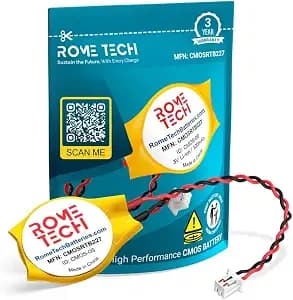
Rome Tech CMOS Battery for Lenovo ThinkPad T430 T450S T460 T430I T430S – Laptop Backup BIOS RTC 3V CR2032 T430 CMOS Battery for PC Motherboard with 2 Pin 2 Wire Cable (1-Pack)
Beschreibung
Rome Tech BIOS CMOS Lenovo T460 battery best suits to replace your broken or non-working old battery - we provide premium quality only; Laptop batteries compatible with Lenovo Thinkpad laptop models: T430 T450S T460 T430I T430S; Enjoy extended reliability of the CR2032 T480 battery for PC Motherboard and heat shrink of a high caliber - the CMOS Dell laptop battery replacement will last you for a long time; The size of the entire unit is extremely small - will fit in almost any electronic device requires 3V Motherboard Battery connector with 2 pins and 2 wires; Quick and simple Lenovo T430 CMOS battery CR2032 installation takes only 10 minutes of your time. Try our customer service for resolving any issues during Lenovo replacement battery
Vor- und Nachteile vergleichen
Ähnliche Produkte im direkten Vergleich
Eine zufällige Auswahl analysierter Produkte aus derselben Kategorie. Unterschiedliche Produkte sind nicht zwangsläufig austauschbar.

01AV478 L17L3P71 SB10K97620 Laptop Battery Replacement for Lenovo ThinkPad T480s Series Notebook L17M3P71 01AV479 SB10K97621 L17M3P72 01AV480 SB10K97622 11.58V 57Wh 4920mAh

TREE.NB Spare Battery for HP Pavilion 15-CC000NO 15-CC001NA 15-CC001NF 920046-121 920046-421 920070-855 TF03XL

XINGLT Replacement Laptop Battery for MacBook Air 13 inch A1466(Mid 2012, Mid 2013, Early 2014, Early 2015,2017) A1369(Late 2010, Mid 2011 Version) 7200mAh,fits A1496 A1405 A1377 [Upgraded 3.0]
Eine Sache weniger zu suchen
Vor dem Kauf: kurze Fragen
このバッテリーは、T430やT450sなどの特定のThinkPadモデルと互換性がありますか?
はい、このバッテリーは、T430、T430i、T430s、T450s、T460を含む多くのクラシックなThinkPad Tシリーズモデルの直接交換用として特別に設計されています。2ピン、2線のケーブルを備えたオリジナルの3V CR2032セルに一致します。パーツ番号を確認するために、常にノートパソコンのサービスマニュアルを再確認することをお勧めしますが、Redditなどのフォーラムでは、これらのモデルに対して物理的・機能的に完璧に適合すると一貫して報告されています。
これは公式のLenovo(OEM)バッテリーですか、それとも互換性のある代替品ですか?
これは高品質の互換性のある交換用バッテリーであり、公式のLenovoブランドの部品ではありません。電圧、容量、コネクタータイプにおいて、元の仕様を満たすか超えるように製造されています。多くのレビュアーは、CMOSエラーの修正においてOEM部品とまったく同じように機能すると指摘していますが、Lenovoのロゴは入っていません。
インストールプロセスはどれくらい難しいですか?特別な工具は必要ですか?
インストールは、基本的なノートパソコンの分解に慣れている人にとっては一般的に簡単です。通常、ノートパソコンの底面パネルを開けて古いバッテリーにアクセスするには、小さなプラスドライバー1本だけが必要です。コネクタはシンプルなスナップ式プラグです。ただし、紙の説明書は付属していません。初めての方は、まずYouTubeで「ThinkPad [お使いのモデル] CMOSバッテリー交換」のチュートリアルを検索することをお勧めします。多くのユーザーがこのステップが不可欠だと感じています。
バッテリーが到着時に充電切れ、または設置後すぐに動作しなくなった場合はどうなりますか?
ほとんどのユニットは開封後すぐに完璧に動作しますが、電子機器にはまれに欠陥が発生する可能性があることを理解しています。動作しないバッテリーを受け取った場合は、注文ページからすぐにカスタマーサポートまでご連絡ください。当社のポリシーに従い、欠陥品の交換または返金を提供いたします。フィードバックによると、ほとんどの問題はこのチャネルを通じて迅速に解決されています。
これは恒久的な修理ですか、それとも1年後にまた交換する必要がありますか?
正常に機能するCMOSバッテリーは、通常の使用条件下でオリジナルと同様に3〜5年持続するはずです。この交換は長期的な解決策を意図しています。数年前に交換した技術フォーラムのユーザーは、ThinkPadが今でも問題なくBIOS設定を保持していると報告することがよくあります。これは、信頼性の高い古いノートパソコンの寿命を延ばす費用対効果の高い方法です。
Von einem ähnlichen Produkt mit mehr Bewertungen in dieser Kategorie: A1405 A1466 Battery for MacBook Air 13 inch A1466 Early 2015, 2017 A1496
Will this battery fit my 2015 MacBook Air 13 inch?
Yes. The listing states it is compatible with MacBook Air 13" Model A1466 EMC 2925 (Early 2015 Version), and reviewers confirm it fit as it should and installed easily in their A1466 MacBook Air.
Is it easy to install this battery yourself?
Reviewers report it is simple to install, with one noting the included tools fit perfectly and the swap took about 10 to 15 minutes. The listing advises turning off the laptop and disconnecting power before installing the new battery.
How long does the battery last on a charge?
Reviewers report varied results: one got well over four hours depending on usage, another held a solid 2.5 to 3 hours with full usage, and one found battery life lacking but was happy overall.
What should I do if the new battery is not recognised by my laptop?
The listing recommends updating the BIOS settings, or disconnecting the old battery and holding down the power button for 20 seconds, then connecting the new battery.
What warranty or return options come with this battery?
The listing states it offers a 60-day money-back return, a 12-month replacement, and 2 years of tech assistance.
Die Antworten beschränken sich auf das Angebot des Herstellers und die von uns analysierten Rezensionen. Fragen, die diese Quellen nicht abdecken, werden hier nicht beantwortet.
Transparent von Grund auf