Was Kunden gut finden
Slim, light, easy to carry
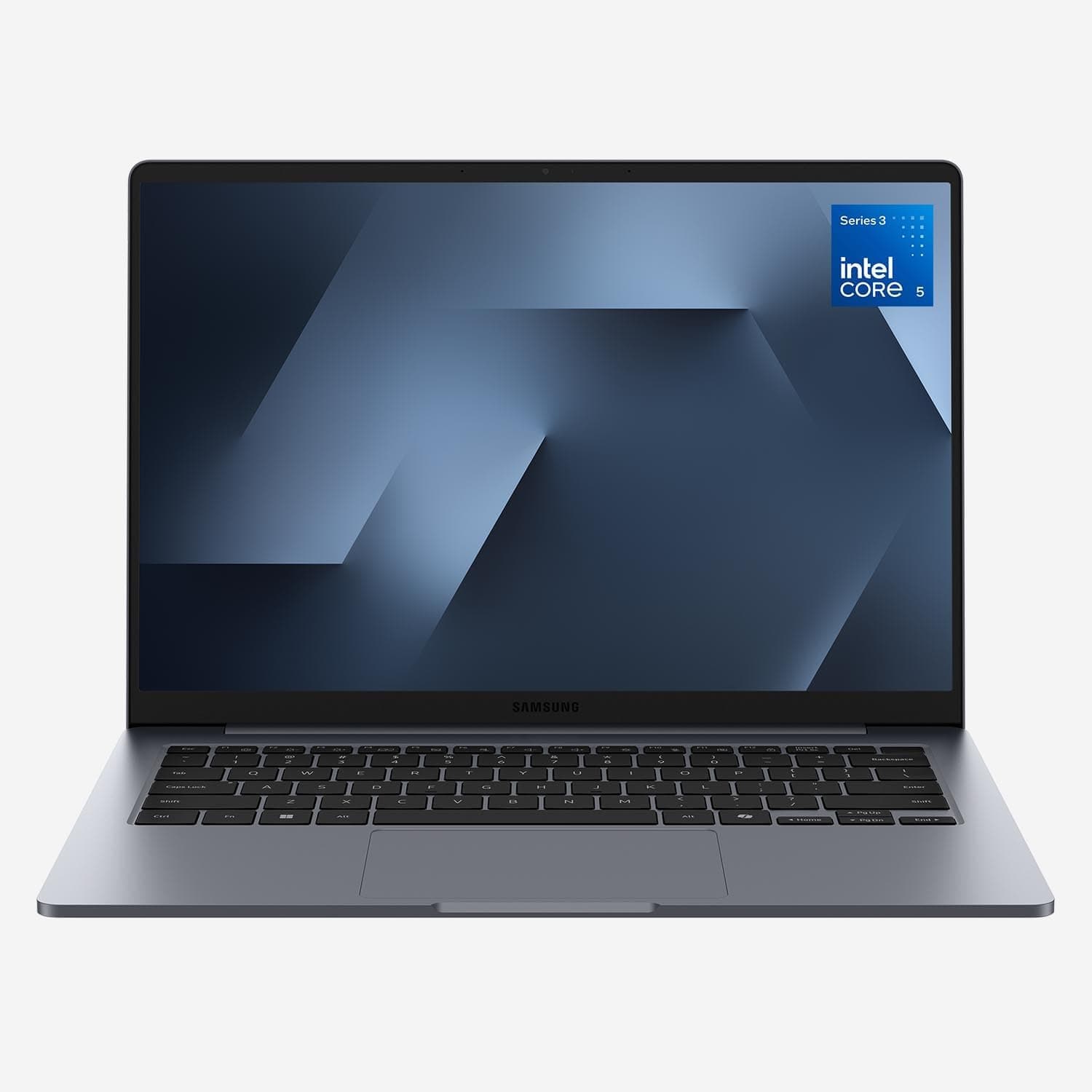
Several reviewers praise the laptop's compact, lightweight build and easy portability for daily carrying, including between classes on campus.
Unser Kauf-Fazit
Portable and easy to set up, but the base 8GB/256GB setup and non-backlit keyboard limit it.
Buyers who want a lightweight 14-inch laptop for everyday tasks like classes, note-taking, browsing, and streaming, and who can rely on cloud storage.
Buyers who need ample local storage, a backlit keyboard, or full internal audio out of the box on Linux.
Die 30-Sekunden-Lektüre
Was Kunden gut finden
Several reviewers praise the laptop's compact, lightweight build and easy portability for daily carrying, including between classes on campus.
Der wichtigste Vorbehalt
Several reviewers say the base 8GB RAM and 256GB storage feel tight for the price, with only about 145GB free and cloud storage recommended.
Bevor Sie sich entscheiden
One reviewer found the keyboard uncomfortable and wanted to return it, while another noted it is not backlit; try the keyboard before buying.
Von einem ähnlichen Produkt mit mehr Bewertungen in dieser Kategorie: 15.6'' AI Laptop with Office 365, I5-6200U,8GB RAM, 128GB SSD, Win 11 Home
Was Kunden gut finden
Several reviewers say it starts quickly and runs smoothly for basic tasks like schoolwork, browsing, and documents, with a clear screen and Office 365 included.
Der wichtigste Vorbehalt
One reviewer found it not very powerful and unable to handle a 4K YouTube video, noting it won't outperform other devices.
Bevor Sie sich entscheiden
One reviewer reported 6GB RAM and another described a Celeron processor, which differ from the listed specs; confirm the actual configuration before buying.
Beschreibung
Galaxy Book6 makes it easy to enjoy your everyday PC experience with reliable performance and tech that's easy to use. It comes with the latest Intel® Core™ Processor that makes everything from video calls to multitasking and browsing very responsive. A 14” FHD+ display enhances your work and play experience while the long lasting battery life and seamless Galaxy connectivity make every day feel more effortless.
Vor- und Nachteile vergleichen
Eine zufällige Auswahl analysierter Produkte aus derselben Kategorie. Unterschiedliche Produkte sind nicht zwangsläufig austauschbar.

ASUS Vivobook 16 Laptop - 16” WUXGA 16:10 Display - Snapdragon® X X1 26 100 Processor - 8 GB RAM - 512 GB SSD - Windows 11 OS Home - Cool Silver - X1607QA-PB54

AOC 2025 Laptop, 15.6 inch FHD Screen Laptop Computer, Work Laptops with Intel N95 Processor Laptop 16GB RAM, 512GB SSD, Windows 11 Laptop Computer, Light&Thin, Metal Shell, Webcam, Type-C, USB 3.2

ASUS TUF Gaming A15 Gaming Laptop, 15.6” FHD 144Hz Display, NVIDIA® GeForce RTX™ 3050, AMD Ryzen™ 5 7535HS, 8GB DDR5, 512GB PCIe® Gen4 NVMe™ SSD, Wi-Fi 6, Windows 11, FA506NC-ES51
Belege prüfen
Einbezogen bedeutet nicht als authentisch bestätigt. Markiert bedeutet nicht als Fälschung nachgewiesen. Dies sind analytische Einordnungen.
3 veranschaulichende Auszüge werden angezeigt, nicht der gesamte Rezensionsbestand.
Beautiful Hardware, but 8GB/256GB Is Tough at $800
“The Galaxy Book6 is one of those laptops I like quite a bit more when I am actually using it than when I look at the specification sheet. Samsung has done a very good job with the part I physically interact with every day. It is slim, clean, well put together, easy to carry around, and generally feels like a more premium machine than a lot of Windows laptops in this class. Then I remember this particular $799.99 configuration has 8GB of RAM and a 256GB SSD, and the value proposition becomes considerably harder to defend. That does not make it a bad laptop. Far from it. The chassis is one of the strongest reasons to consider it. Samsung has gotten very good at making Galaxy Books feel sleek without turning them into something fragile or overly decorative. The gray finish is understated, the design is clean, and the whole machine has the polished look I would expect from something meant to compete with premium thin-and-light laptops rather than budget plastic notebooks. The 14-inch display is also a nice fit for the size. The 16:10 aspect ratio is much better for actual work than older 16:9 laptop screens because I get more vertical room for documents, websites, spreadsheets, and code. At FHD+ resolution, text and UI elements look sharp enough at this screen size without creating unnecessary scaling issues, and the anti-glare finish is genuinely useful when I am working somewhere with overhead lighting or windows behind me. It is only a 60Hz IPS panel, so there is nothing especially exciting happening here from a display enthusiast perspective. Likewise, 350 nits is perfectly usable indoors but not unusually bright. The upside is that IPS still gives me good viewing angles and consistent image quality, and Samsung clearly prioritized a sensible productivity display rather than trying to turn the base Book6 into something it is not. Performance follows the same philosophy. The Intel Core 5 is absolutely capable of normal laptop work. Browsing with a pile of tabs open, Office, video calls, streaming, light photo work, and everyday multitasking all feel responsive. This is not the configuration I would buy for serious video editing, 3D work, large development workloads, or gaming, but those are also not the jobs this version is aimed at. The bigger limitation is the 8GB of RAM. In 2026, I consider 8GB adequate rather than comfortable on a Windows laptop in this price range. It will handle the intended everyday workload, but once I start piling on browser tabs, Teams or Zoom, Office applications, background utilities, and whatever else Windows has decided should live in memory that day, there simply is not much headroom left. The 256GB SSD bothers me for similar reasons. It is enough if most of my files live in the cloud and the laptop is primarily being used for work, school, browsing, and streaming. Once Windows, applications, updates, local photos, downloads, and a few larger programs start accumulating, though, 256GB becomes surprisingly small. At $800, I would have been much happier seeing 16GB of memory and at least 512GB of storage. To be somewhat fair to Samsung, we are currently living through what I can only describe as RAMageddon. AI and data-center demand have pushed memory manufacturers toward higher-margin server products, while both DRAM and NAND prices have climbed dramatically. That does help explain why new laptops across the market are becoming more expensive or arriving with stingier base configurations. It explains the specs. It does not necessarily make me like them. The good news is that almost everything surrounding those specifications feels well executed. Battery life is strong enough that this works as a genuine portable machine rather than something I instinctively bring a charger for every time I leave the house. The relatively modest processor and 60Hz display also make sense in that context because Samsung is clearly balancing performance around efficiency rather than chasing benchmark numbers. The keyboard and touchpad fit the same theme. The keyboard is cleanly laid out and comfortable for longer typing sessions, while the centered touchpad gives the whole deck a nicely symmetrical appearance. Samsung has avoided some of the strange design decisions that show up on laptops trying too hard to look different, and that makes the Book6 feel immediately familiar. The Galaxy ecosystem is another legitimate reason to choose this over an equivalently specced Windows machine from another manufacturer. Quick Share is extremely convenient for moving photos and files between a Galaxy phone and the laptop. Phone Link lets me deal with calls and messages without constantly picking up my phone. Storage Share can expose files from the phone directly on the PC, and Multi Control lets the laptop keyboard and touchpad interact with compatible Galaxy devices. Second Screen is particularly useful if I already own a Galaxy Tab. Being able to turn the tablet into an extra display without carrying another portable monitor makes a lot of sense for travel or working away from a desk. None of these features individually justify an $800 laptop, but together they create the same sort of ecosystem convenience that makes tightly integrated hardware more pleasant to live with. That is really where the Book6 earns back some of the goodwill lost on the spec sheet. The experience is cohesive. It wakes up, runs quietly, travels well, works nicely with other Galaxy devices, and feels like a premium everyday laptop rather than a cheap computer with a nice processor dropped into it. The two-year warranty is also better than the one-year coverage commonly bundled with consumer laptops, and I appreciate that on a machine I would realistically expect to carry around for several years. My problem is that the competition at around $800 is fierce. There are Windows laptops that give me 16GB of RAM, 512GB or even 1TB of storage, faster processors, or some combination of all three for similar money. They may not be as slim, as polished, or integrate as neatly with a Galaxy phone. Some of them look considerably more like "computer" than "nice object I would actually enjoy carrying." But performance per dollar is not the Galaxy Book6's strongest argument. That leaves me at four stars rather than five. I genuinely like the Galaxy Book6. The build quality is solid, the design is attractive, battery life is good, the 16:10 display is practical, and Samsung's ecosystem features are much more than marketing fluff if I already use Galaxy devices. I just think Samsung is asking a lot for the base configuration. Memory and storage prices are undeniably ugly right now, and that deserves some consideration, but 8GB/256GB still feels under-equipped for an $800 laptop in 2026. If the sleek hardware and Galaxy integration matter more to you than maximizing specifications for every dollar, the Book6 is easy to like. If value is the priority, there are competitors offering considerably more horsepower underneath a somewhat less attractive coat.”
Erkannte Signale: Konkretes Detail: quantity, entity, comparison · Liest sich wie eine authentische Stimme
14", pairs w/Galaxy phones. Best w/cloud storage (only @ 145G free space). No CD ROM/touch screen
“I picked up this Samsung 14" Galaxy Book6 laptop computer because I was in need of a new laptop. When it arrived it was a great looking computer, very slim came with a power brick and a USB-C power delivery (PD) cable. It's a Intel Core 5, 8G ram, 256G memory (213G capacity with only about 145G free space after updates), Windows 11 computer with 2 USB-c, 1 USB-a, 1 HDMI and port for a Kensington lock (I believe). It has a great matte, low-glare screen, Bluetooth functionality, and plays well with Samsung Galaxy Phones. Speakers are crisp but thin. Things it doesn't have: touch screen, DVD rom, backlit keyboard, a user manual. Things that could be better: The hard drive memory's free space and AI accuracy. Function: There's no instruction manual and no marked power button. I opened it and hit the unmarked black button in the upper right and the power did come on. It had taken 4 tries to connect to the internet after entering the password after that it stayed reliably connected. It wanted a computer name, optional phone link, optional phone pictures link, optional x-box sign in, and went into a 28-minute windows update based on my cable internet speed. From there it wanted a Microsoft account sign in, a hello (security) PIN #, restored settings from my Microsoft account, and offered me "1 month" of Microsoft 365 office suite for free, and then I chose layouts/colors etc, and it was done. The whole process took me 3 hours due to researching options. I also picked up my own case, headphones, external DVD-ROM, and Bluetooth mouse to round out my set up. Speed has been great, navigating the computer has been pretty easy and if I can't figure something out, I just ask the AI to find it. I didn't do the phone link because I prefer my phone and computer separate, but for young tech savvy students this would be a plus if they have a compatible Samsung phone. I have used Quick Share to get my photos from my phone to the laptop quickly and I like that a lot. Bluetooth is very easy to work for my headphones, mouse and cell phone Quick Share. The Copilot AI is par for the course for AI's - it makes a lot of promises it has a hard time producing and doesn't fact check enough, but it can answer some simple questions pretty fast. Careful "speaking" file names to it - it spells out punctuations (like underscore) into the file name and then can't find the file name because it didn't use the actual punctuation. All in all, I think the description was right on. I think this laptop is best for tech savvy students who are good with using cloud storage to expand the limited @ 145 G of Free Space and that want to quietly be connected to their phones and text messages while working. It's also good for entertainment with quality headphones to make up for the compact internal speakers. I've been streaming a lot, downloaded a DVD playback app for my external DVD ROM and will be working on consolidating a music library as well as doing some word processing. I do miss a touch screen and backlit keyboard though. All things considered (especially the limited 145G Free space), I like this laptop and look forward to using it a lot now that I have all my peripheral devices set up (and I may even use cloud storage to expand my space for movies, music and documents in the future).”
Erkannte Signale: Konkretes Detail: quantity, entity · Liest sich wie eine authentische Stimme
As of Oct. 2026: Linux Works Except for Internal Audio, and Support Is Coming Soon
“The packaging is fairly minimal and appears environmentally friendly. The laptop is protected by paper/pulp packaging, including a paper-like bag and a thin sheet between the keyboard and display. Samsung documents similar Galaxy Book6 packaging as using recycled paper, pulp and paper bags. Other than the laptop, you get a USB-C cable, charger and warranty information. No unnecessary fluff. The laptop itself has a sleek, refined feel. It is very light and thin, but doesn't feel cheap. The hinges feel solid, and the display folds back 180 degrees. I actually find that useful for watching movies in cramped places such as an airline seat. The 1920x1200 display is sharp and looks very nice. I especially like the extra vertical resolution. You can display a full 1080p image or movie and still have some room left for a toolbar. The keyboard uses the modern minimalist layout, with things like Page Up/Down assigned to other keys using Fn. I prefer older laptop keyboards with more dedicated keys, but despite that, this one has a surprisingly nice feel. The trackpad is smooth and responsive. Port selection is good: full-sized HDMI, two USB-C ports, USB-A, and a headphone jack. The webcam also looks quite good and worked immediately under Linux with Cheese. Samsung did a nice job hiding the camera lens and microphone openings. They're almost invisible unless you specifically look for them. So far the laptop has been quiet and cool, even while sitting on my lap. I haven't done any serious performance testing yet. For Linux users, I'm running Debian 13. This laptop is new enough that Debian Stable's stock kernel and firmware are too old for some of the hardware. I needed a newer kernel, Intel graphics firmware and Mesa packages from backports. After that, the display, Wi-Fi, Bluetooth, camera, keyboard and trackpad have all worked normally. The current exception is the internal audio. This model uses a very new Senary SN6247 SoundWire audio codec, and Linux support for it is only now being added upstream. The Intel audio hardware is detected, but the built-in speakers don't currently work. I expect this to be temporary as Linux support catches up. Users of newer distributions may need less manual setup than Debian Stable, but this particular audio codec is new enough that I would not currently assume it works out of the box. The 8GB RAM is soldered and cannot be upgraded. Samsung lists the 256GB NVMe SSD as occupying a storage slot, so it appears replaceable, although I haven't opened the laptop to verify it. The USB-C charger works fine, but is somewhat bulky and not especially power-strip friendly. Overall, I like the laptop, but at $799 I think it is overpriced for a Core 5 machine with only 8GB of non-upgradable RAM and a 256GB SSD. The specifications are almost high-end Chromebook territory. What you're paying for is the thin, lightweight construction, nice display, good keyboard and trackpad, and overall polish. It's a very pleasant laptop to use, but for $799 I would expect more RAM and storage.”
Erkannte Signale: Konkretes Detail: entity, process · Liest sich wie eine authentische Stimme
Eine Sache weniger zu suchen
Unfortunately, no — the 8GB of memory is soldered to the board, and there's no second SSD slot for the 256GB drive. If you regularly run heavy creative apps or keep huge file libraries, it's worth choosing a higher-spec configuration up front. For browsing, video calls, and Office work, most users find the standard setup plenty.
Yes — the headline ecosystem perks (Quick Share, Storage Share, Multi Control, Second Screen) work best within Samsung's Galaxy family. If you carry a Galaxy phone or Tab, reviewers consistently call these features a genuine time-saver. If you're on an iPhone or another Android brand, treat them as a bonus rather than a reason to buy.
The 16:10 FHD+ panel with an anti-glare coating and 350 nits is comfortable for documents, spreadsheets, and streaming, and many users praise the extra vertical space. It's crisp indoors and handles bright cafés reasonably well, though it's not a touchscreen and won't match premium OLED displays in direct sunlight.
This is an everyday-performance laptop, not a powerhouse. The Intel Core 5 and integrated graphics breeze through video calls, browsing, and light photo editing, but casual gamers report it's limited to indie titles and older games, and serious editors will want more RAM. If that's your workload, a dedicated-GPU model is the better fit.
Users report all-day battery life for typical productivity, and the laptop ships with a 2-year warranty plus AC adapter and USB-C cable. At under 3 lbs with fast wake and a clean design, it's strong value for students and remote workers — just confirm the 8GB/256GB spec matches your needs before checkout, since it isn't upgradeable.
Von einem ähnlichen Produkt mit mehr Bewertungen in dieser Kategorie: 15.6'' AI Laptop with Office 365, I5-6200U,8GB RAM, 128GB SSD, Win 11 Home
Fair question — and one plenty of Reddit and YouTube reviewers have raised. The "AI" here refers to Windows 11's built-in smart features (writing assistance, summaries, task suggestions) plus cloud-based tools, not a dedicated AI chip. If you're expecting Copilot+ PC-level on-device AI, this isn't that. But for everyday smart assistance while you work or study, it delivers real, usable help.
For browsing, Word, Excel, Zoom, email, and streaming, yes — it handles daily multitasking smoothly. Just set expectations: this is a 6th-gen processor with DDR3 memory, so it's built for productivity, not gaming or video editing. As one TikTok reviewer put it, *"buy it for documents, not for DaVinci Resolve."* If your workload is light-to-moderate, you'll be happy.
After Windows 11 and Office, you'll have roughly 70GB free — fine for documents and light media, tight if you store lots of photos or videos. The good news: the TF card slot supports expansion up to 2TB, so you can add space affordably without opening the laptop. Many student buyers treat the card slot as their "second drive."
The chassis is lightweight plastic — portable and fine for daily carry, though it won't feel premium. The 180° lay-flat hinge is a genuine highlight for presentations and screen-sharing, and reviewers consistently call it sturdy. Battery life is solid for classes and meetings, but "all-day" assumes moderate brightness; heavy use at full brightness will drain it faster. Honest verdict: good value, not ruggedized.
It's a great fit for students, parents buying a first laptop, light office workers, and anyone who wants an affordable Windows 11 + Office 365 machine with a sharp 1080p screen. Skip it if you need gaming, video editing, heavy multitasking, or future-proof upgradeable RAM — in that case, a refurbished business laptop or a model with a newer chip and 256GB+ SSD will serve you better. Buy it for value and everyday productivity, and it won't disappoint.
Die Antworten beschränken sich auf das Angebot des Herstellers und die von uns analysierten Rezensionen. Fragen, die diese Quellen nicht abdecken, werden hier nicht beantwortet.
Transparent von Grund auf