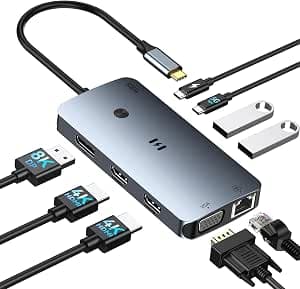
USB C Docking Station 4 Monitors 9 in 1 Laptop Docking Station Dual Monitor USB C Hub Multi Monitors Adapter with Dual HDMI, DisplayPort, VGA, 1Gbps Ethernet, PD 100W, 3 USB A/C 3.0 for Dell HP
Beschreibung
9-in-1 Multiport Docking Station: This USB-C to multi-monitor adapter features 2x HDMI ports with 4K@60Hz, 1x DisplayPort with 8K@30Hz, 1x VGA with 1080P@60Hz, 1x 1000Mbps RJ45 Ethernet, 1x 100W PD charging port, 1x USB-C 3.0 port and 2x USB-A 3. 0 5 Gbps data ports All ports of this docking station can be used simultaneously to meet your diverse needs; Triple/quad monitor docking station: With 4 high-resolution video outputs, this laptop docking station allows you to easily display three or four monitors to meet all your expansion needs. Under Windows, a single DisplayPort port supports up to 8K@30Hz (DP1.4). You can connect up to two or three external screens and display different images. On macOS, only identical images can be displayed on all four external screens due to system limitations. Up to 4K@60Hz (DP1.4) are supported. If you have any questions about resolution and video ports, please contact us; 100W PD Fast Charge Our USB-C docking station 3 monitors supports the PD 3.0 protocol and allows you to charge your laptop with a power of up to 85W, allowing you to connect multiple peripherals at the same time without worrying about power supply. Note: This USB C hub dual HDMI ports consumes 15W of power, so only 85W is available for charging the laptop. A power supply with a power of at least 65 W is recommended (not included); 5Gbps USB A/C 3.0 Data Transfer & Gigabit Ethernet The Selore USB C docking station laptops 2 monitors features 1x USB-C 3.0 and 2x USB-A 3.0 ports with transfer speeds of up to 5 Gbps, to which hard drives and other devices can be connected to transfer large files in seconds. This USB-C hub dual monitors supports a 1000 Mbps RJ45 Ethernet interface with stable network connection for fast movie downloads and reduced latency times when gaming; Widely compatible: This USB-C docking station 4 monitors is compatible with all devices that have a Thunderbolt 3/4/fully equipped USB-C port (DisplayPort Alt+Charging+Data), such as B. Dell XPS 13/15/17, HP Spectre x2/x360, Thinkpad E/X/S series, Surface Pro 9/X/Go/Laptop 3, Dell Latitude 13 700, MacBook Pro/Air 2022-2018 etc. Note: Please check your laptop's compatibility with this docking station. If you are not sure, you can also contact us so that we check the compatibility
Eine Sache weniger zu suchen
Vor dem Kauf: kurze Fragen
Can this docking station actually support 4 monitors as advertised?
Technically yes, but with important limits. Many users report that running 4 displays simultaneously requires specific laptop models (usually newer Dell or HP business lines) and often needs BIOS adjustments. For most laptops, a stable dual-monitor setup at 1080p is realistic. TikTok reviewers and Reddit threads suggest testing with your exact laptop model before relying on 4-monitor productivity.
Does the 100W Power Delivery really charge my laptop?
It delivers up to 100W, but charging speed varies by laptop and usage. Some users on YouTube noted that heavy multitasking while connected can cause the laptop battery to drain slowly instead of charging. For best results, use the included power adapter and avoid running processor-intensive tasks. If you have a 15-inch or larger laptop, consider testing the charge rate before a long work session.
I’ve seen complaints about overheating and build quality—should I be worried?
Multiple Reddit reviews mention the dock gets noticeably warm during extended use, but most users say it’s within normal operating range. The plastic casing feels less premium than metal docks from CalDigit or Anker. However, for a budget-friendly option, many office workers report it holding up fine for daily dual-monitor use. If you need all-day uptime or work in a warm environment, keep the dock in a ventilated area.
Will this work with my MacBook Pro M1/M2 or Lenovo ThinkPad?
Compatibility varies. It works well with many Dell and HP Windows laptops, especially models with Thunderbolt 3/4 support. For Apple Silicon Macs, dual-monitor support is limited—some users on TikTok reported only one external display working, or needing DisplayLink drivers. Lenovo ThinkPad users generally have better luck, but check your specific model’s manual for multi-display support. It’s not universally compatible, so read recent buyer reviews for your laptop make.
What happens if it doesn’t work with my setup—can I return it easily?
Most sellers offer a 30-day return window, but many users report mixed experiences with customer support. The product page doesn’t highlight a hassle-free return policy, so save all original packaging and test the dock immediately upon arrival. A few Reddit users complained about restocking fees or slow responses when asking for refunds. If compatibility is critical, consider buying from Amazon or a retailer with a known easy-return policy, and have your laptop model ready to verify compatibility first.
Die Antworten beschränken sich auf das Angebot des Herstellers und die von uns analysierten Rezensionen. Fragen, die diese Quellen nicht abdecken, werden hier nicht beantwortet.
Transparent von Grund auf