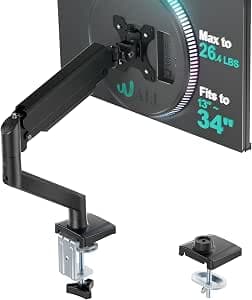
WALI Single Monitor Mount for 13-34 inch Screens, Adjustable Single Monitors Arm, Regular Screen up to 32 inch, 26.4lbs, Computer Monitor Stand for Desk, VESA 75/100mm (GSMP001N), Black
Beschreibung
Compatibility: WALI single monitor arm is designed to fit most flat or curved LCD/LED screens ranging from 13" to 34", regular screen up to 32 inch, max load capacity 26.4 lbs for flat screens and 19.8 lbs for curved screens, with standard Mounting Pattern mounting holes (75x75mm and 100x100mm); Full Adjustable: This monitor stand allows for full adjustment; it swivels +180°/-180°, tilts +70°/-45°,and rotates 360° for optimal workspace organization and efficient use of desk space. Its sturdy construction ensures long-term usability; Ergonomic Viewing Comfort: WALI single monitor mount allows you to extend your screen out by 19.3" and raise the arm up to 17.3" above the desktop by adjusting settings, allowing optimal screen positioning for reduced neck, eye and back strain; Easy Installation: WALI vesa monitor mount comes with two installation methods: clamp and grommet base. With straightforward instructions, you can set up your monitor arm effortlessly, making it a hassle-free addition to your desk; Package Includes: 1 x WALI Single Monitor Mount (Black), Mounting Hardware Kit, User Manual, experienced and friendly US based customer support available to assist 7 days a week
Vor- und Nachteile vergleichen
Ähnliche Produkte im direkten Vergleich
Eine zufällige Auswahl analysierter Produkte aus derselben Kategorie. Unterschiedliche Produkte sind nicht zwangsläufig austauschbar.

VIVO 13 inch Over Under VESA Monitor Shelf Mount, Holds Media Devices, Speakers, Routers, and More, Fits VESA 75mm, 100mm, 200mm, Black, MOUNT-SF01M

MOUNT PRO Laptop Arm Desk Mount for Max 22lbs 17" Laptop & Max 32" Monitor

VIVO Single 13 to 38 inch Ultrawide Monitor Arm Desk Mount, Regular Screens up to 32 inches, 22 lbs capacity, Fully Adjustable Stand with C-Clamp and Grommet Base, Black, STAND-V001
Eine Sache weniger zu suchen
Vor dem Kauf: kurze Fragen
I have a 34-inch ultrawide monitor. Will this mount hold it securely without sagging?
This mount is officially rated for screens up to 34 inches and 26.4 lbs. However, user experiences vary. Many users with standard 34" monitors find it works perfectly when adjusted correctly. Some owners of *heavier* 34" ultrawide models have reported slight sagging or difficulty achieving perfect balance. We recommend checking your monitor's exact weight and VESA pattern. If it's near the 26lb limit or has an unusual weight distribution, you might consider a mount with a higher weight capacity for optimal performance.
How easy is it to install and adjust the tension on the gas spring arm?
Most users find installation straightforward with the included tools. The key step is adjusting the gas spring tension to match your monitor's weight. This requires turning a hex key (provided) while supporting the monitor arm. It may take a few tries to get the "sweet spot" where the monitor floats effortlessly. A common tip from YouTube setup guides is to start with higher tension and loosen it gradually until it moves smoothly without drifting.
Will the heavy-duty clamp damage my desk?
The clamp is designed to be very secure, which is why it's so sturdy. To protect your desk, it includes a large rubber pad. For most desks—including many popular laminated tops—this prevents damage. However, users with very soft wood, pressed particleboard, or glass desks have expressed concern. If you're worried, placing a small, firm protective sheet (like a thin cutting mat) between the pad and your desk is a popular hack discussed on Reddit. Always ensure your desk's thickness is within the clamp's specified range (typically up to 3.3 inches).
Is the cable management effective, and how is the overall build quality?
The arm itself receives near-universal praise for its solid, metal construction and lack of wobble. The cable management consists of channels along the arm and plastic clips to bundle wires. While functional, some users note the clips can be brittle if overtightened. For a super-clean look, many recommend using your own velcro straps or zip ties, which are more durable for frequent adjustments. The finish is generally high-quality, though as with any mass-produced item, an occasional unit may have a minor cosmetic flaw.
Who is this monitor mount best suited for, and what's the return policy if it doesn't work for me?
This mount is an excellent value-driven choice for users with standard monitors up to 32 inches, students, remote workers, and gamers looking to free up desk space. It's perfect if you want sturdy, fluid adjustment without a premium price tag. If you have a monitor at the very upper limit of its weight/size rating or need extremely robust cable management, you might explore heavier-duty alternatives. The mount is covered by WALI's customer support, and return policies are handled through the retailer you purchased from (e.g., Amazon). Be sure to check their specific return window and process for a hassle-free experience if needed.
Von einem ähnlichen Produkt mit mehr Bewertungen in dieser Kategorie: FORGING MOUNT Heavy Duty Single Monitor Arm Stand Fits 17-42" Computer Screen, Adjustable Gas Spring Desk Mount Holds up to 33lbs, Full Motion with Clamp/Grommet Base, VESA Mount 75x75/100x100
Will this arm really hold a 40" or 43" monitor without sagging?
Yes — reviewers regularly mount 40" and 43" displays and report a secure, stable hold. Just keep your monitor (plus the VESA plate) under the 33 lb limit, and expect to spend a few minutes tightening the gas spring tension the first time. Once dialed in, it stays put.
How difficult is the tension adjustment? I've seen complaints about it.
It's the most common gripe, and honestly it's fair — the arm ships at minimum tension, so heavier screens need many turns of the included Allen key before they hold position. It's not hard, just tedious. Do it *before* mounting the monitor if you can, and you'll save yourself some frustration.
Will the clamp fit my desk? What if it doesn't?
The C-clamp works on most desks up to about 2" thick with a flat underside, while the grommet base is the better choice for thicker tops or desks with a metal frame or lip underneath. If you have a glass desk or an unusually beveled edge, measure first — and check the return policy before drilling anything.
Is installation really as easy as people say?
For most users, yes — 15 to 30 minutes solo with the included hardware and instructions. You'll need a Phillips screwdriver and the supplied Allen key. The only step that trips people up is tension tuning, and having a second person help lift larger monitors onto the plate makes it much smoother.
Is it worth it compared to cheaper arms or premium brands like Ergotron?
If you want heavy-duty capacity, both clamp and grommet mounting, and smooth gas-spring motion without paying Ergotron prices, this is a strong value pick — many TikTok and YouTube reviewers call it a "budget HX." If you need tool-free tension adjustment or plan to mount something over 35 lbs, step up to a premium arm instead.
Die Antworten beschränken sich auf das Angebot des Herstellers und die von uns analysierten Rezensionen. Fragen, die diese Quellen nicht abdecken, werden hier nicht beantwortet.
Transparent von Grund auf