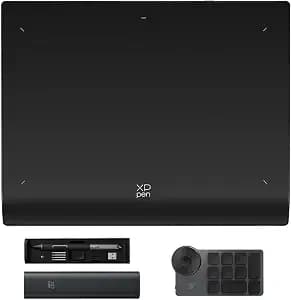
XPPen Wireless Drawing Tablet Deco Pro LW 2nd, 11 Inch Bluetooth Computer Graphics Tablet with X3 Pro Stylus & Mini Key-dial, Digital Drawing Pad for Animation, Digital Art, Video Editing
Beschreibung
Wireless Freedom: Connect to your device via Bluetooth v5.0, USB wireless receiver, or wire connection for reliable and flexible use. Deco Pro Gen2 drawing tablet supports two devices pairing simultaneously, switching between them with one click. Large-capacity lithium battery (1000mAh/3.7V) for over 10 hours of battery life. Note: Bluetooth wireless connection is not compatible with Android and Linux; X3 Pro Batteryless Stylus: The upgraded X3 Pro stylus with eraser features 16k levels of pressure sensitivity and a 60-degree tilt function for precise and natural drawing and painting; Elegant Design: One paper design provides a larger work area, which meets standard A3 paper size. The metal back plate helps your drawing pad cool better, preventing overheating and improving performance. Plus, the X-edge design will combat the tension and fatigue of your wrist; Efficient Workflow: With 10 keys and the ability to customize up to 4 sets of shortcuts, the XPPen Wireless Shortcut Remote is a powerful productivity tool for creation, study, work, and gaming; More Compatibility: Wire connection is compatible with Windows 11/10/8/7 (32/64bit), Mac X 10.10 or later, Android, Chrome OS 88 or later, and Linux。 Note: Bluetooth wireless connection is not compatible with Android 10.0 (or later), and Linux
Vor- und Nachteile vergleichen
Ähnliche Produkte im direkten Vergleich
Eine zufällige Auswahl analysierter Produkte aus derselben Kategorie. Unterschiedliche Produkte sind nicht zwangsläufig austauschbar.

GAOMON M10K Drawing Tablet, 10x6 inch Large Graphics Tablet with Touch Ring, 8192 Levels Battery-Free Stylus, 10 Hot Keys, Art Tablet for Design, Writing, Editing, Work with Mac, Windows, Android

HUION Inspiroy 2 Small Drawing Tablet with Scroll Wheel, 6.3 x 3.9, Pink | 6 Custom Keys, PenTech 3.0 Battery-Free Stylus for Drawing, Design and Writing, Works with PC, Mac and Android

Graphics Drawing Tablet, UGEE M708 10 x 6 inch Large Drawing Tablet with 8 Hot Keys, Passive Stylus of 16384 Levels Pressure, UGEE M708 Graphics Tablet for Paint, Design, Art Creation Sketch
Eine Sache weniger zu suchen
Vor dem Kauf: kurze Fragen
I keep reading about Bluetooth disconnections. Is this common, and can I fix it?
Yes, some users on Reddit mention random drops, especially when the tablet is more than 3 feet from the computer or the battery is below 20%. To minimize this, keep the Deco Pro LW 2nd within line of sight, update your Bluetooth drivers, and disable power-saving mode for the tablet in your system settings. Many find switching to wired USB mode solves it entirely for critical work.
The X3 Pro stylus tip feels a bit loose. Will it affect drawing precision?
You’re noticing a common quirk—the tip has a tiny amount of lateral play by design to mimic a real pen’s give. For sketching and general illustration, most users find it negligible. However, TikTok artists doing fine line art or calligraphy sometimes swap the tip with the firmer felt nib (included in the box) for a tighter feel.
Does this tablet work with Chromebooks or Android phones?
Yes, it supports Android 6.0+ devices and Chromebooks with Bluetooth 4.0 or higher, but note that the Mini Key-dial is only fully customizable on Windows and macOS. On mobile, the dial acts as a basic scroll wheel. You’ll need to download the XPPen app from the Google Play Store for driver installation.
How durable is the drawing surface? I’ve heard it scratches easily.
The matte texture reduces glare and feels paper-like, but it’s softer than glass. Several YouTube reviewers recommend applying the included screen protector immediately—it’s a thin film that preserves the feel while preventing micro-scratches from dust or heavy-handed strokes. Without it, you may see fine marks after a few months of daily use.
I’m a beginner—is this a good first drawing tablet, or should I look at alternatives?
For beginners on a budget, it’s an excellent start: the 11-inch size, low parallax, and responsive X3 Pro stylus make learning enjoyable. The wireless Bluetooth is a nice bonus for a tidy desk. That said, if you plan to do professional line art, some Reddit users suggest the Huion Inspiroy 2 M for better driver stability. For pure note-taking, the Deco Pro LW 2nd performs wonderfully.
Von einem ähnlichen Produkt mit mehr Bewertungen in dieser Kategorie: Anker USB A to USB C Cable, USB to USB C Cable (2-Pack, 6 ft, Black)
Is this cable compatible with fast charging?
It supports fast charging up to 15W (3A/5V) and Qualcomm Quick Charge, but it is not compatible with Power Delivery and does not support laptop charging.
How long is the cable and is that length practical?
It is 6 ft long, and reviewers say this gives enough room to use it in the car, at a desk, next to the bed, or with a wall charger without feeling too short.
Is the cable durable?
Reviewers describe it as sturdy, well-made, and more durable than basic rubber cables, with a braided nylon exterior that resists wear and tangling.
Does it support data transfer, and at what speed?
Yes, it supports data transfer speeds up to 480Mbps, and reviewers confirm it works for transferring data as well as charging.
Is this a USB 3.0 cable?
No, it is a USB 2.0 cable, as noted in the product specifications and pointed out by a reviewer.
Die Antworten beschränken sich auf das Angebot des Herstellers und die von uns analysierten Rezensionen. Fragen, die diese Quellen nicht abdecken, werden hier nicht beantwortet.
Transparent von Grund auf