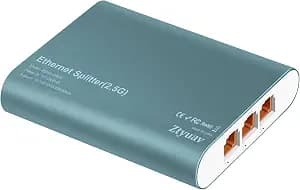
1 to 3 2.5Gbps Ethernet Splitter with POE Input, 4 Port 2.5G Network Switch with Type-C Power Cable for Cat5/5e/6/7/8 Cable, Aluminum Case, Plug & Play for Router PC ADSL Hub and Switch
Description
2.5Gb Ethernet Splitter 1 to 3: This Lan Splitter provides 1 x 2.5Gbps RJ45 input port and 3 x 2.5Gbps RJ45 output ports, 10/100/1000/2500Mbps, with a bandwidth up to 20Gbps. It supports three devices sharing the same ethernet line and transmission distance reaches 100M( the port speed will decrease with the number of connected devices ), saving network cable costs and easily achieving network expansion. It can be powered by Type-C cables included.; Unique Design: The Ethernet splitter has a delicate appearance, similar to the appearance of a "power bank", PoE or Type-C flexible power supply method, aluminum alloy texture and rounded corners, and a compact size that can be held by one hand. 6KV lightning and surge protection, aluminum alloy shell, stable and durable, more efficient heat dissipation than metal casing, and quiet operation. Intelligent port indicator light, with clear status at a glance.; VLAN Mode: One click enable port isolation. When the VLAN button is pressed, the three output ports will be isolated from each other and can only communicate with the input port. Divide the network into multiple regions to achieve network isolation for different devices or departments, thereby optimizing network performance and enhancing network security.; Widely Application: Fully compatible with various networked devices such as computers, hubs, switches, routers, printers, cameras, TVs, game consoles and wireless devices. It has a wide range of application network expansion scenarios and the compact size is particularly suitable for home and office use, and can be placed in weak current boxes.; Plug & Play: The internet splitter is easy to use, no need to configure, just use the USB-C to Type-C cable included to power the ethernet splitter then plug in the network cable to connect to your devices. Cat 8, Cat 7, Cat 6, Cat 5 and Cat5e network cables is compatible.
Compare the trade-offs
Similar products, side by side
A random selection of analyzed products from the same category. Different products are not necessarily interchangeable.

SODOLA 8 Port 2.5Gb Switch, Multi-Gigabit Unmanaged Ethernet Switch for Home Office Gaming, 8 x 2.5GBASE-T Ports, 1X10G SFP+,100Gbps Switching Capacity, Plug & Play, Fanless, Metal
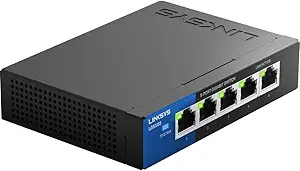
Linksys LGS105: 5-Port Business Desktop Gigabit Ethernet Unmanaged Switch, Computer Network, Wired Connection Speed up to 1,000 Mbps (Black, Blue)

Mini Ethernet Switch 5 Ports Gigabit Enhanced Protection 10/100/1000 Mbps Unmanaged Network Switch Plug & Play Office Ethernet Splitter Fanless Silent Metal Case Network Hub Desktop Design
One less thing to search
Before you buy: quick questions
Does this splitter support PoE passthrough, or do I still need to power each device separately?
This unit accepts PoE input (you supply the injector or PoE switch), but it does not provide PoE output to connected devices. Each device like a PC or router still needs its own power source. Many Reddit users appreciated this design for reducing cable clutter at the switch itself.
I’m using Cat6 cables with a 2.5Gbps router. Will this work out of the box?
Absolutely. This is a true plug-and-play unmanaged switch—just connect your router to any port, plug in your devices, and you’re good to go. It auto-negotiates speeds from 100Mbps up to 2.5Gbps on all ports. It works with Cat5e, Cat6, Cat7, and Cat8 cables.
The Type-C power cable seems short. Can I use my own adapter?
Yes, the included Type-C cable is meant for flexible placement on a desk or shelf. If you need a longer cable or want to use a standard USB-C power brick, any 5V/1A USB-C charger will work. Some TikTok users showed creative setups using a laptop’s USB-C port to power it temporarily.
Why does the aluminum case get warm, and should I be concerned?
The metal casing acts as a heat sink—it’s designed to pull heat away from the internal components. Under continuous 2.5Gbps traffic, the case may feel warm to the touch, but this is normal and within safe operating temperature. Just ensure adequate airflow around it.
Can I use this to split a single 2.5Gbps connection for multiple gaming PCs?
Yes, it functions as a standard network switch, not a true multi-port splitter. Each connected device gets its own dedicated port at full 2.5Gbps speed (up to the total switch capacity). Gamers on YouTube have reported stable connections and low latency for competitive titles. Just note there are no QoS or VLAN settings—it’s strictly plug and play.
From a similar, more-reviewed product in this category: TP-Link Deco X55 AX3000 WiFi 6 Mesh System, Deco X55(3-Pack)
How easy is the Deco X55 to set up?
Reviewers consistently describe setup as easy and quick, using the free Deco app on a phone with clear visual guidance. One novice noted that coordinating reboots of the ISP modem and first router was a bit confusing.
How much area does the 3-pack cover?
The manufacturer states the Deco X55 3-pack covers up to 6,500 square feet and eliminates dead zones. Reviewers report strong coverage in a 1,600-square-foot home, a two-story villa with thick precast walls, and a 240m2 two-floor house with concrete walls.
How many devices can the Deco X55 3-pack connect?
According to the manufacturer's listing, the Deco X55 3-pack is strong enough to connect up to 150 devices with strong and reliable Wi-Fi.
Does it support wired Ethernet connections?
The listing states each Deco X55 has 3 Gigabit Ethernet ports (6 in total for a 2-pack) and supports Wired Ethernet Backhaul for better speeds, and any unit can work as a Wi-Fi router.
How reliable is the connection over time?
One long-term reviewer reported a year of flawless performance with a single network throughout the house and low ping in games. Another reviewer, however, experienced the pods losing connection to the main router every couple of days, which increased to 2-3 times a day until the issue was resolved.
Answers are limited to the manufacturer's listing and the reviews we analysed. Questions those sources cannot support are not answered here.
Transparent by design