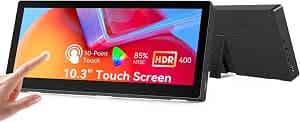
10.3 Inch Small Touchscreen Monitor, 400cd/m², IPS Stretched Bar LCD Mini Travel Touch Display 1920 * 720 HDMI USBC, Portable Touch Screen for Laptop Computer Windows Aida64 GPU CPU RAM Monitoring
Description
Versatile External Monitor with Multiple Modes: Functioning as an external monitor, it supports mirror mode, extend mode, and second screen mode to enhance your workflow and multitasking capabilitie,NOTE: touch function is not supported on iOS and iPadOS. (The MacOS stystem only support 2 point touch).When the monitor brightness is set to maximum, the monitor requires power to function properly.; Plug & Play Monitor for On-the-Go Productivity: This mini touch monitor plug&play design allows easy connection via one Type-C to Type-C cable (device with full-featured Type-C port), making it the perfect travel monitor for professionals. (Your device should support Thunderbolt 3.0/4.0 or USB 3.1 Type C DP ALT-MODE.); Small Monitor Touchscreen with FHD IPS Display: Experience vibrant visuals on this 10.3 inch portable monitor touchscreen featuring an FHD IPS touch screen and responsive 10-point touch for seamless interaction. Its 1920x720 resolution offers crisp, vibrant visuals, a 178°wide viewing angle, 60Hz refresh rate per; Adjustable Design with Built-in Speakers: 10.3 inch portable touch screen monitor Features a 90° adjustable stand, built-in speakers, and wall-mount capability, this touch monitors adapts to your setup preferences for optimal viewing and sound; Real-Time System Monitoring: Seamlessly integrates with AIDA64 (not included) to monitor your computer's performance. Keep an eye on CPU, GPU, system health, and more, all at a glance. (Tips: If you need to use Aida64, please download it yourself); Instructions for the touch function: Control Panel > Tablet PC Settings > Setup > A white screen then appears, press the Enter key until the text appears on the monitor. Then simply press the touchscreen with your finger and everything will work. Whether portrait or landscape format.
Compare the trade-offs
Similar products, side by side
A random selection of analyzed products from the same category. Different products are not necessarily interchangeable.

KTC 32 inch Curved Gaming Monitor, 2K 180Hz 185Hz 1440P PC Monitor, 1500R Frameless, 1ms, HDR, FreeSync Premium, DisplayPort/HDMI/USB, VESA Wall Mount, H32S17

LG 34G630A-B 34-Inch Ultragear WQHD (3440 x 1440) Curved Gaming Monitor, 240Hz, 1ms, FreeSync Premium, DisplayHDR 400, Built-in Speaker, HDMI, DisplayPort, USB Type-C, Tilt/Height/Swivel Stand, Black

Sceptre 4K IPS 27" 3840 x 2160 UHD Monitor up to 70Hz DisplayPort HDMI 99% sRGB Build-in Speakers, Black 2021 (U275W-UPT)
One less thing to search
Before you buy: quick questions
Is the touchscreen truly plug-and-play, or will I need to install drivers?
While the video signal over HDMI or USB-C is usually plug-and-play, the touch functionality typically requires a driver installation. Many users on tech forums note that downloading the correct driver from the manufacturer's website is key for reliable touch performance, especially on Windows 11. It's a quick setup for tinkerers but may not be ideal for those seeking absolute simplicity.
How durable is the monitor, and does it feel cheap?
The monitor is designed to be ultra-lightweight and portable, which does mean the plastic casing can feel less robust than a standard desktop monitor. Reviews often mention it has a "functional" build quality—it's perfectly durable for careful travel and desk use, but the thin bezels and light weight give it a utilitarian feel. It's not recommended for rough handling.
What is the 1920x720 resolution best used for? Who is this monitor really for?
The unique "stretched bar" aspect ratio is specifically excellent for vertical information displays. It's a hit with PC enthusiasts for real-time system monitoring (like Aida64 or GPU stats), streamers for chat windows, or professionals who want a dedicated panel for tools like audio mixers or code editors. It's less ideal for general web browsing or document work, where a standard square screen is better.
What cables are needed, and can it be powered by a single USB-C port from my laptop?
The monitor often requires two connections: one for video (HDMI or USB-C) and a separate USB-A cable to a power source (like a wall adapter or a powered USB hub) for the touch function. While some laptops can deliver enough power over a single USB-C cable for both, many users report needing the two-cable setup for consistent operation. Planning for some cable management is advised.
Can this monitor be VESA mounted, and is it bright enough for a well-lit room?
Yes, it typically includes a standard 75x75mm VESA mount pattern on the back, allowing you to attach it to an arm for a clean setup. The 400cd/m² brightness is adequate for indoor use beside your main monitor or in a room with normal lighting, but it may struggle with glare in very bright, direct sunlight.
From a similar, more-reviewed product in this category: KOORUI 24 Inch Gaming Monitor, 180Hz 1080P VA Display with 3000:1 Contrast
Does this monitor really run at 180Hz, and what do I need to enable it?
Yes — it's a native 180Hz panel, but you'll need to switch it on manually. Connect via the included HDMI cable (or a DisplayPort-capable setup), then set 180Hz in your GPU's display settings; it defaults to a lower refresh rate out of the box. Many Reddit and YouTube users note that enabling Adaptive Sync/FreeSync alongside it gives the smoothest experience, and it works with both AMD and NVIDIA cards.
How does the VA panel perform for gaming and everyday work?
The 3000:1 contrast gives noticeably deeper blacks than typical IPS budget monitors, which shines in dark game scenes and movies. For fast-paced competitive shooters, some TikTok and Reddit users mention mild ghosting/smearing in dark transitions — it's great for casual gaming, students, and office work, but color-critical creators or hardcore FPS players may prefer an IPS panel.
The stand looks basic — can I adjust the height or mount it?
Correct, the included stand only tilts (-5° to 20°) and doesn't offer height, swivel, or pivot adjustment, and a few users find the base slightly wobbly. The good news: it's VESA 100×100mm compatible, so a monitor arm or desk mount solves ergonomics entirely — a popular fix among dual-monitor and dorm-room setups.
What if I receive a unit with a dead pixel or backlight bleed?
Budget monitors can vary unit to unit, and some buyers report stuck pixels or corner bleed — but KOORUI backs it with a 3-year manufacturer warranty. If your unit arrives defective, contact the seller for a replacement or refund promptly; most users who did so report a smooth resolution, so inspect the screen within the return window.
Is it good value, and who is it best suited for?
At around $120, it's widely praised as one of the best budget 180Hz options — ideal for students, casual gamers, home-office users, and compact or dual-monitor setups. Just set expectations: no built-in speakers, a single HDMI plus VGA, and basic ergonomics. If you need height adjustment, color accuracy, or built-in audio, consider spending more on an IPS alternative.
Answers are limited to the manufacturer's listing and the reviews we analysed. Questions those sources cannot support are not answered here.
Transparent by design