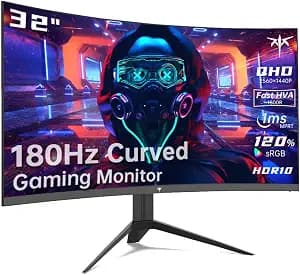
KTC 32 inch Curved Gaming Monitor, 2K 180Hz 185Hz 1440P PC Monitor, 1500R Frameless, 1ms, HDR, FreeSync Premium, DisplayPort/HDMI/USB, VESA Wall Mount, H32S17
Description
32 inch Wide Quad High Definition 2560 x 1440p, 1500R, Curved HVA Fast Panel, 120% sRGB, HDR10, 185Hz, 1ms(MPRT) Ultimate eSports Gaming Monitor. Experience the next innovation in PC gaming performance.; With FreeSync Premium & G-Sync Compatible,the graphic card and monitor refresh rates are synchronized to eliminate tearing and stuttering. Enhance gamers FPS,RTS,RAC gaming experience without question.; The GAMEPLUS - Crosshairs can provide sure-shot FPS accuracy & Black eQualizer can see hidden details in the darkness. Stamp out FPS drops with KTC's GAMEPLUS Timer for buttery-smooth and immersive gameplay.; With a premium platinum silver finish, OSD Sidekick & a 3-sided narrow bezel, navigate the menu and adjust screen settings with the easy-to-use joystick control and unveil maximum space for bigger, bolder gameplay.; Enjoy accurate and vibrant colors with 120% sRGB color gamut area coverage in an ultra wide 178° horizontal & vertical viewing angle, deeper blacks and brighter colors for seeing more details in dark and shadowy scenes.
Compare the trade-offs
Similar products, side by side
A random selection of analyzed products from the same category. Different products are not necessarily interchangeable.

10.3 Inch Small Touchscreen Monitor, 400cd/m², IPS Stretched Bar LCD Mini Travel Touch Display 1920 * 720 HDMI USBC, Portable Touch Screen for Laptop Computer Windows Aida64 GPU CPU RAM Monitoring

CAPERAVE 15.6'' Portable Monitor Touchscreen, FHD IPS Touch Screen with Tempered Glass, Travel Monitor with Kickstand & Speaker, HDMI USB C External Monitors for Mac Laptop Phone Computer

Amazon Basics 24 Inch (23.8 inch viewable) Monitor, FHD 1080P, Max 100Hz, VESA Compatible, Built-in Speakers, Black
One less thing to search
Before you buy: quick questions
The specs mention 185Hz, but I can only get 144Hz. Is this monitor defective or is there a specific setup required?
You're not dealing with a defect—this is a common configuration hurdle. To hit the higher refresh rates (180Hz/185Hz), you must use the DisplayPort cable included in the box, as the HDMI ports are limited to lower refresh rates at 2K resolution. You'll also need to manually set the refresh rate in your PC's display settings (Windows Settings > System > Display > Advanced Display). If you're using a console like a PS5, you'll be capped at 120Hz, which is normal for that interface. Many TikTok users noted the console limitation, so check your cable and settings first before concluding the panel is faulty.
Is this monitor suitable for productivity and office work, or is it strictly for gaming?
It does double duty, but with a caveat. The 1440p resolution offers crisp text for spreadsheets and documents, making it a viable office screen. However, the 1500R "gaming" curve takes some getting used to for design work or reading text—some users find it immersive, while others find it slightly distorting for straight lines in CAD or Excel. Additionally, the design features red accents that can look out of place in a minimalist work environment. If your job involves a lot of design work, this is a solid budget choice; if you are a graphics professional, you might want an IPS panel instead.
I’m worried about the "frameless" design and build quality. Is the bezel actually thin?
"Frameless" in marketing terms means the bezel is extremely thin, not non-existent. You will see a slim black border around the screen at all times. It is much smaller than older monitors, making it great for immersion, but it is not a seamless zero-bezel panel. Regarding build quality, the stand is surprisingly robust and allows for full height/tilt/swivel adjustments without feeling flimsy. The back panel is plastic, as expected at this price point, but it doesn't creak or flex under normal use. Just be aware that the VA panel is sensitive to pressure, so handle it from the edges during setup to avoid temporary distortion.
I saw in a review that the built-in speakers are bad. Should I rely on them, and are there any other missing extras?
This is the most consistent complaint across the board—the built-in speakers should be considered a "last resort" only. They lack bass and distort at high volume; we strongly recommend using a headset or external speakers. Aside from the audio, the packaging is a point of praise. The monitor comes with 100x100mm VESA mount support, a DisplayPort cable, and an HDMI cable, so you don't need to make a "surprise" trip to the electronics store for essential cables upon arrival.
Is this a good upgrade for a PS5 or Xbox Series X, or should I stick with a 4K TV?
It depends on your budget and desk space. This monitor handles a PS5 beautifully at 1440p with a 120Hz refresh rate, resulting in a much smoother experience than a standard 60Hz TV. However, it does not support 4K resolution, so you will be relying on the console's built-in supersampling. On the flip side, this monitor gets quite bright and supports FreeSync Premium, which is ideal for racing games and shooters. If you are sitting at a desk, this is the better option; if you are on a couch far away, a 4K TV is the better choice for sharpness. Game mode is functional, but don't expect it to completely replace a dedicated HDR television for movie watching.
From a similar, more-reviewed product in this category: KOORUI 24 Inch Gaming Monitor, 180Hz 1080P VA Display with 3000:1 Contrast
Does this monitor really run at 180Hz, and what do I need to enable it?
Yes — it's a native 180Hz panel, but you'll need to switch it on manually. Connect via the included HDMI cable (or a DisplayPort-capable setup), then set 180Hz in your GPU's display settings; it defaults to a lower refresh rate out of the box. Many Reddit and YouTube users note that enabling Adaptive Sync/FreeSync alongside it gives the smoothest experience, and it works with both AMD and NVIDIA cards.
How does the VA panel perform for gaming and everyday work?
The 3000:1 contrast gives noticeably deeper blacks than typical IPS budget monitors, which shines in dark game scenes and movies. For fast-paced competitive shooters, some TikTok and Reddit users mention mild ghosting/smearing in dark transitions — it's great for casual gaming, students, and office work, but color-critical creators or hardcore FPS players may prefer an IPS panel.
The stand looks basic — can I adjust the height or mount it?
Correct, the included stand only tilts (-5° to 20°) and doesn't offer height, swivel, or pivot adjustment, and a few users find the base slightly wobbly. The good news: it's VESA 100×100mm compatible, so a monitor arm or desk mount solves ergonomics entirely — a popular fix among dual-monitor and dorm-room setups.
What if I receive a unit with a dead pixel or backlight bleed?
Budget monitors can vary unit to unit, and some buyers report stuck pixels or corner bleed — but KOORUI backs it with a 3-year manufacturer warranty. If your unit arrives defective, contact the seller for a replacement or refund promptly; most users who did so report a smooth resolution, so inspect the screen within the return window.
Is it good value, and who is it best suited for?
At around $120, it's widely praised as one of the best budget 180Hz options — ideal for students, casual gamers, home-office users, and compact or dual-monitor setups. Just set expectations: no built-in speakers, a single HDMI plus VGA, and basic ergonomics. If you need height adjustment, color accuracy, or built-in audio, consider spending more on an IPS alternative.
Answers are limited to the manufacturer's listing and the reviews we analysed. Questions those sources cannot support are not answered here.
Transparent by design