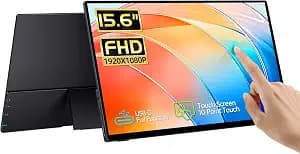
CAPERAVE 15.6'' Portable Monitor Touchscreen, FHD IPS Touch Screen with Tempered Glass, Travel Monitor with Kickstand & Speaker, HDMI USB C External Monitors for Mac Laptop Phone Computer
Description
Make Your Devices Touch-enabled: This portable monitor features a 10-point capacitive touch. It is compatible with both Windows and macOS systems, allowing you to add touch functionality to your laptop/PC/Macbook by simply connecting it via the fully featured USB-C interface. MUST NOTE: For Type-C 3.1 DP ALT-MODE or Thunderbolt 3/4 ports, use a Type-C to Type-C cable for power, video, and touch. Use HDMI+power cable+USB-A to USB-C cable for devices without these ports. No extra drivers are required.; FHD Portable Monitor: The portable monitor features a 15.6-inch touchscreen with a Full HD resolution of 1920x1080. Its advanced IPS display offers a wide viewing angle of 178°, delivering accurate and vibrant colors that are perfect for gaming and watching videos. Moreover, the monitor is equipped with blue light reduction and flicker-free technology, ensuring a comfortable viewing experience even during long periods of use and reducing eye strain.; Lightweight and Portable Travel Monitor: Designed to be ultra-slim and easy to carry. Its compact size makes it a convenient option for people on the go who need a second screen. Whether you're a traveler, student, gamer, engineer, or anyone who needs a portable monitor, this device can easily fit into any suitcase or backpack. It's perfect for those who require a second screen while out and about.; Full Size HDMI and USB-C Ports: The monitor has Standard HDMI and USB-C ports, providing versatile connectivity options. You can connect it to a variety of devices, including laptops, desktops, gaming consoles, and mobile phones.; Built-in Kickstand and Speakers: The CAPERAVE Portable Monitor has a built-in kickstand that allows you to easily prop it up at different angles, making it comfortable to use while sitting or standing. Additionally, it features built-in speakers that deliver clear and immersive audio, enhancing your multimedia experience.
Compare the trade-offs
Similar products, side by side
A random selection of analyzed products from the same category. Different products are not necessarily interchangeable.

KYY Portable Monitor 15.6'' Laptop Screen Extender w/180° Rotation Stand

acer SB272U Ebiip 27" WQHD 2560x1440 IPS Zero-Frame Gaming Office Monitor | AMD FreeSync Technology | Ultrathin Stylish Design | 100Hz | 1ms VRB | Low Blue Light | Display Port & 2 x HDMI 2.0 Ports

SANSUI 34 Inch 240Hz Ultrawide Curved Gaming Monitor UWQHD 3440×1440, 21:9 2K Curved Monitor 1500R,HDR400,Fast VA, PIP/PBP,AI Crosshair,AIPQ(Visual Enhance),MPRT 1ms,HDMI2.1*2,DP1.4*2(DP Cable Incl.)
One less thing to search
Before you buy: quick questions
Is the touchscreen truly responsive and compatible with my devices?
The 10-point capacitive touchscreen receives high marks for responsiveness, especially with modern Windows laptops, Macs, and many Android phones via USB-C. It's true plug-and-play for most devices. However, a small number of users on forums like Reddit have noted occasional lag or non-responsiveness with specific phone models or when using certain HDMI adapters. For optimal touch performance, a direct USB-C connection is recommended.
How stable and functional is the built-in kickstand?
The included kickstand provides a basic, lightweight stand for desk use. While it gets the job done, a common piece of feedback from the community is that it can feel a bit wobbly and only offers a limited range of angles. If you plan to use the monitor extensively on a desk, many users on TikTok and YouTube suggest pairing it with a more robust, inexpensive portable monitor stand or a VESA-compatible arm for greater stability and flexibility.
Can I power the monitor with just one USB-C cable from my laptop?
In most cases, yes! With a modern laptop that supports USB-C Power Delivery (like most MacBooks and many Windows ultrabooks), a single cable can handle both video signal and power—a true one-cable solution. For devices with lower power output (like some phones or older laptops), you may need to connect the second USB-A cable to a power source (like a wall adapter or a power bank) to achieve full brightness. The product page's "one cable solution" claim primarily applies to sufficiently powerful host devices.
What's the real deal with the speakers and build quality?
Let's be honest: the built-in speakers are best for system sounds and notifications. As many reviewers have pointed out, they are quite basic and lack bass, so you'll want headphones or external speakers for movies or music. On the plus side, build quality is generally praised for its solid feel and the protective tempered glass screen. While the vast majority of units arrive in perfect condition, as with any mass-produced electronics, there are rare reports of minor QC issues like backlight bleed.
Who is this portable monitor best suited for?
This monitor is a fantastic fit for students, remote workers, and travelers looking to easily create a dual-screen setup with their laptop. It's also popular for extending a smartphone display or for casual gaming on consoles like the Nintendo Switch. It's less ideal for users seeking a primary monitor replacement, competitive gamers needing a high refresh rate, or those who expect premium built-in audio. If your main need is a reliable, high-quality portable screen for productivity and entertainment on the go, this is a highly-rated choice.
From a similar, more-reviewed product in this category: KOORUI 24 Inch Gaming Monitor, 180Hz 1080P VA Display with 3000:1 Contrast
Does this monitor really run at 180Hz, and what do I need to enable it?
Yes — it's a native 180Hz panel, but you'll need to switch it on manually. Connect via the included HDMI cable (or a DisplayPort-capable setup), then set 180Hz in your GPU's display settings; it defaults to a lower refresh rate out of the box. Many Reddit and YouTube users note that enabling Adaptive Sync/FreeSync alongside it gives the smoothest experience, and it works with both AMD and NVIDIA cards.
How does the VA panel perform for gaming and everyday work?
The 3000:1 contrast gives noticeably deeper blacks than typical IPS budget monitors, which shines in dark game scenes and movies. For fast-paced competitive shooters, some TikTok and Reddit users mention mild ghosting/smearing in dark transitions — it's great for casual gaming, students, and office work, but color-critical creators or hardcore FPS players may prefer an IPS panel.
The stand looks basic — can I adjust the height or mount it?
Correct, the included stand only tilts (-5° to 20°) and doesn't offer height, swivel, or pivot adjustment, and a few users find the base slightly wobbly. The good news: it's VESA 100×100mm compatible, so a monitor arm or desk mount solves ergonomics entirely — a popular fix among dual-monitor and dorm-room setups.
What if I receive a unit with a dead pixel or backlight bleed?
Budget monitors can vary unit to unit, and some buyers report stuck pixels or corner bleed — but KOORUI backs it with a 3-year manufacturer warranty. If your unit arrives defective, contact the seller for a replacement or refund promptly; most users who did so report a smooth resolution, so inspect the screen within the return window.
Is it good value, and who is it best suited for?
At around $120, it's widely praised as one of the best budget 180Hz options — ideal for students, casual gamers, home-office users, and compact or dual-monitor setups. Just set expectations: no built-in speakers, a single HDMI plus VGA, and basic ergonomics. If you need height adjustment, color accuracy, or built-in audio, consider spending more on an IPS alternative.
Answers are limited to the manufacturer's listing and the reviews we analysed. Questions those sources cannot support are not answered here.
Transparent by design