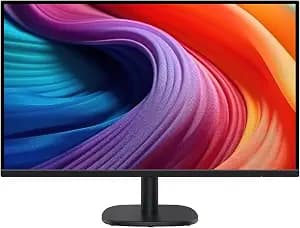
Amazon Basics 27 Inch Monitor, FHD 1080P, 100Hz, IPS, Built-in Speakers, VESA Compatible, USB Ports, Black
Description
An Amazon Brand
Compare the trade-offs
Similar products, side by side
A random selection of analyzed products from the same category. Different products are not necessarily interchangeable.

KTC 27 Inch QHD Computer Monitor, 2K 144Hz 1440P Gaming Monitor, Eye Care PC Monitor for Office Gamers, HDMI/DP, FreeSync & G-Sync, HDR10, VESA, Tilt Adjustable, H27T27S

Samsung 27" Odyssey G5 (G51F) Gaming Monitor - QHD (1440P), 180Hz, 1ms, AMD FreeSync, HDR10, Height Adjustable Stand, Black Equalizer, Virtual Aim Point, Auto Source Switch+, LS27FG512ENXZA

KTC 27 Inch Gaming Monitor 220Hz, 2K QHD Monitor 1ms w/ Speakers H27T22C-3
One less thing to search
Before you buy: quick questions
The reviews mention the stand only tilts. Will I be able to adjust the height for comfortable viewing?
You're right—the included stand offers tilt adjustment only, no height or swivel. For proper ergonomics, most users recommend pairing this monitor with a VESA-compatible arm or mount, which is a standard 100x100mm pattern. Many reviewers on Reddit noted they added a $30 arm and it solved the posture issue quickly. If you're setting up a permanent desk, factor that cost into your budget.
I see a VGA port on the specs. Will my modern laptop (USB-C/HDMI only) work with this monitor?
Absolutely, but you'll need an adapter. The monitor comes with a VGA cable in the box, not HDMI. If your laptop has HDMI, you can connect directly. For USB-C-only devices like MacBooks, a simple USB-C to HDMI adapter (or a USB-C to HDMI cable) will do the trick. A few reviewers mentioned they initially panicked when they saw the included cable, but a quick adapter purchase solved everything.
Is a 100Hz refresh rate good enough for gaming, or should I look for something with 144Hz?
For casual gaming, the 100Hz is a noticeable upgrade over standard 60Hz monitors—smooth scrolling and faster response in games like *Fortnite* or *Overwatch* feel solid. However, if you're a competitive FPS player who cares about every millisecond, you'll likely want a dedicated 144Hz+ gaming monitor. As one TikTok reviewer put it, “It's the perfect 'good enough' for 80% of gamers, but it won't win you a tournament.” For productivity and everyday use, it's buttery smooth.
How is the picture quality for photo editing? Are the colors accurate out of the box?
For the price, the color accuracy is genuinely impressive. Multiple user reviews noted the IPS panel delivers wide viewing angles and vibrant, balanced colors with minimal dead pixels—a rare find at this price point. Photoshop or Lightroom work will look great. However, if you're doing professional-grade print work or need Adobe RGB coverage, you'll want a more specialized, factory-calibrated monitor. For web design, social media content, or hobbyist editing, this is more than sufficient.
This monitor keeps popping up in my searches. What makes it so popular compared to other budget 27-inch monitors?
It comes down to three things: price, panel quality, and reliability. Buyers consistently mention that it feels like a $200 monitor at a budget price, with the IPS panel delivering vivid colors that surpass many Acer or LG competitors in the same range. The added perks—built-in speakers (decent for casual use, not for music), USB ports for simple connectivity, and a VGA port for retro systems—make it a versatile pick. It won't win any design awards, but nearly every reviewer says they'd buy it again, which says a lot in this category.
From a similar, more-reviewed product in this category: KOORUI 24 Inch Gaming Monitor, 180Hz 1080P VA Display with 3000:1 Contrast
Does this monitor really run at 180Hz, and what do I need to enable it?
Yes — it's a native 180Hz panel, but you'll need to switch it on manually. Connect via the included HDMI cable (or a DisplayPort-capable setup), then set 180Hz in your GPU's display settings; it defaults to a lower refresh rate out of the box. Many Reddit and YouTube users note that enabling Adaptive Sync/FreeSync alongside it gives the smoothest experience, and it works with both AMD and NVIDIA cards.
How does the VA panel perform for gaming and everyday work?
The 3000:1 contrast gives noticeably deeper blacks than typical IPS budget monitors, which shines in dark game scenes and movies. For fast-paced competitive shooters, some TikTok and Reddit users mention mild ghosting/smearing in dark transitions — it's great for casual gaming, students, and office work, but color-critical creators or hardcore FPS players may prefer an IPS panel.
The stand looks basic — can I adjust the height or mount it?
Correct, the included stand only tilts (-5° to 20°) and doesn't offer height, swivel, or pivot adjustment, and a few users find the base slightly wobbly. The good news: it's VESA 100×100mm compatible, so a monitor arm or desk mount solves ergonomics entirely — a popular fix among dual-monitor and dorm-room setups.
What if I receive a unit with a dead pixel or backlight bleed?
Budget monitors can vary unit to unit, and some buyers report stuck pixels or corner bleed — but KOORUI backs it with a 3-year manufacturer warranty. If your unit arrives defective, contact the seller for a replacement or refund promptly; most users who did so report a smooth resolution, so inspect the screen within the return window.
Is it good value, and who is it best suited for?
At around $120, it's widely praised as one of the best budget 180Hz options — ideal for students, casual gamers, home-office users, and compact or dual-monitor setups. Just set expectations: no built-in speakers, a single HDMI plus VGA, and basic ergonomics. If you need height adjustment, color accuracy, or built-in audio, consider spending more on an IPS alternative.
Answers are limited to the manufacturer's listing and the reviews we analysed. Questions those sources cannot support are not answered here.
Transparent by design