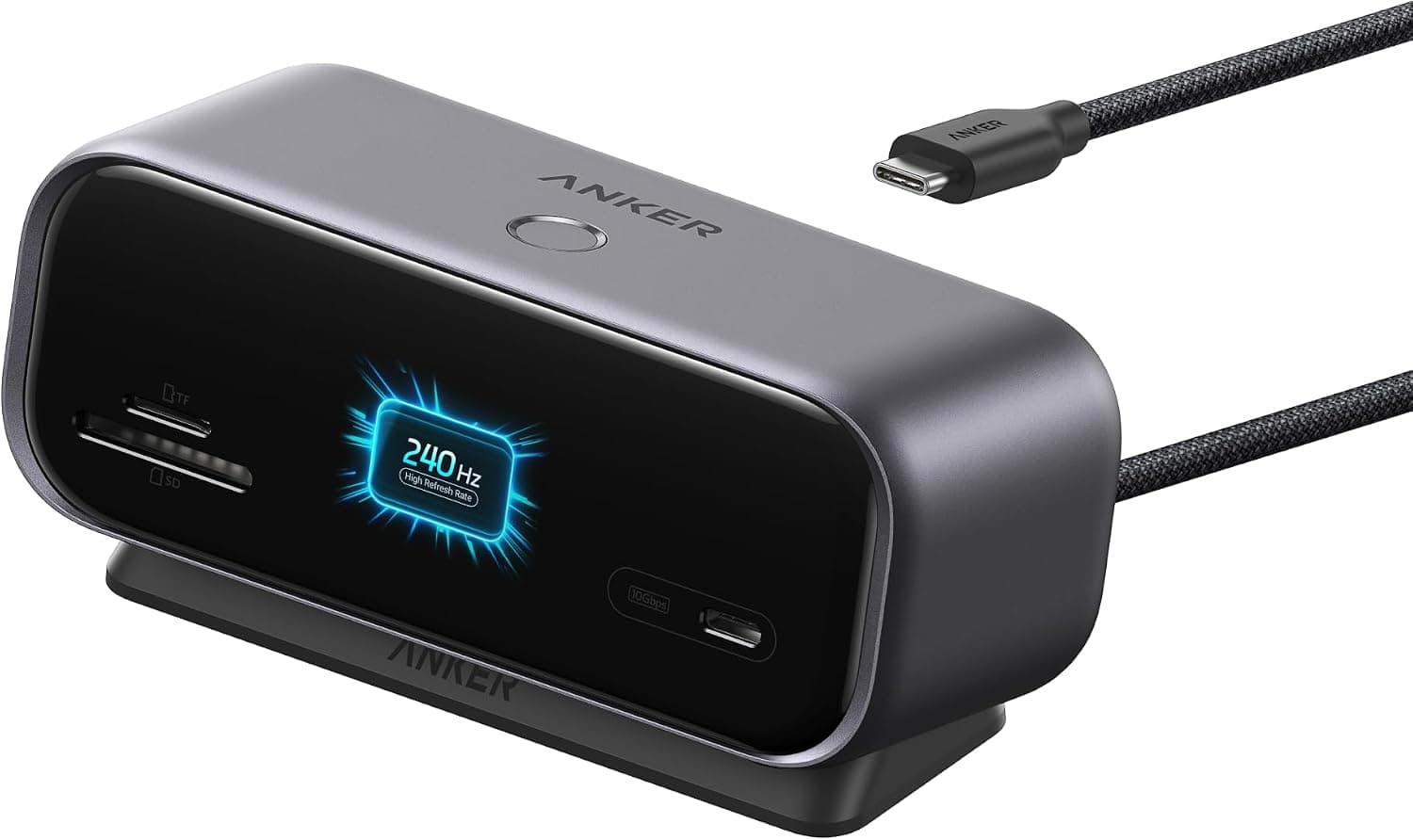
Anker Nano 10in1 USB C Hub, Smart Display Hub, Docking Station Dual Monitor

Anker Nano 10in1 USB C Hub, Smart Display Hub, Docking Station Dual Monitor

4 on Amazon15 ratingswww.amazon.com
Review reliability
82/ 100Grade B
Reviews generally match their star ratings, with most including specific, checkable details, no promotional phrasing, and many sounding authentic, though ratings lean toward the top with some mid-range opinions.
Affiliate link — commission is the same whatever the score.

Description

240 Hz Display 2 Ultra-Smooth Motion 3 Work and Play 4 Faster Visual Feedback Previous page Next page 1 Customizable Focus Timer 2 Your Desk Companion 3 Personalize Your Display 4 Web and App Control 5 Compact Space-Saver Previous page Next page 1 10-in-1 Connectivity 2 Declutter Your Desk 3 80W Host Charging 4 10Gbps Data Transfer 5 Magnetic Base Previous page Next page 1 Button Control Guide 2 Universal Compatibility 3 Resolution Support 4 Display Modes 5 Important Product Notes Model Number: A210C [Anker Desktop USB-C Hub] High-Bandwidth Chip Architecture: Powered by an advanced display controller, the hub efficiently manages video and data bandwidth across all ports. It is designed to support up to dual 2K@240 Hz displays alongside high-speed data transfer. (Note: Dual 2K@240 Hz output requires a host laptop USB-C port that supports for DP 2.1 with DSC 3:1). Minimal Footprint to Free Up Space: Measuring 5.12 × 1.97 × 2.19 in, the compact upright design takes up minimal desk space. Rear-facing ports route cables out of sight, keeping your setup clean and uncluttered. A Screen You Can Personalize: Beyond port status, the display doubles as a desktop photo frame and focus companion, timing your work sessions and reminding you to take gentle breaks throughout the day. Snap On for a Better Angle: The included magnetic base snaps on to lift the display to a comfortable viewing angle, while the residue-free adhesive keeps the hub stable on your desk. The base is washable and reusable. (Note: Adhesion performance may vary depending on the surface.) Compatibility: Works with laptops whose USB-C ports support Power Delivery, DisplayPort 1.2 / 1.4 / 2.1, and either USB4 or Thunderbolt 3 / 4 / 5. Supports Windows 10 / 11 and macOS. (Note: On macOS, both external monitors will display identical content. This device is not compatible with Linux.) Notes: 1. Extended display mode differs by system. On Windows, each external monitor can show different content. On macOS, both external monitors show the same content. 2. Dual 2K@240 Hz output requires a host laptop USB-C port that supports DP 2.1 with DSC 3:1. Video output is supported through HDMI and DisplayPort only. USB-C monitors are not supported. 3. Charger not included. For best performance, use a 65W or higher USB-C charger. Without an external charger, the hub draws power from your laptop for basic functionality. 4. The USB-A ports and the front USB-C port support data transfer only. They do not support charging or video output.

Compare the trade-offs

Similar products, side by side

A random selection of analyzed products from the same category. Different products are not necessarily interchangeable.

Check the evidence

What the review excerpts say

Included does not mean verified authentic. Flagged does not mean proven fake. These are analytical classifications.

Showing 3 illustrative excerpts, not the complete review set.

Included in analysis4.0/5 stars

Excellent Docking Station, Just Wish It Had Two HDMI Ports

“This docking station has worked great for my setup and has turned out to be one of the more useful accessories I've purchased. Everything connected quickly, performs reliably, and the additional ports make it easy to hook up multiple devices without constantly swapping cables. My only disappointment was my own fault. I didn't look closely enough before ordering and assumed it had two HDMI outputs. When it arrived, I realized one of the video connections is actually a DisplayPort. Since my previous docking station used dual HDMI, that meant I had to buy an additional cable to make the switch. Other than that minor issue, I have zero complaints. The dock is well-built, has plenty of connectivity options, and handles everything I've thrown at it. The smart display is a neat feature, and I like how the port layout helps keep cables organized and out of sight. If you're considering this dock, just make sure the HDMI/DisplayPort configuration matches your needs. If it does, I highly recommend it.”

Signals matched: Specific detail: entity, scenario, process · Reads as an authentic voice

Included in analysis5.0/5 stars

Another Anker Win – The Perfect Desktop Hub!

“Let me start by saying how much I LOVE Anker hardware, and this 10-in-1 Nano Hub absolutely does not disappoint. The convenience of having a single dock connected to all of my external peripherals with just a single cable running to my laptop is a game-changer for keeping my workspace clean and organized. The built-in smart display mini-screen is a very cool feature and surprisingly informative. My external monitor works perfectly through it, outputting exactly as expected without any display issues or lag. It is sleek, powerful, and easily one of my new favorite additions to my desk. Highly recommended for anyone looking to streamline their setup!”

Signals matched: Specific detail: quantity, scenario · Reads as an authentic voice

Included in analysis5.0/5 stars

Great Compact Hub

“The hub quality is excellent, and its compact design fits nicely into a desk setup. It has one HDMI and one DisplayPort for monitor connections. Tested it with a MacBook M5 and M4 Mac mini. It can drive a Gigabyte M28U at 4K 144Hz. Run it with a Lenovo laptop and LG 27U and Dell U2422H monitors. The display performance was good, and the hub remained relatively cool for extended use. Using a 65W USB-C power supply, the hub can charge my Lenovo laptop. However, Anker does not include a power adapter in the package.”

Signals matched: Specific detail: quantity, entity, scenario, process · Reads as an authentic voice
One less thing to search

Before you buy: quick questions

Will this hub actually run two monitors at the same time, or is that just marketing?

Yes—dual-monitor output is one of its strongest features, and most reviewers confirm it works smoothly for 1080p and 1440p displays. That said, a few users with ultrawide or older monitors ran into handshake issues, so it's worth checking your monitor's input specs before buying. If you're on a mainstream Dell, LG, or Samsung panel, you should be fine.

Does it work with MacBooks and Windows laptops, or do I need special drivers?

It's plug-and-play on both macOS and Windows—no drivers required. MacBook users (M1/M2/M3) report a clean single-cable setup, and Windows users appreciate that it just works out of the box. Linux users should note that a few have reported minor quirks, so it's not the safest pick if you're on Ubuntu or Fedora.

Is the smart display actually useful, or just a gimmick?

It depends on your workflow. Fans say it's genuinely handy for monitoring port activity and power draw at a glance, and it adds a premium feel to the desk. Skeptics on Reddit and TikTok call it a novelty that wears off after a week—so if you're buying purely for the display, temper your expectations. If you're buying for the ports and it happens to have a screen, you'll be happy.

How does it compare to cheaper 10-in-1 hubs from Ugreen or Baseus?

You're paying a premium for Anker's build quality, cooler operation, and the integrated display. Ugreen's Revodok Pro offers more HDMI ports for less, and Baseus undercuts it on price—but reviewers consistently say the Anker feels more solid and runs cooler under load. If raw port count is your priority, go cheaper; if reliability and desk aesthetics matter, the Anker earns its price.

What if my monitor isn't compatible—can I return it?

Yes, standard return policies apply, and Anker's after-sales support has a solid reputation among reviewers. That said, to avoid the hassle, double-check that your monitors support USB-C alt mode or DisplayPort over USB-C before ordering. A quick look at your monitor's spec sheet will save you the round trip.

From a similar, more-reviewed product in this category: USB C to USB Hub Multiport Adapter with 4 USB-A & 3 USB-C 3.0 Port

Does this hub support charging?
From the manufacturer's listing

No. The manufacturer's note states this device only supports data transmission, not charging.

How many devices can I connect at once?
From the manufacturer's listing

Up to 7 devices can be connected simultaneously through a single port, including a keyboard, mouse, external HDD, and flash drives.

What data transfer speed does this hub offer?
From the manufacturer's listing

It uses USB 3.0 technology with data transfer rates up to 5Gbps, which the listing describes as 10x faster than USB 2.0.

How long is the cable on this hub?
From the manufacturer's listing

The hub has an integrated 1-foot cable, which the listing describes as offering a balance of reach and neatness for routing on a desk, in a laptop stand, or behind a monitor.

What operating systems and devices is this hub compatible with?
From the manufacturer's listing

It supports Windows, macOS, and Linux, and is listed as compatible with laptops, MacBook, tablets, USB flash drives, and iMac.

Answers are limited to the manufacturer's listing and the reviews we analysed. Questions those sources cannot support are not answered here.

Transparent by design

Understand the analysis