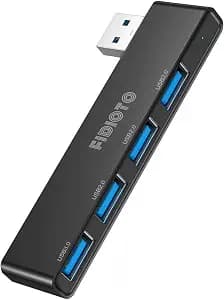
USB Hub, Fidioto 4 Port USB Adapter(1 * 3.0 Hub, 3 * 2.0 Hub), Networking Hub for Laptop, iMac Pro, MacBook Air, Mac mini/Pro, Surface Pro, Notebook PC, USB Flash Drives and Mobile HDD Etc.
Description
USB Hub tansfer a single USB port into 4 USB data ports. you can get 1 USB 3.0 and 3 USB2.0 ports with your laptop. Support 4 ports to work at the same time, without any pressure, and keep the temperature in the middle range. Plug and play, no need driver, easy to use.; USB3.0 Super Speed Networking Hub: 1*USB 3.0 and 3*USB 2.0. The USB 3.0 supports super faster data transfer up to 5Gbps which is 10X faster than USB 2.0 (480 Mbps), which allows you to transfer datas in just seconds; USB extension hub was built in OTG function chip, it can easily connect the mouse, keyboard, USB disk, and other USB devices.; This 4-port USB expander has a wide range of compatibility, including USB cables, flash drives, mice, keyboards, mouse, card reader, cellphone OTG adapter, printer, camera, USB fan. Also works with hubs for MacBook Pro 2021/2020/2019, Google Chromebook Pixelbook, Samsung series and laptops and more USB devices. Note: This hub support output max current up to 900mA, so some HDDs that need a current of more than 900mA need an external power adapter.; Smaller usb hub: Size only: L9cm * W2.1cm * H1cm; weight: 24g. the USB extension cable multiple port has been Special designed to be as slim and light as possible, ideal for your working and traveling with ultrabook. easy to store and use. Advanced chipset with good thermal design, will not heat even if used for a long time.; Package Contents: 1 USB Hub Four Ports, More suitable for using the USB interface on the right side of the computer. If anything is wrong or you are not 100% satisfied,Please feel free to contact us,Customer-first is our objective!
Compare the trade-offs
Similar products, side by side
A random selection of analyzed products from the same category. Different products are not necessarily interchangeable.

Powered USB 3.2 to Type-A, Type-C Hub, SmartDelux 10Gbps 10 Port Adapter, Individual LED Switches end High-Speed Data Transfer, Power Adapter 60W, USB Extension for Laptop, Flash Drive, PC and More

P9 USB C Docking Station, intpw 9-in-1 USB C Hub with 4K HDMI, PD 100W, 3 Type A/C 3.0 5Gbps, 2 Type-A 2.0, SD/TF, Aluminum USB Hub for Laptop,MacBook, iPad, iPhone 17 Series

VENTION USB C Hub for MacBook Neo/Air/PRO, 80Gbps Detachable Magnetic 8K USB-C Dock with 4K@240Hz HDMI, 140W MAX PD SD/TF Reader for Laptops/ipad, Charging Multiport Adapter(Silver)
One less thing to search
Before you buy: quick questions
Is this USB hub suitable for charging my phone or tablet?
This hub is designed primarily for data transfer. While it may provide a small amount of power, many users on social media and review platforms note that charging phones or tablets is very slow and unreliable, especially if other ports are in use. For consistent charging, we recommend using your device's original wall charger or a dedicated powered USB hub.
How well does it fit laptops with side-mounted or recessed USB ports?
The cordless, plug-in design is perfect for laptops with easily accessible rear or front ports. However, a common point of feedback is that if your laptop's port is on the side or in a deep recess, the hub can protrude and may feel less secure. It does not include an extension cable. Checking your laptop's port placement before purchase is advised.
I've read reviews about overheating. Should I be concerned?
It's normal for any electronic device to generate some warmth. This hub may become noticeably warm during sustained, high-speed data transfers—like backing up large files to an external hard drive. This is a frequent mention in user discussions. For typical use with mice, keyboards, and flash drives, heat is minimal. For constant, heavy data workloads, a hub with a metal casing or active cooling might be a better fit.
What devices and operating systems is it compatible with?
It's widely compatible and truly plug-and-play. It works seamlessly with Windows, macOS, and ChromeOS laptops like MacBooks, Surface devices, and many others. It's perfect for connecting standard peripherals like wired mice, keyboards, flash drives, printers, and webcams. For specific device compatibility, checking your device's manual is always a good idea.
Who would benefit most from this USB hub?
This hub is an excellent value for students, remote workers, and travelers who need a compact, portable solution to add a few extra ports for basic peripherals. If your main needs are connecting a mouse, a presentation clicker, and a USB drive for a lightweight laptop like a MacBook Air, the rave reviews about its size and simplicity apply to you. It's less ideal for users who need to simultaneously power multiple high-demand devices.
From a similar, more-reviewed product in this category: USB C to USB Hub Multiport Adapter with 4 USB-A & 3 USB-C 3.0 Port
Does this hub support charging?
No. The manufacturer's note states this device only supports data transmission, not charging.
How many devices can I connect at once?
Up to 7 devices can be connected simultaneously through a single port, including a keyboard, mouse, external HDD, and flash drives.
What data transfer speed does this hub offer?
It uses USB 3.0 technology with data transfer rates up to 5Gbps, which the listing describes as 10x faster than USB 2.0.
How long is the cable on this hub?
The hub has an integrated 1-foot cable, which the listing describes as offering a balance of reach and neatness for routing on a desk, in a laptop stand, or behind a monitor.
What operating systems and devices is this hub compatible with?
It supports Windows, macOS, and Linux, and is listed as compatible with laptops, MacBook, tablets, USB flash drives, and iMac.
Answers are limited to the manufacturer's listing and the reviews we analysed. Questions those sources cannot support are not answered here.
Transparent by design