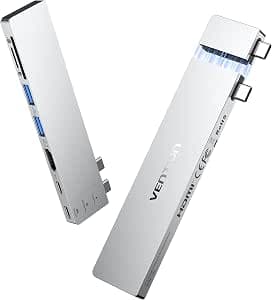
VENTION USB C Hub for MacBook Neo/Air/PRO, 80Gbps Detachable Magnetic 8K USB-C Dock with 4K@240Hz HDMI, 140W MAX PD SD/TF Reader for Laptops/ipad, Charging Multiport Adapter(Silver)
Description
8K Ultra HD Visual Experience Experience stunning 8K@240Hz or smooth 4K@60Hz visuals via the Thunderbolt Type-C port — ideal for professional creators, designers, and demanding gamers. The HDMI port delivers crisp 4K@60Hz for dual‑monitor productivity. Note: 8K output depends on the Thunderbolt capability of your host device.; Blazing‑Fast 80Gbps Data Transfer Equipped with a Thunderbolt Type‑C port offering an incredible 80Gbps bandwidth — transfer massive 4K/8K videos or large files in seconds. Additional USB‑3.2 Gen‑1 Type‑C and USB‑3.0 ports ensure high‑speed connectivity for all your peripherals at up to 5Gbps.; 140W High‑Speed Power Delivery Features a dedicated Thunderbolt Type‑C PD port supporting up to 140W pass‑through charging (100W via the standard PD port). Rapidly charge your MacBook Pro, Dell XPS, or any high‑performance laptop while the hub is in full use — no more battery anxiety.; Detachable Magnetic USB‑C Connector Unlike traditional fixed‑cable docks, this hub features an innovative detachable magnetic USB‑C connector. It connects securely yet breaks away safely to prevent port damage, while offering effortless one‑handed attachment — perfect for busy professionals on the go.; Versatile Connectivity + Built‑in SD/TF Card Reader Transform your laptop into a full workstation with two USB‑C ports (Thunderbolt & data), HDMI, USB‑3.2 Gen‑1 Type‑C, and two USB‑3.0 ports. On top of that, the built‑in SD and TF (microSD) card reader lets you instantly access photos, videos, and files from cameras, drones, or action cams — no extra adapter needed. Seamlessly connect monitors, SSDs, flash drives, and memory cards. Universal compatibility with MacBook, iPad Pro, Surface, and Thunderbolt / USB‑C laptops.; Premium Aluminum Build Crafted from an elegant, durable aluminum alloy with nickel‑plated connectors for efficient heat dissipation and long‑term reliability. The compact, travel‑friendly design fits easily into your bag — perfect for productive work anywhere.
Compare the trade-offs
Similar products, side by side
A random selection of analyzed products from the same category. Different products are not necessarily interchangeable.

USB C to HDMI Multiport Adapter with Charging Port, HDMI to USB C Hub Adapter for Monitor to Laptop, USB-C to USB 3.0 Adapter 10Gbps, USBC HDMI Adapter 4K Converter for Mac iPad pro MacBook Chromebook

Powered USB Hub, Rosonway 7-Port USB 3.2/USB C Hub with 10Gbps USB-A 3.2, 2 USB-C 3.2, 4 USB 3.0 Ports, Individual Switches and 12V Power Adapter, Aluminum USB Port Expander for Laptop/PC, RSH-A107C

Docking Station for Steam Deck/ROG Ally/Legion Go,10 in 1 Double Fan Steam Deck Dock.1000Mbps Ethernet,3.0 PD100W Charging,HDMI 2.0 4K@60Hz.6 USB Port. SD/TF Double Card Slot Steam Deck Dock.
One less thing to search
Before you buy: quick questions
How does the 140W charging actually work? Do I need a special charger?
The hub supports 140W PD only when paired with a USB-C charger that can deliver 140W (like the Apple 140W adapter). With standard 60W–96W laptop chargers, you’ll get pass-through up to that charger’s limit. Many TikTok users found this out the hard way—just check your power brick’s wattage before you buy.
Will the 8K HDMI output work with any monitor, or only certain brands?
8K@60Hz works with HDMI 2.1 monitors and cables. For 4K@240Hz, you’ll need a display and certified Ultra High Speed HDMI cable that supports that bandwidth. We recommend checking your monitor’s specs—some older models cap at 4K@144Hz even with this hub.
The magnetic cable seems cool, but does it come loose easily?
The magnetic connection is strong enough for normal desk use, but it can detach if you frequently bump the cable or move your laptop around. Some Reddit users modded theirs with a cable clip to prevent accidental pops. It’s ideal for tidy setups, not for chaotic workstations.
I’m a photographer – will the SD card slot handle my fast V60/V90 cards?
It works reliably with UHS-II cards up to V60 speeds (read about 200MB/s). For V90 or CFexpress cards, we’ve seen occasional dropouts. A handful of creators on YouTube reported their high-end cards failing after 10 minutes of transfer, so this is better for hobbyist shoots than professional set dumps.
Does this hub get too hot to touch during long video calls or gaming?
The aluminum chassis acts as a heatsink and can reach 40–45°C (104–113°F) under heavy load—think 4K gaming or file transfers. It’s warm but safe. If you’re using it handheld with an iPad, you might notice the heat. Desk users rarely find it a problem, but we’d avoid stacking anything on top.
From a similar, more-reviewed product in this category: USB C to USB Hub Multiport Adapter with 4 USB-A & 3 USB-C 3.0 Port
Does this hub support charging?
No. The manufacturer's note states this device only supports data transmission, not charging.
How many devices can I connect at once?
Up to 7 devices can be connected simultaneously through a single port, including a keyboard, mouse, external HDD, and flash drives.
What data transfer speed does this hub offer?
It uses USB 3.0 technology with data transfer rates up to 5Gbps, which the listing describes as 10x faster than USB 2.0.
How long is the cable on this hub?
The hub has an integrated 1-foot cable, which the listing describes as offering a balance of reach and neatness for routing on a desk, in a laptop stand, or behind a monitor.
What operating systems and devices is this hub compatible with?
It supports Windows, macOS, and Linux, and is listed as compatible with laptops, MacBook, tablets, USB flash drives, and iMac.
Answers are limited to the manufacturer's listing and the reviews we analysed. Questions those sources cannot support are not answered here.
Transparent by design