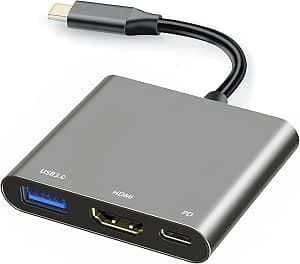
USB C to HDMI Multiport Adapter with Charging Port, HDMI to USB C Hub Adapter for Monitor to Laptop, USB-C to USB 3.0 Adapter 10Gbps, USBC HDMI Adapter 4K Converter for Mac iPad pro MacBook Chromebook
Description
Plug anusb c to hdmi adapterd Play No drivers or software to install, work anywhere. High-Speed Charging You can connect usb c charger cable to quickly charge Laptops & Tablets & smartphones, the maximum charging PD 87W. Data Transmission USB3.0 and 2.0 ports can connect flash drive, mobile hard disk, card reader, USB cable for data transfer and file reading, and support OTG function of Android phone. Function Expansion The USB port supports connecting a mouse, keyboard, printer, and easily get any job done. Multi-Screen Display Mirror or extended display mode, you can duplicate the same content to display on different monitors, or display different content at the same time. Super Resolution The HDMI port 2.1 standard is backward compatible with HDMI2.0, supports output resolution 4K, compatible with 2K, 1080P, 720P, etc. Super Compatible Compatible with Laptops & Tablets & Smartphones with USB C ports, also with Thunderbolt 3 and 4 port devices. Good After Sales Unconditional return or exchange of goods within 1 year. COMPATIBILITY LIST (not limited to this) Laptops & Tablets - MacBook Pro (2021 / 2020 / 2019 / 2018 / 2017 / 2016) - iPad Pro (2021 / 2020 / 2018) - iMac Pro, Mac Mini (Late 2018 and newer) - Chromebook, Pixelbook, Pixel Slate - Surface Book 3 / 2, Surface Go - Latitude 7373 / 5570 / 5490 / 5400 (2019) - Ideapad 5/5i/3/3i - XPS 17/15/13 Smart Phones - Galaxy S20 Ultra / Note 20 / Note 9 / S10+ / S9+ / S8+ - HTC U12+ / U11+ / U11 /10 / U Ultra - Pixel 7 / 6 / 6pro - OnePlus 9 / 9T / 8 / 8T / 7 / 7T - Asus ZenFone / ROG Phone
Compare the trade-offs
Similar products, side by side
A random selection of analyzed products from the same category. Different products are not necessarily interchangeable.

USB C Hub Docking Station Dual Monitor for Laptop, MacBook Air/Pro Dock Adapter Multiport Dongle with 2 HDMI Ports 4K 60Hz, 100W PD Charging, 3 USBA 3.0 & USBC

USB Hub, Fidioto 4 Port USB Adapter(1 * 3.0 Hub, 3 * 2.0 Hub), Networking Hub for Laptop, iMac Pro, MacBook Air, Mac mini/Pro, Surface Pro, Notebook PC, USB Flash Drives and Mobile HDD Etc.

Anker 6-in-1 USB C Hub with Ethernet, USB C to 4K HDMI Multiport Adapter, 1Gbps Ethernet, 65W Power Delivery, 1xUSB-C & 2xUSB-A Ports for MacBook Air, iPad Pro, XPS, Home Office and More
One less thing to search
Before you buy: quick questions
Is this adapter truly plug-and-play, and will it work with my specific laptop?
For the vast majority of users, yes—it's plug-and-play. It's widely compatible with USB-C laptops like MacBooks, Chromebooks, and many Windows machines (Dell, HP, Lenovo). However, a small number of Windows users on forums like Reddit have noted occasional driver hiccups, which are usually resolved with a quick unplug/replug or a system reboot. For guaranteed compatibility, check your laptop's manual for USB-C port specifications.
Can it charge my laptop at full speed while I'm using the other ports?
The charging (PD) port supports pass-through charging, but with an important caveat. While it will charge your device, if you're simultaneously using the HDMI port for video and the USB ports for data transfer, the available power for charging may be reduced. This is a common limitation in hubs at this price point. Many TikTok reviewers love it for extending their MacBook Air or iPad battery, but power users with high-wattage laptops (like a 16-inch MacBook Pro) often note it may only slow-charge or maintain the battery under heavy load.
Does it reliably support 4K video at 60Hz as advertised?
It is capable of 4K@60Hz output, but stability can depend on your specific monitor, cable, and laptop. Most users report perfect 4K@60Hz performance, while some online discussions mention achieving only 4K@30Hz. For the best results, ensure you're using a high-speed HDMI cable (certified for 18Gbps) and that your laptop's graphics and USB-C port support the required bandwidth. If 60Hz is critical for you, testing with your setup is recommended.
How durable is it, and what if it stops working?
The build quality is generally good for everyday use, and with over 2,100 reviews maintaining a 4.3-star average, most users find it reliable. However, as with any electronic accessory, longevity can vary. Common praise highlights its sturdy feel, but a minority of critical reviews mention ports loosening over time. The product comes with a standard manufacturer's warranty (typically 12-18 months—check your purchase details). The brand's customer service is responsive for replacements under warranty, which is a plus many Amazon reviewers have highlighted.
Who is this adapter best suited for, and who might need something else?
This hub is a fantastic, value-packed solution for students, remote workers, and general users who need to connect to a monitor, use USB-A devices, and keep their device charged without breaking the bank. It's perfect for MacBook Air, iPad Pro, and Chromebook users. However, if you're a professional video editor, gamer, or user with a high-power laptop who needs guaranteed 4K@60Hz, simultaneous 100W charging, and multiple high-speed drives running, you might regret not investing in a more robust, Thunderbolt-enabled dock from brands like Anker or CalDigit.
From a similar, more-reviewed product in this category: USB C to USB Hub Multiport Adapter with 4 USB-A & 3 USB-C 3.0 Port
Does this hub support charging?
No. The manufacturer's note states this device only supports data transmission, not charging.
How many devices can I connect at once?
Up to 7 devices can be connected simultaneously through a single port, including a keyboard, mouse, external HDD, and flash drives.
What data transfer speed does this hub offer?
It uses USB 3.0 technology with data transfer rates up to 5Gbps, which the listing describes as 10x faster than USB 2.0.
How long is the cable on this hub?
The hub has an integrated 1-foot cable, which the listing describes as offering a balance of reach and neatness for routing on a desk, in a laptop stand, or behind a monitor.
What operating systems and devices is this hub compatible with?
It supports Windows, macOS, and Linux, and is listed as compatible with laptops, MacBook, tablets, USB flash drives, and iMac.
Answers are limited to the manufacturer's listing and the reviews we analysed. Questions those sources cannot support are not answered here.
Transparent by design