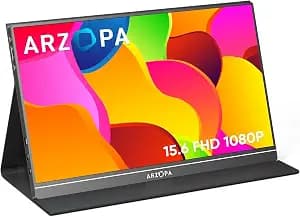
ARZOPA Portable Monitor, 15.6'' 1080P FHD Laptop Monitor USB C HDMI Computer Display HDR Eye Care External Screen w/Smart Cover for Mac Phone Xbox Switch PS5-S1 Table
Description
Second Monitor: The ARZOPA portable monitor can very well act as your secondmonitor and improve your work efficiency. You can work and perform multiple taskssimultaneously while using this monitor; FHD IPS Screen: Designed with a 15.6-inch display, the screen features 1080P, FHD,IPS and anti-glare display. The 60Hz high resolution brings excellent richness in color ofpictures, videos, work and screen quality; Plug and Play: There is no need of app and drivers, you only need one USB-C cable toset the portable monitor for its video signal and power to deliver a full HD resolutionviewing. (Phones need full-featured USB port); Lightweight and Portable: Keeping in mind the portability of the monitor, we havecreated a lightweight and easy to carry screen which weighs 1.7lbs and is 0.3-inch slim.Your work gets done efficiently while you are on the trip; Wide Compatibility: With dual USB-C ports, you can easily connect with PC, Mac,Phone, Xbox, Switch, PS4, 5 and the mini HDMI port allows compatibilitywith any laptop(To ensure your Mac is compatible with Arzopa monitors, please make sure your Mac has a Thunderbolt 3/4 or HDMI port)
Compare the trade-offs
Similar products, side by side
A random selection of analyzed products from the same category. Different products are not necessarily interchangeable.

Acer Vero 22" FHD 100Hz FreeSync Monitor

ROADOM 7" Touchscreen Monitor, 1024x600 IPS Raspberry Pi Screen, HDMI

SAMSUNG 49-inch Odyssey G9 (G91F) DQHD, 144Hz, Curved Gaming Monitor, Ultra-Wide 32:9 Screen, DisplayHDR 600, AMD FreeSync™ Premium Pro, Ergonomic Stand, LS49FG910ENXZA, 2025
One less thing to search
Before you buy: quick questions
このモニターは本当にプラグアンドプレイで、スマートフォンやゲーム機で動作しますか?
はい、ほとんどの最新デバイスでは有名なプラグアンドプレイです!付属のHDMIケーブルで、ノートパソコン、MacBook、Nintendo Switch、PS5とシームレスに動作します。スマートフォンやタブレットの場合は、通常、十分な電力を確保するために付属の*デュアルヘッドUSB-Cケーブル*を使用する必要があります。TikTokユーザーからの一般的なヒントは、最もシンプルなシングルケーブル接続のために、お使いのデバイスが「USB-C経由のDisplayPort」をサポートしているか確認することです。
バックパックでの日常的な持ち運びにはどれくらい耐久性がありますか?
ユーザーはその携帯性を気に入っていますが、画面は圧力による傷やキズがつきやすい可能性があります。付属のスマートカバーは基本的な保護を提供しますが、多くのRedditレビュアーは、従来のモニターというよりタブレットのように扱い、安心感を高めるために、ハードシェルケースや専用スリーブをバッグ内で使用することを強く推奨しています。
内蔵スピーカーとHDR機能は良いですか?
正直に言うと、せいぜい機能的なレベルです。内蔵スピーカーは非常に最小限で、緊急時のビデオ通話には最適ですが、メディア視聴やゲームには、ほぼすべてのユーザーがヘッドフォンまたは外部スピーカーを推奨しています。HDRサポートは良い追加機能ですが、真のハイエンドHDR体験とは言えません。視覚的にわずかな向上はありますが、色に厳しいプロフェッショナルやハードコアゲーマーには物足りないと感じられるかもしれません。
このポータブルモニターは、どのような方に最適ですか?
モバイルデュアルスクリーン設定が必要な出張が多いプロフェッショナル、寮や図書館で使う学生、外出先でNintendo SwitchやSteam Deck用の大きな画面を求めるゲーマーにとって、非常にコストパフォーマンスに優れています。スタンドの調整機能が限られているため、一日中使用するメインデスクトップモニターとしてはあまり理想的ではなく、非常に過酷で保護されていない旅行環境で使用するユーザーにも向いていません。
私のデバイスで動作しない場合や、満足できない場合はどうなりますか?
ブランドは標準的な返品期間を設けています(商品ページの特定の販売者のポリシーをご確認ください)。返品する前に、ケーブルと電源を再確認してください!レビューでよく言及されている解決策は、正しいケーブル(高電力デバイス用のデュアルUSB-Cケーブル)を使用していること、および送信元デバイスのUSB-Cポートがビデオ出力をサポートしていることを確認することです。カスタマーサポートは、互換性の問題に対応してくれます。
From a similar, more-reviewed product in this category: KOORUI 24 Inch Gaming Monitor, 180Hz 1080P VA Display with 3000:1 Contrast
Does this monitor really run at 180Hz, and what do I need to enable it?
Yes — it's a native 180Hz panel, but you'll need to switch it on manually. Connect via the included HDMI cable (or a DisplayPort-capable setup), then set 180Hz in your GPU's display settings; it defaults to a lower refresh rate out of the box. Many Reddit and YouTube users note that enabling Adaptive Sync/FreeSync alongside it gives the smoothest experience, and it works with both AMD and NVIDIA cards.
How does the VA panel perform for gaming and everyday work?
The 3000:1 contrast gives noticeably deeper blacks than typical IPS budget monitors, which shines in dark game scenes and movies. For fast-paced competitive shooters, some TikTok and Reddit users mention mild ghosting/smearing in dark transitions — it's great for casual gaming, students, and office work, but color-critical creators or hardcore FPS players may prefer an IPS panel.
The stand looks basic — can I adjust the height or mount it?
Correct, the included stand only tilts (-5° to 20°) and doesn't offer height, swivel, or pivot adjustment, and a few users find the base slightly wobbly. The good news: it's VESA 100×100mm compatible, so a monitor arm or desk mount solves ergonomics entirely — a popular fix among dual-monitor and dorm-room setups.
What if I receive a unit with a dead pixel or backlight bleed?
Budget monitors can vary unit to unit, and some buyers report stuck pixels or corner bleed — but KOORUI backs it with a 3-year manufacturer warranty. If your unit arrives defective, contact the seller for a replacement or refund promptly; most users who did so report a smooth resolution, so inspect the screen within the return window.
Is it good value, and who is it best suited for?
At around $120, it's widely praised as one of the best budget 180Hz options — ideal for students, casual gamers, home-office users, and compact or dual-monitor setups. Just set expectations: no built-in speakers, a single HDMI plus VGA, and basic ergonomics. If you need height adjustment, color accuracy, or built-in audio, consider spending more on an IPS alternative.
Answers are limited to the manufacturer's listing and the reviews we analysed. Questions those sources cannot support are not answered here.
Transparent by design