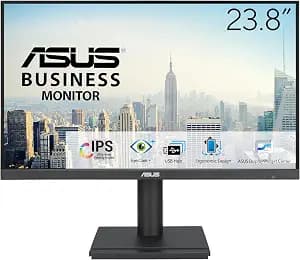
ASUS Business VA24DQFS - 24 Inch Full HD Monitor - Frameless, Ergonomic, Adaptive Sync, EPEAT Gold - 100 Hz, 16:9 IPS Panel, 1920 x 1080 - DP, HDMI, D-Sub, USB Hub, Speaker
Description
ASUS VA24DQFS Business Monitor - 24" (23.8" Visible), IPS, Full HD, Frameless, 100Hz, Adaptive Sync, 1ms MPRT, HDMI®, DisplayPort™, VGA, Low Blue Light, Flicker-Free, Ergonomic Design, Wall Mountable
Compare the trade-offs
Similar products, side by side
A random selection of analyzed products from the same category. Different products are not necessarily interchangeable.

Upperizon Portable Monitor 18.5" FHD 125% sRGB 100Hz IPS HDR HDMI USB-C Travel Monitor for Laptop MacBook PC Surface PS5 Xbox, Large External Display with Kickstand & Speakers, VESA Compatible

ASUS 27” 1080P Eye Care Monitor (VU279HFI-W) - Full HD, IPS, 100Hz, SmoothMotion, Adaptive Sync, Nano-ion, Eye Care Plus, Blue Light Filter, Flicker Free, VESA Wall Mountable, 3 yr Warranty

Sceptre 34-Inch Curved Ultrawide WQHD Monitor, 3440 x 1440, R1500, Up to 180Hz/165Hz, DisplayPort x2, 100% sRGB, 1ms, Built-in Speakers, Black (C345B-QUT168 Series)
One less thing to search
Before you buy: quick questions
¿Es el soporte ergonómico tan bueno como dicen y es fácil de ajustar?
Sí, el soporte es una de las características más elogiadas. Ofrece un ajuste de altura suave y sin herramientas, inclinación, giro e incluso un pivote de 90 grados para el modo vertical. Los usuarios en Reddit y YouTube destacan con frecuencia su robustez y cómo ayuda a mantener la comodidad durante largas jornadas laborales.
Sigo escuchando que los altavoces integrados son malos. ¿Qué tan malos son realmente?
Los altavoces se describen mejor como básicos y funcionales para sonidos del sistema o uso de emergencia, pero no para disfrutar de música, videos o llamadas. Como demuestran muchos videos de TikTok y reseñas, el audio es delgado y carece de graves. Recomendamos encarecidamente usar altavoces externos o auriculares para una mejor experiencia.
¿Puedo usar un brazo de monitor con este producto y es difícil de instalar?
Por supuesto, es compatible con el montaje VESA estándar de 100x100 mm. Sin embargo, algunos usuarios han señalado que quitar el cuello de la base predeterminada puede requerir un poco de presión firme o una herramienta plana para soltar el clip. Una vez retirado, instalar su propio brazo es sencillo.
¿Es adecuado este monitor para juegos casuales, o debería buscar en otro lado?
Es una opción sólida para juegos casuales gracias a su frecuencia de actualización de 100 Hz y Adaptive-Sync, que reduce el desgarro de pantalla. Para juegos competitivos de ritmo rápido (por ejemplo, esports), los monitores de juego dedicados con frecuencias de actualización más altas (144 Hz+) son mejores. Para uso empresarial, informática general y títulos casuales, su rendimiento es excelente y ofrece una gran relación calidad-precio.
Uso un MacBook. ¿Funcionará bien este monitor con él?
Puede conectarlo mediante un cable HDMI o DisplayPort (puede ser necesario un adaptador para los puertos de su MacBook). Tenga en cuenta que este monitor no tiene puerto USB-C, por lo que no puede cargar su portátil ni conectarse mediante un solo cable. Si la conectividad USB-C con un solo cable es esencial, puede considerar alternativas de Dell o LG que incluyan esa función.
From a similar, more-reviewed product in this category: KOORUI 24 Inch Gaming Monitor, 180Hz 1080P VA Display with 3000:1 Contrast
Does this monitor really run at 180Hz, and what do I need to enable it?
Yes — it's a native 180Hz panel, but you'll need to switch it on manually. Connect via the included HDMI cable (or a DisplayPort-capable setup), then set 180Hz in your GPU's display settings; it defaults to a lower refresh rate out of the box. Many Reddit and YouTube users note that enabling Adaptive Sync/FreeSync alongside it gives the smoothest experience, and it works with both AMD and NVIDIA cards.
How does the VA panel perform for gaming and everyday work?
The 3000:1 contrast gives noticeably deeper blacks than typical IPS budget monitors, which shines in dark game scenes and movies. For fast-paced competitive shooters, some TikTok and Reddit users mention mild ghosting/smearing in dark transitions — it's great for casual gaming, students, and office work, but color-critical creators or hardcore FPS players may prefer an IPS panel.
The stand looks basic — can I adjust the height or mount it?
Correct, the included stand only tilts (-5° to 20°) and doesn't offer height, swivel, or pivot adjustment, and a few users find the base slightly wobbly. The good news: it's VESA 100×100mm compatible, so a monitor arm or desk mount solves ergonomics entirely — a popular fix among dual-monitor and dorm-room setups.
What if I receive a unit with a dead pixel or backlight bleed?
Budget monitors can vary unit to unit, and some buyers report stuck pixels or corner bleed — but KOORUI backs it with a 3-year manufacturer warranty. If your unit arrives defective, contact the seller for a replacement or refund promptly; most users who did so report a smooth resolution, so inspect the screen within the return window.
Is it good value, and who is it best suited for?
At around $120, it's widely praised as one of the best budget 180Hz options — ideal for students, casual gamers, home-office users, and compact or dual-monitor setups. Just set expectations: no built-in speakers, a single HDMI plus VGA, and basic ergonomics. If you need height adjustment, color accuracy, or built-in audio, consider spending more on an IPS alternative.
Answers are limited to the manufacturer's listing and the reviews we analysed. Questions those sources cannot support are not answered here.
Transparent by design