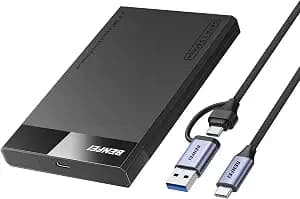
BENFEI 2.5 Inch SATA to USB Tool Free External Hard Drive Enclosure (6Gbps, Optimized for SSD, Support UASP SATA III)
Description
Feature - BENFEI 2.5 inch Hard Drive Enclosure easily hook up your 2.5 inch SATA I/II/III hard drive to transfer files from one PC to another PC, laptop, PS4 or as a USB external hard drive. USB Type-C/Type-A 10Gbps cable is included in the package.; Speed - Adopts advanced JMS580 chipset, support up to 6 Gbps data transfer rate with more stable and realiable data speed transmission compared with other solution. Supports UASP SATA III transmission protocol, which is 70% faster than traditional USB3.0, Backward compatible with USB 2.0 or 1.1 ports.; Design - Tool free installation, Plug & Play, No driver needed for this SATA enclosure. Just push out the cover, plug in the drive, close the cover and go. Hot-Swappable.; Compatibility - BENFEI Hard Drive Enclosure supports Windows, LINUX, MacOS 8.0, and above. Specifically designed for 7/9.5mm thick, 2.5 inches, 6TB HDD & SSD. Compatible with Western Digital, Seagate, Toshiba, Samsung, Kingston, Crucial, Hitachi, and more.; 【18 MONTH WARRANTY】 Exclusive BENFEI Unconditional 18-month Warranty ensures long-time satisfaction of your purchase; Friendly and easy-to-reach customer service to solve your problems timely.
Compare the trade-offs
Similar products, side by side
A random selection of analyzed products from the same category. Different products are not necessarily interchangeable.

CENMATE Aluminum 4 Bay Hard Drive RAID Enclosure with Cooling Fan for 2.5/3.5" SATA HDD/SSD with USB A/C 3.0+eSATA Cable, 3.5 Hard Drive Reader Supports 80TB Capacity, 8 RAID Modes, DAS(NO NAS)

CENMATE Aluminum 3 Bay Hard Drive Enclosure with Cooling Fan for 2.5“/3.5" SATA HDD/SSD with USB A/C 3.0, Support Hot Swappable, Tool-Free HDD Enclosure, DAS(NO RAID/NAS)

BENFEI 2.5 Inch SATA to USB Tool Free External Hard Drive Enclosure, USB Type-C/Type-A to Sata Compatible for 2.5 Inch SSD(Optimized for SSD, Support UASP)
One less thing to search
Before you buy: quick questions
Is the installation truly tool-free, or will I need any additional parts?
The enclosure itself snaps together without tools. However, a common note from Reddit users is that if your 2.5" drive is brand new and doesn't have mounting screws pre-attached, you may need to provide two small screws (typically M3x3mm) to secure the drive to the internal sled. Most drives pulled from old laptops already have these screws.
How is the build quality, and will my SSD overheat in the plastic case?
The enclosure is made of durable plastic. While some YouTube reviewers prefer metal for heat dissipation, the vast majority of users report no overheating issues, even during large file transfers with SSDs. The design includes ventilation slots. It's built for function and value rather than a premium feel.
What's the deal with the included cable? I've seen mixed reviews.
The included USB-C to USB-A cable is functional but short (approx. 15cm/6 inches). Many TikTok and Amazon reviewers suggest using a higher-quality or longer cable you may already own for a more secure connection, especially on tight USB-C ports. The enclosure works with any standard USB-C cable.
Is this compatible with both Windows and Mac computers right out of the box?
Yes, it's plug-and-play for both! For Windows, it should be recognized immediately. For Mac, you may need to use Disk Utility to format the drive if it's new or from a Windows PC (APFS or Mac OS Extended are common choices). It works with ChromeOS and Linux as well.
Who is this enclosure best suited for, and who might want to look elsewhere?
This is an excellent, budget-friendly choice for anyone looking to easily convert an old laptop hard drive or SSD into an external drive for backups, extra storage, or data recovery. If you need a rugged, all-metal enclosure for constant travel, or require a longer, premium cable in the box, you might consider a higher-priced alternative from brands like Sabrent.
From a similar, more-reviewed product in this category: CENMATE Aluminum 4 Bay Hard Drive RAID Enclosure with Cooling Fan for 2.5/3.5" SATA HDD/SSD with USB A/C 3.0+eSATA Cable, 3.5 Hard Drive Reader Supports 80TB Capacity, 8 RAID Modes, DAS(NO NAS)
How many drives can this enclosure hold and what is the maximum total capacity?
It supports up to 4 drives (2.5/3.5" HDD or SSD) with a maximum capacity of 80TB, which is 20TB per drive.
Is the fan noisy?
The manufacturer states fan noise is around 40-50 decibels and does not recommend it if you are very sensitive to noise, though some reviewers found it quiet enough for a home theater room while others noted it is a little loud.
How do I switch between RAID modes?
Disconnect the power, use a screwdriver to toggle the paddle to the corresponding mode, press and hold the reset button, turn on the power, and hold reset for ten seconds; note that when replacing RAID you must go back to NORMAL first, and designing RAID may result in data loss.
Is it easy to set up and is it compatible with my drives?
Reviewers report it is easy to set up and plug and play, with one noting it worked immediately after moving drives from another enclosure and setting the dip switches to RAID 10, and another confirming compatibility with shucked 20TB WD Easystore drives.
Does the eSATA port support hot-swapping or a SATA-to-eSATA adapter?
No, the eSATA port does not support a computer's SATA-to-eSATA adapter and hot-swapping is not supported; the computer's eSATA port must support RAID functionality to access multiple drive bays, otherwise only one bay can be accessed.
Answers are limited to the manufacturer's listing and the reviews we analysed. Questions those sources cannot support are not answered here.
Transparent by design