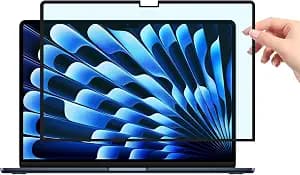
FILMEXT Macbook Air 15 inch Screen Protector (2026-2023, M5 M4 M3 M2) Mddel A2941 A3114 A3241, Anti-Glare Anti-Blue Light Filter Bubble Free Eye Protection Macbook Air 15.3"
Description
[69.7% Blue Light Blocking Filter]: FILMEXT 2026 macbook Air 15 inch screen protector 69.7% blue light blocking filter blocks the harmful blue light between 380nm~495nm from the wave range of visible lights, blue light reaches the retina with strong energy. FILMEXT macbook Air 15.3 inch M5 2026 blue light filter reduces digital eye strain when viewing screens and gives you a better sleeping.; [Eye Protection & Reduce Eyestrain] By preventing the injurious blue ray, FILMEXT macbook air 15.3 inch M4 M5 2026 blue light screen protector can protect the eyes from computer/ macbook laptop visual syndrome (eyes losing focus, vision getting unclear, fatigue, ophthalmic acid, bulging, headache, etc.).High quality for lasting durability and will protect your eyes from UV rays; 2023 macbook air M2 15.3 inch Anti-glare, anti-fatigue, anti-jet lag blue blocker screen protector Maintains color fidelity Perfect.; [Compatibility] FILMEXT macbook air screen protector 15.3 inch compatible with 2026 macbook air 15.3 inch M5 chip/2025 M4 chip /2024 M3 chip 15.3-inch Model A3241 / A3114 /2023 M2 chip 15.3-inch Model A2941 . FILMEXT Macbook Blue light screen protector computer laptop workable for short-sighted people, students, office workers, social media addicts, online gamers, fashion lovers, etc.; [Bubble Free Installation]: The latest black frame silicone seal design, easy to install and remove, 100% bubble-free. The anti blue light screen protector for computer macbook Air 15 inch 2023 /2024 /2025/2026 release with fingerprint resistance, and excellent touching sensibility.; [What's in Box] Macbook Air 15.3 inch Anti-blue light Glare filter (M5 M4 M3 M2 , 2026 2025 2024 2023) ×1pcs, microfiber cleaning cloth×1pcs, installation cleaning kit×1set. Blue light screen protector installation Guide×1pcs; [After Sale Service] Refer to the instructions for the installation. Clean the screen and ensure it is dust-free, align the product to screen, gently press over on the frame to remove the bubbles and let the silicone adhered to the frame. in case of any question or problem, please contact the seller without any hesitation to solve until satisfaction. We provide 100% no risk, worry-free after sale service for all FILMEXT Screen Protector.
Compare the trade-offs
Similar products, side by side
A random selection of analyzed products from the same category. Different products are not necessarily interchangeable.

2Pack Magnetic 14 Inch Laptop Privacy Screen 16:10 Aspect Ratio, Removable Anti-Blue/Glare Protector Film, Anti Spy Desktop Security Private Filter 14in

MOSISO 2 Pack Anti Glare Screen Protector Compatible with MacBook Neo 13 inch Case 2026 Model A3404, Matte Reduces Fingerprints Scratches Resistant Screen Filter Film Easy to Install

Spigen Tempered Glass Screen Protector [Glas.tR Slim] Designed for Macbook Air 13 inch M5 (2026) / M4 / M3 / M2
One less thing to search
Before you buy: quick questions
Will this screen protector fit my 2026 M5 MacBook Air 15-inch?
FILMEXT lists compatibility for 2026–2023 models (M5–M2), but keep in mind the 2026 M5 Air hasn’t launched yet. Some early testers say the protector is slightly off on pre-production units. If you’re buying for a future M5 model, we recommend checking the exact model number (A2941, A3114, or A3241) against the listing. For the most reliable fit, buy after receiving your MacBook so you can confirm within the return window.
Does the anti-glare coating make the screen look grainy or less sharp?
A few users on Reddit and TikTok mention a subtle “sparkle” or grain effect under direct sunlight—this is common with matte protectors. Most people don’t notice it indoors, but if you do photo editing or watch high-definition video, the slight optical shift might bother you. For a clearer view, try the glossy version of this protector instead.
How do I avoid bubbles—especially around the notch?
The included alignment frame helps a lot, but bubbles near the notch are the top complaint. Pro tip: clean your screen with the included wipe, use a piece of tape to lift the protector after the first press, and slowly roll it down from center. If bubbles appear after 48 hours, gently push them to the edge with a soft microfiber cloth. Many users find success with the “hinge method” shown in FILMEXT’s YouTube guide.
I’m worried about sticky residue when removing the protector later. Any risk?
A small number of users report slight adhesive residue after 6+ months, especially if the protector was exposed to heat or direct sunlight. To avoid this, remove the protector within the first 12 months if possible, and use a gentle heat source (like a hairdryer on low) to soften the adhesive. If residue remains, a tiny drop of isopropyl alcohol on a cloth usually cleans it without hurting the screen.
Is this better than the Belkin or Spigen options for the same price?
The FILMEXT is a budget-friendly choice that does a solid job reducing eye strain and glare. However, if you’re a perfectionist about fit and clarity, many TikTok reviewers recommend spending $10–15 more on Belkin UltraGlass (industry-leading clarity) or Spigen Tempered Glass (better edge-to-edge coverage). For causal daily use on a 2023–2025 MacBook Air, FILMEXT is a reliable value pick—just double-check your exact model number before ordering.
From a similar, more-reviewed product in this category: Mamol Magnetic Laptop Privacy Screen 15.6 inch ,16:9 Aspect Removable Anti Glare Protector Blue Light Privacy Screen Filter,Filter Shield Compatible with HP/Dell/Acer/Asus/Samsung/Lenovo/Thinkpad Envy
Will this privacy screen fit my 15.6 inch laptop?
The listing states it is designed for 15.6" laptops with a 16:9 aspect ratio, with a width of 13 9/16" (345 mm) and height of 7 5/8" (194 mm), and it advises verifying your screen's width and height rather than just the diagonal. Some reviewers reported fit issues, so measuring your exact screen dimensions before ordering is recommended.
How does the magnetic attachment work?
The listing describes an automatic snap-on magnetic attachment where you place the screen along the top and side of your laptop and the magnets snap on, with no adhesive needed on the screen. Reviewers confirm it is easy to put on and remove, though some note the magnets only adhere to the top edge and that thin-framed laptops may not hold as well.
Does it leave air bubbles or residue on the screen?
Because it attaches magnetically rather than with adhesive film, reviewers report no air bubbles and no sticky residue on the screen. One reviewer specifically noted it "won't slide or have air bubbles on the screen."
Does the privacy filter actually block the view from the side?
The listing states the viewing angle is narrowed to +/- 30 degrees, so facing the screen you can see it, but off to the side you only see a darkened screen. Reviewers confirm the privacy function works, with several noting people beside them cannot see their screen.
Does it reduce glare and blue light?
The listing states it reduces UV light up to 97% and blue light up to 65% to help with eye strain, and it has a matte finish. Reviewers confirm the matte finish reduces glare and reflections, though some note it can slightly reduce screen brightness and clarity.
Answers are limited to the manufacturer's listing and the reviews we analysed. Questions those sources cannot support are not answered here.
Transparent by design