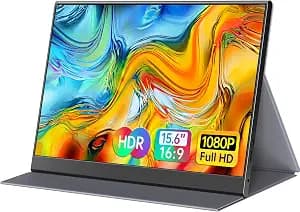
ForHelp 15.6inch Portable Monitor,1080P USB-C HDMI Second External Monitor for Laptop,PC,Mac Phone,PS,Xbox,Swich,IPS Ultra-Thin Zero Frame Gaming Display/Premium Smart Cover
Description
Extensive Compatibility - Forhelp portable monitor features 2 full-featured Type-C ports and 1 MINI HDMI port. You can easily access your favorite devices with just one USB Type-C or MINI HDMI cable. NOTE: Your device should support Thunderbolt 3.0/4.0 or USB 3.1 Type C DP ALT-MODE. It is compatible with all devices equipped with HDMI and USB Type-C ports like laptops, PS, XBOX, SWITCH game consoles.; Full HD Portable Monitor - 15.6inch portable laptop monitor with 1920*1080 resolution, advanced IPS Matte screen support 178° full viewing angle, it renders accurate and bright color, draws you into the video or game with lifelike colors and amazing detail. It can effectively reduce blue light radiation damage, no flickering, eye-care, and make it easier to watch for a long time.; Ultra-slim Portable Monitor - As a portable external monitor, Forhelp portable laptop monitor's body is made of aluminum alloy, the weight of the whole machine is 1.52lb, 0.3" ultra-thin profile, can easily fit into your bag, so you can carry it with you. With our magnetic smart holster, you can use and store it anytime.; Able to Balance Work and Play - With multiple display modes [copy mode/extension mode/second screen mode]. During meetings,it can copy your laptop's content as a second screen to share with others. At work, it can be used as a second extended screen to increase productivity. In life, adjusting to HDR mode can upgrade the image to a new level, providing you with brighter highlights, more realistic colors and images. Two built-in speakers provide an amazing viewing and gaming experience.; DURABLE SMART COVER - Comes with a scratch-proof smart cover made of durable PU leather exterior, doubles as a stand, provides comprehensive protection for this portable computer monitor. There are two grooves in the cover base to give at least some choice of viewing angle for your comfort.; Please note: HDMI is on the left side of the product.
Compare the trade-offs
Similar products, side by side
A random selection of analyzed products from the same category. Different products are not necessarily interchangeable.

KEFEYA Laptop Screen Extender, 14" Portable Monitor for Laptop, 1440P QHD Triple Screen Monitor Extender for 13"-17" Laptops, HDMI/USB-C for MacBook, Windows, Chrome, Switch, Plug & Play

ELECROW 8 Inch Portable Monitor, 1280x800 Mini HD Display with Built-in Speakers, USB Powered, Non-Touch LCD Screen for Raspberry Pi, PC, Laptop, Jetson Nano, Game Consoles

LG 27GS60QC-B Ultragear 27-inch Curved Gaming Monitor QHD (2560x1440) 180Hz 1ms 1000R AMD FreeSync HDR10 HDMIx2 DisplayPort Borderless Design Black Stabilizer DAS Crosshair FPS Counter - Black
One less thing to search
Before you buy: quick questions
Will this monitor work with my MacBook or Android phone using just one cable?
It depends on your device. Many Windows laptops and newer MacBooks with USB-C ports that support video output (DisplayPort Alt Mode) will work plug-and-play. However, some MacBook Air models and most Android phones require an additional power cable via the second USB-C port. A good rule of thumb: if your device’s USB-C port has a monitor or DisplayPort icon next to it, you’re set. Several TikTok users have posted compatibility lists – it’s worth checking before buying.
I keep seeing complaints that the screen is too dim. Is that really an issue?
Honest answer – it’s fine for indoor use in a room with controlled lighting, but it struggles near bright windows or outdoors. The advertised brightness rating doesn’t translate to real-world punch. If you’re a student using it in a dorm or a traveler in hotel rooms, you’ll be happy. But if you work in a sunny cafe or need it for HDR content, this isn’t the monitor for you.
How durable is this monitor for travel? I’m worried about cracked screens.
The screen is the most vulnerable part, and there are reports of cracks from backpacks that got tossed around. The included smart cover offers decent scratch protection but minimal impact resistance. For peace of mind, we recommend a padded laptop sleeve. Many Reddit users also suggest packing it flat against a rigid surface rather than against clothes. It’s portable, but treat it like a tablet, not a rugged tool.
I’m a casual gamer – is the 60Hz refresh rate good enough for PS5 or Xbox?
Yes, for most games it works fine, especially in slower-paced titles like RPGs or strategy games. However, the 60Hz cap means you won’t get the full 120Hz potential of a PS5 or Series X, and there’s no VRR support. Fast-paced shooters may feel slightly less smooth. For the price, it’s a popular choice for traveling with a console, just don’t expect competitive-level performance.
What if I get a dead pixel or the screen stops working after a few weeks?
The monitor comes with a standard 30-day return window and a 1-year warranty against manufacturing defects. Dead pixels are the most common issue reported. If you notice any within the first month, contact customer support directly – response times are generally good, though some users have had to send photos for verification. For extra peace of mind, we recommend buying through a retailer with an extended return policy, like Amazon.
From a similar, more-reviewed product in this category: KOORUI 24 Inch Gaming Monitor, 180Hz 1080P VA Display with 3000:1 Contrast
Does this monitor really run at 180Hz, and what do I need to enable it?
Yes — it's a native 180Hz panel, but you'll need to switch it on manually. Connect via the included HDMI cable (or a DisplayPort-capable setup), then set 180Hz in your GPU's display settings; it defaults to a lower refresh rate out of the box. Many Reddit and YouTube users note that enabling Adaptive Sync/FreeSync alongside it gives the smoothest experience, and it works with both AMD and NVIDIA cards.
How does the VA panel perform for gaming and everyday work?
The 3000:1 contrast gives noticeably deeper blacks than typical IPS budget monitors, which shines in dark game scenes and movies. For fast-paced competitive shooters, some TikTok and Reddit users mention mild ghosting/smearing in dark transitions — it's great for casual gaming, students, and office work, but color-critical creators or hardcore FPS players may prefer an IPS panel.
The stand looks basic — can I adjust the height or mount it?
Correct, the included stand only tilts (-5° to 20°) and doesn't offer height, swivel, or pivot adjustment, and a few users find the base slightly wobbly. The good news: it's VESA 100×100mm compatible, so a monitor arm or desk mount solves ergonomics entirely — a popular fix among dual-monitor and dorm-room setups.
What if I receive a unit with a dead pixel or backlight bleed?
Budget monitors can vary unit to unit, and some buyers report stuck pixels or corner bleed — but KOORUI backs it with a 3-year manufacturer warranty. If your unit arrives defective, contact the seller for a replacement or refund promptly; most users who did so report a smooth resolution, so inspect the screen within the return window.
Is it good value, and who is it best suited for?
At around $120, it's widely praised as one of the best budget 180Hz options — ideal for students, casual gamers, home-office users, and compact or dual-monitor setups. Just set expectations: no built-in speakers, a single HDMI plus VGA, and basic ergonomics. If you need height adjustment, color accuracy, or built-in audio, consider spending more on an IPS alternative.
Answers are limited to the manufacturer's listing and the reviews we analysed. Questions those sources cannot support are not answered here.
Transparent by design