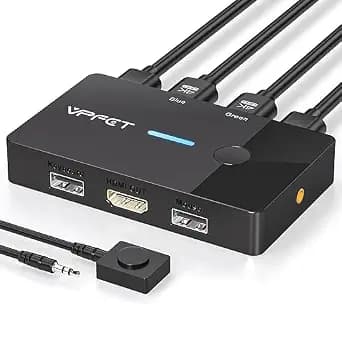
HDMI KVM Switch 1 Monitors 2 Computers 4K@60Hz USB KVM Switches 2 Ports for 2 PC Sharing Single Monitor and Keyboard Mouse with Wired Extend Controller Plug and Play
Description
【KVM Switch 2 In 1 Out】This KVM switch 1 monitors 2 computers supports sharing a set of mouse and keyboard; simply press the switch button to quickly switch between 2 PCs without having to plug and unplug HDMI and USB cables back and forth, keeping your desktop neat and tidy while increasing your productivity. It also saves you money and reduces the need for duplicate equipment. Note: Each computer and monitor must be equipped with an HDMI port for proper operation. The use of conversion cables or adapters may result in unstable/flickering transmission or failure to transmit images(The device will disconnect intermittently); 【Ultra HD 4k】The HDMI KVM switch supports resolutions up to 4K@60Hz, allowing images to be displayed more beautifully and realistically, and colours will be more vivid and dynamic, and backward compatible with 3840*2160@30Hz, 1920*1080P@60Hz, 1920*1080P@30Hz, etc. Note: KVM requires a high-quality HDMI 2.0 standard cable no longer than 3.3 feet in length, and ensure that your computer and monitor support 4K to ensure the transmission of video signals!; 【Desktop Remote Wired Control】The monitor switch for two computers has two switching modes.1) You can switch directly by clicking the button on the body of the KVM switch.2) You can hide the KVM switch and use the desktop controller to switch between the two computers, which makes your desktop cleaner, saves a lot of space and is more convenient to use. Note: This KVM switch does not support hotkey switching; 【Mouse Keyboard KVM Switch 】This USB KVM switch has 2 USB 2.0 ports with data transfer speed up to 480Mbps, which can recognise a wired keyboard and mouse or other USB 2.0 devices to move files and photos easily. Different LEDs (green PC1 / blue PC2) clearly show which computer is active. KVM switch is also hot-swappable, allowing you to connect devices without rebooting, ensuring flexibility and portability; 【Stable Use & After-sales】Our KVM switches are made of high quality materials, lightweight and compact, low power consumption, excellent compatibility, no driver required; plug and play, no external power supply required. Note: For compatibility reasons this small KVM switch is not recommended for use with Mac devices. If you encounter any problems during use, you can send us an email via the order number. Within 24 months, we will replace the switch at no charge; 【Purchase Note & Packing List】If you can't confirm the compatibility of this HDMI KVM switch before purchasing, or find it can't be used after purchasing, please provide us with the video ports of 2 computers and 1 monitor, and we will recommend the most suitable KVM switch for you according to your computer configuration. Package includes: 1*HDMI KVM switch, 1* desktop controller, 2*USB 2.0 cables, 1*after-sales service card, 1*User Manual. No external power supply is needed for the KVM switch (HDMI cable is not included in the package)
Compare the trade-offs
Similar products, side by side
A random selection of analyzed products from the same category. Different products are not necessarily interchangeable.

Unitek HDMI KVM Switch 1 Monitor 2 Computers with Power Adapter

BENFEI USB 3.0 Switch, USB Switch 2 Computers Share 4 USB for PC, Mouse, Keyboard, Printer, Scanner, USB KVM Switch Selector Compatible with Windows, Mac, Linux

8K@60Hz KVM Switch 3 Monitors 2 Computers Displayport 4K@120Hz
One less thing to search
Before you buy: quick questions
My monitor is 4K, but will this KVM switch keep the resolution sharp and stable at 60Hz without any lag?
Yes, this unit is specifically designed for 4K@60Hz output, so you’ll get crisp, flicker-free visuals with no noticeable input lag for everyday tasks like browsing, spreadsheets, or video streaming. That said, many users note that if you have a gaming monitor with a 144Hz or higher refresh rate, you’ll be capped at 60Hz — so this is best for standard office work and light media use. A few reviewers also mentioned a quick black screen for a split second when switching computers — this is a normal EDID handshake and not a performance issue.
Can I use a wireless keyboard and mouse (Logitech Unifying, Bluetooth receiver) through the USB ports on the switch?
Absolutely. As long as your wireless receiver is a standard USB dongle, you can plug it into one of the switch’s USB ports and control both computers seamlessly. From user feedback across forums and video reviews, most Logitech Unifying receivers, Razer hyperspeed dongles, and generic 2.4GHz wireless mice work fine. Just note that some advanced software (like mouse RGB lighting apps or macro editors) may not detect the device through the switch — so you’ll need to update settings before plugging in.
I have a MacBook Pro and a Windows desktop PC. Will this KVM switch work with both without needing extra drivers?
Yes — this is a plug-and-play device, and it works with macOS, Windows, and Linux. There’s no software to install, which is a big plus for mixed setups. If you use a MacBook, just connect your monitor and USB peripherals to the switch, and it will treat the USB passthrough as a basic wired keyboard/mouse connection. That means standard keys (like Command and Control) work fine, but certain Mac-specific shortcuts may not pass through exactly the same way — a few Mac users say they had to remap one or two keys.
Is the included wired controller and cables long enough, or do I need to buy extra accessories?
The wired controller cable is about 3.9 feet (1.2 meters), which is great for placing the switch button somewhere reachable on your desk. However, many buyers from Reddit and social media recommend replacing the included HDMI and USB cables, as they are on the shorter side (about 1.5 feet) and a bit stiff for cable management. If your two PCs are placed far from your monitor, it’s safer to buy separate high-quality HDMI 2.0 and USB-A cables beforehand — this is the most common practical tip shared by experienced KVM users.
I’m worried about compatibility with a printer or an external hard drive. Will the USB ports handle anything other than keyboards and mice?
The two USB 2.0 ports on this switch are primarily intended for keyboard, mouse, and standard human-interface devices. They will work with a printer or an external drive, but you may notice slower transfer speeds (since it’s USB 2.0) and some devices may require you to reconnect the device after switching between PCs. For high-bandwidth devices like external SSDs or capture cards, we recommend connecting those directly to the computer instead of through the switch. A common workaround from user reviews is to keep your keyboard and mouse on the KVM, and plug other peripherals directly into the machine you’re actively using.
From a similar, more-reviewed product in this category: Unitek HDMI KVM Switch 1 Monitor 2 Computers with Power Adapter
Can I switch between computers with a keyboard shortcut, or do I have to press a button?
This model uses a physical button on the unit — there's no hotkey switching. That's the most common complaint in reviews, so if keyboard shortcuts are a must-have for your workflow, you'll want to look at a hotkey-capable KVM instead. If you're fine reaching for a button (or placing the switch within arm's reach), it works reliably.
Do I need to use the included power adapter, or can it run without it?
Use the adapter. While some users have tried bus-powering it, the most stable experience — especially with wireless peripherals — comes from plugging in the included DC adapter. Several reviewers noted mouse dropouts when running unpowered, so treat the adapter as required, not optional.
Will it work with my Mac and Windows PC together, and does it handle 4K?
Yes, mixed Mac/Windows setups are one of its most common use cases, and it's plug-and-play for both. For resolution, check your monitor's specs against the switch's rated maximum before buying — some users with high-refresh or 4K@60Hz displays ran into EDID handshake issues (blank screen after sleep), which is the second-most-cited complaint. Standard 1080p and 4K@30Hz setups report smooth sailing.
Are the cables included, and are they long enough for a desktop tower?
Yes — HDMI and USB cables are in the box, which reviewers consistently call a nice bonus. That said, they're on the short side (roughly 3 ft), so they're ideal for laptop docks or monitors sitting close to both computers. If your tower lives under the desk, plan on buying longer cables.
Who is this KVM best suited for — and who should skip it?
It's a great fit for remote workers, students, or anyone sharing one monitor, keyboard, and mouse between two computers on a budget, especially if you value compact size, included cables, and simple setup. Skip it if you need hotkey switching, dual-monitor output, DisplayPort, or rock-solid EDID behavior with a fussy high-refresh display — in those cases, a TESmart or Cable Matters alternative will save you the return shipping.
Answers are limited to the manufacturer's listing and the reviews we analysed. Questions those sources cannot support are not answered here.
Transparent by design