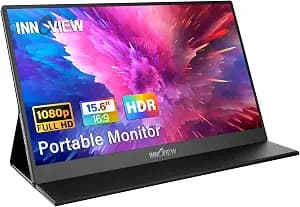
InnoView Portable Monitor, 15.6 Inch FHD 1080P HDMI USB C Second External Monitor for Laptop, Desktop, MacBook, Phones, Tablet, PS5/4, Xbox, Switch, Built-in Speaker with Protective Case
Description
[Portable Monitor Laptop] InnoView laptop screen extender is no need of app and drivers! 15.6 in is a more suitable size for traveling or remote work. Suitable for traveler, student, gamer, engineer, and white-collar worker to connect HP laptop, Lenovo laptop, Dell laptop, Asus laptop, Macbook, iPhone, game console, tablet, PS, Xbox, etc. The laptop screen can expand the viewing area and be more efficient when playing games, working, meeting and studying; [Plug and Play] The travel monitor for laptop provides 2 full-function Type-C ports and 1 HDMI port to connect most devices. Only one USB-C cable is needed to connect the external display to computer, and it supports power pass-through reverse charging. Note: Your device should support Thunderbolt 3.0/4.0 or USB 3.1 Type-C DP ALT-MODE. If not, you can connect via HDMI and power cable(NOT INCLUDE IN THE PACKAGE); [IPS FHD USB C Monitor] 15.6 inch portable screen with a resolution of 1920*1080P, made of A+ IPS screen, supports 178° full viewing angle, can present accurate and vivid colors. Combined with HDR, images and videos present realistic colors and amazing details. Low blue light can effectively reduce blue light radiation damage, no flicker, eye protection, making it easier for you to work and perform multiple tasks at the same time; [Versatile Cover and Stand] Equipped with a scratch-resistant smart protective cover made of durable PU leather, it can also be used as a stand when working. Two grooves are used to adjust the angle and fix the external monitor. It can also provide all-round protection for the 1080p monitor when going out or traveling, suitable for putting in a backpack to avoid squeezing. Optional landscape and portrait modes, save more desktop space; [Worry-free Purchase] Since the output power of each device is different, the screen may flicker or restart. You can power the laptop monitor to solve it. Provide a 30-day return policy and 18-month warranty (excluding external force damage). If you have any concerns, please let us know (displayed on the back of the monitor)
Compare the trade-offs
Similar products, side by side
A random selection of analyzed products from the same category. Different products are not necessarily interchangeable.

ASUS ROG Swift 32” 4K OLED Gaming Monitor (PG32UCDM) - UHD (3840 x 2160), QD-OLED, 240Hz, 0.03ms, G-SYNC Compatible, Custom Heatsink, Graphene Film, 99% DCI-P3, True 10-bit, 90W USB-C

LG 27GS60QC-B Ultragear 27-inch Curved Gaming Monitor QHD (2560x1440) 180Hz 1ms 1000R AMD FreeSync HDR10 HDMIx2 DisplayPort Borderless Design Black Stabilizer DAS Crosshair FPS Counter - Black

KTC 32 inch Curved Gaming Monitor, 2K 180Hz 185Hz 1440P PC Monitor, 1500R Frameless, 1ms, HDR, FreeSync Premium, DisplayPort/HDMI/USB, VESA Wall Mount, H32S17
One less thing to search
Before you buy: quick questions
Is this truly a plug-and-play monitor, and will it work with my specific device (like a Steam Deck, MacBook, or phone)?
Yes, it's designed for plug-and-play simplicity. For most modern laptops, gaming handhelds like the Steam Deck, and phones with video-out support (e.g., Samsung Dex), a single USB-C cable often handles both video and power. Some devices or older laptops may require the included HDMI cable or the second USB-C for extra power. Checking your device's video-output specs is recommended, but compatibility is very broad, as many Reddit users have confirmed success across countless setups.
How is the build quality, and is the included case protective enough for travel?
The monitor itself is praised for being slim, lightweight, and durable enough for regular backpack travel. However, a common point of feedback is that the included folio case is better for scratch protection than as a sturdy stand. Many users on social media suggest it's fine for transport but recommend a separate stand or a more rigid case if you need reliable, adjustable viewing angles.
What's the real catch or downside I should know about before buying?
The most frequently mentioned compromises are the built-in speakers and the case. The speakers are serviceable for system sounds but are described as tinny and quiet for videos or music—plan to use headphones or external speakers. Also, while the value is high, it's a budget-friendly monitor. A small number of users report minor quality control points like slight backlight bleed, which is common in this price segment.
Who is this portable monitor NOT ideal for?
It might not be the best fit if your primary need is a dedicated, high-quality media consumption device (a tablet may be better), or if you require pristine, studio-grade color accuracy for professional photo/video editing. Also, competitive esports gamers seeking very high refresh rates would need to look at specialized, more expensive portable gaming monitors.
What if I have an issue with my unit? What is the return or support process like?
InnoView offers a standard manufacturer warranty. Based on customer review sentiment, it's advisable to test your monitor thoroughly upon arrival. If you encounter a significant issue like dead pixels, reach out to the seller (e.g., Amazon) or InnoView support directly for a replacement under warranty. Their support responsiveness is typical for the category—persistent and polite communication usually resolves problems.
From a similar, more-reviewed product in this category: KOORUI 24 Inch Gaming Monitor, 180Hz 1080P VA Display with 3000:1 Contrast
Does this monitor really run at 180Hz, and what do I need to enable it?
Yes — it's a native 180Hz panel, but you'll need to switch it on manually. Connect via the included HDMI cable (or a DisplayPort-capable setup), then set 180Hz in your GPU's display settings; it defaults to a lower refresh rate out of the box. Many Reddit and YouTube users note that enabling Adaptive Sync/FreeSync alongside it gives the smoothest experience, and it works with both AMD and NVIDIA cards.
How does the VA panel perform for gaming and everyday work?
The 3000:1 contrast gives noticeably deeper blacks than typical IPS budget monitors, which shines in dark game scenes and movies. For fast-paced competitive shooters, some TikTok and Reddit users mention mild ghosting/smearing in dark transitions — it's great for casual gaming, students, and office work, but color-critical creators or hardcore FPS players may prefer an IPS panel.
The stand looks basic — can I adjust the height or mount it?
Correct, the included stand only tilts (-5° to 20°) and doesn't offer height, swivel, or pivot adjustment, and a few users find the base slightly wobbly. The good news: it's VESA 100×100mm compatible, so a monitor arm or desk mount solves ergonomics entirely — a popular fix among dual-monitor and dorm-room setups.
What if I receive a unit with a dead pixel or backlight bleed?
Budget monitors can vary unit to unit, and some buyers report stuck pixels or corner bleed — but KOORUI backs it with a 3-year manufacturer warranty. If your unit arrives defective, contact the seller for a replacement or refund promptly; most users who did so report a smooth resolution, so inspect the screen within the return window.
Is it good value, and who is it best suited for?
At around $120, it's widely praised as one of the best budget 180Hz options — ideal for students, casual gamers, home-office users, and compact or dual-monitor setups. Just set expectations: no built-in speakers, a single HDMI plus VGA, and basic ergonomics. If you need height adjustment, color accuracy, or built-in audio, consider spending more on an IPS alternative.
Answers are limited to the manufacturer's listing and the reviews we analysed. Questions those sources cannot support are not answered here.
Transparent by design