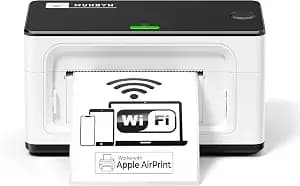
MUNBYN Wireless Wi-Fi Thermal Printer Shipping Label Printer, Compatible with AirPrint iPhone, iPad, MacOS, Android Windows Suit for Small Business, Etsy, Ebay, USPS, No Ink, Fast & Clear Printing
Description
Works with Apple AirPrint: The MUNBYN Wireless Thermal Printer is fully compatible with AirPrint, making it easy to print directly from your iPhone, iPad, or Mac. Simply connect to Wi-Fi, and with one click, you can print without needing to install drivers (just download "Munbyn Print" to configure the network on your phone during the first use); Wi-Fi & Wireless Connectivity: Experience lightning-fast Wi-Fi at 1300Mbps, three times faster than the standard 2.4GHz connection. Supports up to 10 devices connected simultaneously, and works seamlessly with iOS, Mac, Android, Windows, Chromebook, and Linux. (Please note that this printer may be partially incompatible with the latest version of iOS 18.5. If you encounter a connection failure, please contact us to free replace the printer.); Smaller, Faster, Clearer: Featuring a Japanese upgraded thermal print head, the ITPP941AP prints at speeds of up to 150mm/s (72 sheets of 4x6 labels per minute). With 203 DPI resolution, your labels will be crisp and easy to read and scan. Compact and lightweight (9.53" x 7.48" x 4.72", only 3 pounds), this printer is easy to carry and store; Flexible Compatibility with Platforms & Labels: Perfect for small businesses, this printer is compatible with Amazon, Shopify, eBay, Etsy, UPS, FedEx, and other major platforms. It supports direct thermal labels from 1.57" to 4.3" wide, including envelope, package, address, barcode, and kitchen/office labels; Exceptional Technical Support: MUNBYN's dedicated customer service team is always here to help. Enjoy fast setup and stress-free use with support available via phone, live chat, email, and remote desktop assistance; Compatible with Munbyn label series including shipping (4"x6"), circle (2"x2"/3"x2"), rectangle (1.57"x1.18"/2"x1"/2.25"x1.25") Supports specialty series: multicolor gradient/shell/aurora (2"x2"), rainbow (2"x2"/2.28"x2.28"/2.25"x1.25"), morandi (2"x2")
Compare the trade-offs
Similar products, side by side
A random selection of analyzed products from the same category. Different products are not necessarily interchangeable.

Phomemo M110 Label Makers, Portable Bluetooth Thermal Printer with Display

Label Printer, 4x6 Shipping Label Thermal Printer for Packages, Bluetooth Conection and Compatible with Android, iPhone, Windows, Mac, Chromebook, Amazon, Ebay, UPS, USPS, FedEx, with Holder

LabelRange Ecommerce Label Printer 4x6, Thermal Shipping Label Printer, Support Amazon, Ebay, USPS, Pirate Ship, Bluetooth and USB Connection
One less thing to search
Before you buy: quick questions
Is the Wi-Fi connection reliable, or will I constantly be reconnecting it?
Most users find the Wi-Fi stable once set up. The initial connection can sometimes be tricky on crowded networks—a common tip from Reddit users is to connect via USB first for initial setup. For the most rock-solid reliability, many small business owners use the USB connection, while others use Wi-Fi daily without issue.
I keep hearing about "firmware updates bricking the printer." Should I be worried?
This is a known but uncommon issue. The consensus from online forums is: if your printer is working perfectly, do not update the firmware. Many happy users never update it. If an update is absolutely necessary, MUNBYN's support is widely praised for being responsive and helping resolve these situations, often with a replacement.
How does the print quality and durability compare to more expensive brands like Rollo or Brother?
For standard shipping labels, users consistently report the print speed and clarity are excellent and comparable to premium brands. The main difference is in the physical build; some note it feels lighter than an industrial Rollo. For typical home or small office use, it holds up very well. Remember, these are *thermal* prints, so labels should be kept out of direct sunlight and extreme heat to prevent fading.
Does it really work with Apple AirPrint directly from my iPhone or Mac, without any extra apps?
Yes! This is one of its most-loved features. You can select the printer directly from the print menu in Safari, Mail, or any app that supports AirPrint, and it works seamlessly. The companion app is only needed for more advanced label design or if you choose not to use AirPrint.
Who is this printer best suited for, and who might want to consider something else?
It's an ideal, cost-effective champion for small business shippers, Etsy/eBay sellers, and anyone tired of inkjet hassle. If you need simple, fast, wireless printing from multiple devices, it's a fantastic fit. However, if you require heavy-duty, industrial-grade hardware for thousands of labels daily, or advanced graphic design software built-in, you might look at a commercial-grade Brother or Zebra model.
From a similar, more-reviewed product in this category: MUNBYN RealWriter 941 Bluetooth USB 4x6 Shipping Thermal Label Printer
Will this printer work with my computer, and is setup really as easy as people say?
For the vast majority of users, yes. The RealWriter 941 supports Windows, macOS, and Chromebook via USB, with Bluetooth as a convenient wireless option. Most reviewers say they were printing labels within 10–15 minutes. One tip from seasoned users: install the MUNBYN driver first and set your label size to 4x6 before your first print — that's the step that trips up a few people.
Do I have to use MUNBYN labels, and does it need ink or toner?
No ink, no toner — ever. It's a true thermal printer, which is one of the biggest reasons small sellers love it. You can use any standard 4x6 thermal labels, though MUNBYN's own labels are the most commonly recommended for consistent feed and print quality. Just make sure they're direct thermal (not thermal transfer).
Is the Bluetooth connection reliable enough for daily shipping, or should I stick with USB?
Honest answer: USB is the most rock-solid option, and many power users keep it plugged in for high-volume days. Bluetooth works well for most people, but a few TikTok and Reddit users noted occasional pairing hiccups with older laptops or certain macOS versions. If you print dozens of labels a day, USB is your safest bet; for lighter use, Bluetooth is perfectly fine.
How fast and quiet is it, and can it handle a busy shop's daily volume?
It prints up to 150mm/s — fast enough that most sellers describe it as "instant" compared to inkjet label printing. It's also notably quiet; several reviewers said they can print while on calls without anyone noticing. Small business owners and Amazon FBA sellers consistently call it reliable for daily, high-volume shipping.
What if something goes wrong — is customer support actually helpful, and what about returns?
This is one of the most praised aspects of the product. Reviewers repeatedly mention fast, friendly support that resolves issues — including replacements for the rare unit that arrives damaged or with a jammed roller. It also comes with a standard warranty and is eligible for returns through the platform you purchased from, so you're covered if it's not the right fit for your workflow.
Answers are limited to the manufacturer's listing and the reviews we analysed. Questions those sources cannot support are not answered here.
Transparent by design