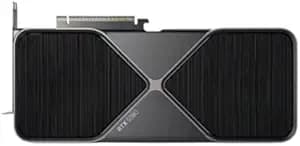
NVIDIA GeForce RTX 5080 Founders Edition
Description
The NVIDIA GeForce RTX 5080 Founders Edition is a state-of-the-art high-end graphics card equipped with Blackwell architecture and delivers impressive performance for demanding applications and games.
Compare the trade-offs
Similar products, side by side
A random selection of analyzed products from the same category. Different products are not necessarily interchangeable.

GIGABYTE GeForce RTX 5060 AERO OC 8G Graphics Card, 8GB 128-bit GDDR7, PCIe 5.0, WINDFORCE Cooling System, Made by NVIDIA, DisplayPort & HDMI - Video Output Interface, GV-N5060AERO OC-8GD Video Card

ASUS Dual GeForce RTX™ 5060 Ti 16GB GDDR7 OC Edition Graphics Card, NVIDIA, Desktop (PCIe 5.0, DLSS 4, HDMI 2.1b, DisplayPort 2.1b, 2.5-Slot, Axial-tech Fan, 0dB Technology)

AISURIX RX 580 Graphics Card, 2048SP, Real 8GB, GDDR5, 256 Bit, Pc Gaming Video Card, 2XDP, HDMI, PCI Express 3.0 with Freeze Fan Stop for Desktop Computer Gaming Gpu
One less thing to search
Before you buy: quick questions
The card has 16GB of VRAM. What is it suitable for, and will it handle 4K games in the future?
The RTX 5080 is designed for high-refresh-rate 1440p gaming and solid 4K gaming *right now*. For current titles, 16GB is sufficient, even with ray tracing enabled. However, if you are looking to make this a 4K workhorse for the next 5+ years, it is a valid concern. Many enthusiasts on YouTube suggest that if you prioritize strict 4K longevity over raw performance, checking benchmarks for upcoming titles is wise. For 1440p players, this is essentially a non-issue, but it is a primary reason some users wait for a potential Super or Ti refresh.
I have an older power supply. Will I need to buy a new one to use this card?
This is a critical check before purchase. The 5080 uses the 12VHPWR power connector. If you have an ATX 3.0/3.1 compatible PSU that comes with this cable natively, you are good to go. If you are using an older ATX 2.x PSU, you will need the 4-to-1 adapter included in the box. Important: TikTok tech reviewers emphasize that you *must* ensure the adapter is plugged in firmly and completely. A loose connection is what causes overheating concerns. As long as you have a quality 750W-850W PSU, you likely just need the cable, not a full replacement.
How does the raw performance compare to the cheaper RTX 4080 Super? Is it worth the upgrade?
If you are building a new system, the 5080 is the better buy due to its improved efficiency and DLSS 4 support. If you already own a 4080 Super, it is *not* worth upgrading. In pure rasterization (non-ray-traced) performance, the difference is often marginal (10-15%). The real value of the 5080 lies in its AI-driven features like multi-frame generation. As many Reddit users note, the raw horsepower jump is small, but the feature set is a generation ahead. It's an upgrade for moving *up* a tier, not a side-grade.
I've heard about the small 2-slot cooler. Does it run hot and loud?
The cooler is very capable, but its behavior is distinct. Under intense gaming loads, it does get warm, certainly hotter to the touch than a 3-slot card, but it stays within safe limits. The bigger issue for many is idle noise. The card's fans can spin up and down intermittently during light desktop usage, which some find annoying. A quick fix is setting a custom fan curve in software like MSI Afterburner. For gaming noise, it does run quieter than the 4090, but those expecting silence while running ultra settings on a hot day may be slightly disappointed.
What are the main differences between the Founders Edition (this model) and third-party cards like ASUS or MSI?
The Founders Edition is the base "reference" design. It has a premium, compact metal body and an excellent price-to-performance ratio, but it sacrifices customization for space. Third-party models (like the Strix, Gaming X, etc.) usually offer larger coolers (quieter under load), higher factory overclocks, and better warranty support—but they cost $100-$250 more and are often physically larger. If you value an SFF build and clean aesthetics, the FE is superb. If you want maximum overclocking headroom and minimal noise at 4K, a premium third-party card is the safer choice, as many official reviews confirm.
From a similar, more-reviewed product in this category: ASUS GeForce GTX 1080 8GB ROG Strix Graphics Card (STRIX-GTX1080-A8G-GAMING)
What games and resolutions can this card handle?
Reviewers report it plays games at 1080p and 1440p at high frame rates, with one noting it handles 4K gaming and another saying 4K at maximum quality is difficult and runs hot. Multiple reviewers describe it as a beast that runs games on ultra settings without stuttering.
Is this card quiet during gaming?
Reviewers consistently describe it as quiet, with one noting low fan speeds and quiet operation at Full HD and WQHD, though the same reviewer says fan noise becomes quite loud at 4K maximum quality. The listing states Direct CU III cools efficiently and quietly.
Does this card have RGB lighting?
Yes, the listing states it has Aura RGB Lighting on the shroud and back plate, and reviewers mention the RGB features and controllable LEDs via Aura.
What power connectors does this card require?
The listing specifies 1 x 6-pin and 1 x 8-pin power connectors, and one reviewer notes they had to buy a new power supply because they lacked an 8-pin connector.
Is this card worth the price?
Reviewers widely consider it well worth the price, with several calling it worth every penny and one recommending buying it during sales, though another suggests going for the 1080 Ti if not on sale.
Answers are limited to the manufacturer's listing and the reviews we analysed. Questions those sources cannot support are not answered here.
Transparent by design