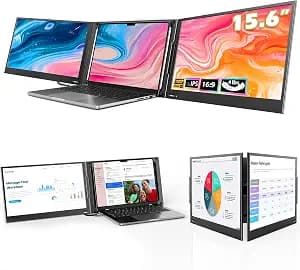
QQH Laptop Screen Extender, 15.6" Triple Portable Monitor with Ultra-Slim FHD IPS Display, One Cable USB-C Monitor Extender Compatible with MacOS, Windows, Android for 12-16" Laptop (Driver Need)
Description
[Wide Compatible Display Extender] – This laptop monitor extender is compatible with ChromeOS, Windows, Android, Linux, and macOS (including MacBooks with M1, M2, M3, and M4 chips). A driver installation is required for all supported systems before connecting the extender.; [One-Cable Laptop Screen Extender] – The QQH Double Screen for Laptops requires a one-time driver installation before use. After the driver is installed, the extender becomes plug-and-play, allowing you to connect both screens easily with just one USB-C or USB-A cable (when the device port supports full functionality). This streamlined single-cable design minimizes cable clutter and keeps your workspace clean, organized, and efficient.; [Upgraded Aluminum Alloy Tri-Screen] – With upgraded aluminum alloy materials and unique CNC cutting process, QQH Z80A multiple screens runs stable, durable and sleek features.Compared with traditional attachable multiple screens, QQH tri-screen also has an upgraded design that allows you to simply place the triple screen behind your laptop without causing any damage to your laptop's screen, while making your laptop more flexible.; [Driver Required for Setup] –Please install the driver before connecting your device to the screen extneder. Note: If your work computer restricts software installation, we recommend using a personal laptop to ensure the best experience.; [Attention] – The Z80A dual screen extender is only compatible with 12–16 inch laptops. Laptops larger than 16 inches are not recommended due to size and stability considerations. Besides, the Z80A features a freestanding desktop design and does not clip onto or attach to your laptop screen.; [Ultra-Slim 15.6” Alloy Dual Display] - The QQH Z80A laptop monitor extender features 0.15-inch ultra slim and dual 15.6-inch FHD 1080P IPS displays. With a 1920x1080 resolution, 178° viewing angle, 300 nits brightness, 360° rotation, 90°rotation built-in stand, and a 1200:1 contrast ratio, this monitor extension delivers a vivid, immersive visual experience.; [Multi-Functional Multiple Screens] – Each screen of the portable laptop extender features dedicated control buttons, allowing you to easily adjust settings like brightness, contrast, and color temperature to suit your preferences. With a built-in memory function, your settings are saved for future use, ensuring a consistent and personalized viewing experience every time.
Compare the trade-offs
Similar products, side by side
A random selection of analyzed products from the same category. Different products are not necessarily interchangeable.

Philips 27" Computer Monitor FHD 100Hz VA VESA Eye Care, 271V8LB

LG 34SR60QC-W 34-inch QHD (3440x1440) Curved Smart Monitor with Streaming, UltraWide Screen, webOS, HDR10, 100Hz, Built-in Speaker, AirPlay2, Screen Share, Bluetooth, ThinQ App, White

KTC 32 Inch 2K Computer Monitor, QHD 120Hz Monitor with IPS Panel, White
One less thing to search
Before you buy: quick questions
Is this truly a "one cable" plug-and-play setup, or will I need additional accessories?
While the monitor connects via a single USB-C cable for both video and power, your experience depends on your laptop's port. Many users love the simplicity, but some find their laptop's USB-C port doesn't deliver enough power for the monitor at full brightness. For guaranteed performance, having a separate power source for your laptop or the monitor is recommended. It's best to check your laptop's specifications for "USB-C with DisplayPort Alt Mode" support.
I'm not very tech-savvy. How difficult is the driver installation?
This is the most common point of feedback. The monitor requires a specific display driver to work, which is not automatically installed by your computer. For most Windows and macOS users, the process is straightforward—you download a file from the manufacturer's website and run it. However, some Mac users and those with specific system configurations have reported needing extra steps. We provide clear driver links and instructions with the product, and many TikTok and Reddit users have created helpful setup guides if you get stuck.
How durable and travel-friendly is this portable monitor?
The monitor is designed for portability, being ultra-slim and lightweight—perfect for slipping into a laptop sleeve or backpack. Reviews consistently praise its travel convenience. Regarding durability, while the IPS screen is vibrant, some users note the external casing is made of lightweight plastic. For daily commuting, it's excellent, but we recommend using the included protective case or a padded sleeve if you'll be tossing it into a crowded bag frequently to prevent scratches.
Will this work with my specific device (like an M1/M2 Mac, Windows laptop, or Android phone)?
Compatibility is key. The monitor is broadly compatible with macOS, Windows, and Android devices that have a USB-C port supporting video output (DisplayPort Alt Mode). It works excellently with most modern laptops. However, always double-check your device's manual. The most common issues arise with older laptops, certain Android phones, or laptops with "power-only" USB-C ports. If you're unsure about your device, contacting the manufacturer of your laptop is the safest step before purchasing.
What if it doesn't work with my setup or has an issue? What's the support and return process like?
We stand by our products with a standard return window. If you encounter compatibility issues or defects, please contact our customer support team first—they can often help with troubleshooting. Based on user feedback, we recommend testing the monitor as soon as it arrives to ensure it fits your workflow. If you're not satisfied, you can initiate a return through your order page. To ensure a smooth process, please keep the original packaging and accessories.
From a similar, more-reviewed product in this category: KOORUI 24 Inch Gaming Monitor, 180Hz 1080P VA Display with 3000:1 Contrast
Does this monitor really run at 180Hz, and what do I need to enable it?
Yes — it's a native 180Hz panel, but you'll need to switch it on manually. Connect via the included HDMI cable (or a DisplayPort-capable setup), then set 180Hz in your GPU's display settings; it defaults to a lower refresh rate out of the box. Many Reddit and YouTube users note that enabling Adaptive Sync/FreeSync alongside it gives the smoothest experience, and it works with both AMD and NVIDIA cards.
How does the VA panel perform for gaming and everyday work?
The 3000:1 contrast gives noticeably deeper blacks than typical IPS budget monitors, which shines in dark game scenes and movies. For fast-paced competitive shooters, some TikTok and Reddit users mention mild ghosting/smearing in dark transitions — it's great for casual gaming, students, and office work, but color-critical creators or hardcore FPS players may prefer an IPS panel.
The stand looks basic — can I adjust the height or mount it?
Correct, the included stand only tilts (-5° to 20°) and doesn't offer height, swivel, or pivot adjustment, and a few users find the base slightly wobbly. The good news: it's VESA 100×100mm compatible, so a monitor arm or desk mount solves ergonomics entirely — a popular fix among dual-monitor and dorm-room setups.
What if I receive a unit with a dead pixel or backlight bleed?
Budget monitors can vary unit to unit, and some buyers report stuck pixels or corner bleed — but KOORUI backs it with a 3-year manufacturer warranty. If your unit arrives defective, contact the seller for a replacement or refund promptly; most users who did so report a smooth resolution, so inspect the screen within the return window.
Is it good value, and who is it best suited for?
At around $120, it's widely praised as one of the best budget 180Hz options — ideal for students, casual gamers, home-office users, and compact or dual-monitor setups. Just set expectations: no built-in speakers, a single HDMI plus VGA, and basic ergonomics. If you need height adjustment, color accuracy, or built-in audio, consider spending more on an IPS alternative.
Answers are limited to the manufacturer's listing and the reviews we analysed. Questions those sources cannot support are not answered here.
Transparent by design